
HomeGamesUpdatesPricingMethodology
Steam News25 March 201610y ago

Update v1.0.3

Hi everyone! The first update for Brick Inventions is out (v1.0.3). The most important change is the addition of shortcuts for selecting blocks and rotations.

Full notes

Full Brick Inventions update

Read the full published notes in a cleaner layout. The original post stays linked below.

What changed

3 fixes4 additions3 changes0 removals
  • Gameplay
  • UI and audio
  • Maps
  • Fixes
  • Performance
changedHi everyone! The first update for Brick Inventions is out (v1.0.3). The most important change is the addition of shortcuts for selecting blocks and rotations. Here is the full changelog with all the changes and bugfixes: Improvements
addedAdded "Next level"-Button to go to the next level without having to go through the menu.
addedAdded "Reset"-Button to reset the current level on levels where the player can run out of resources
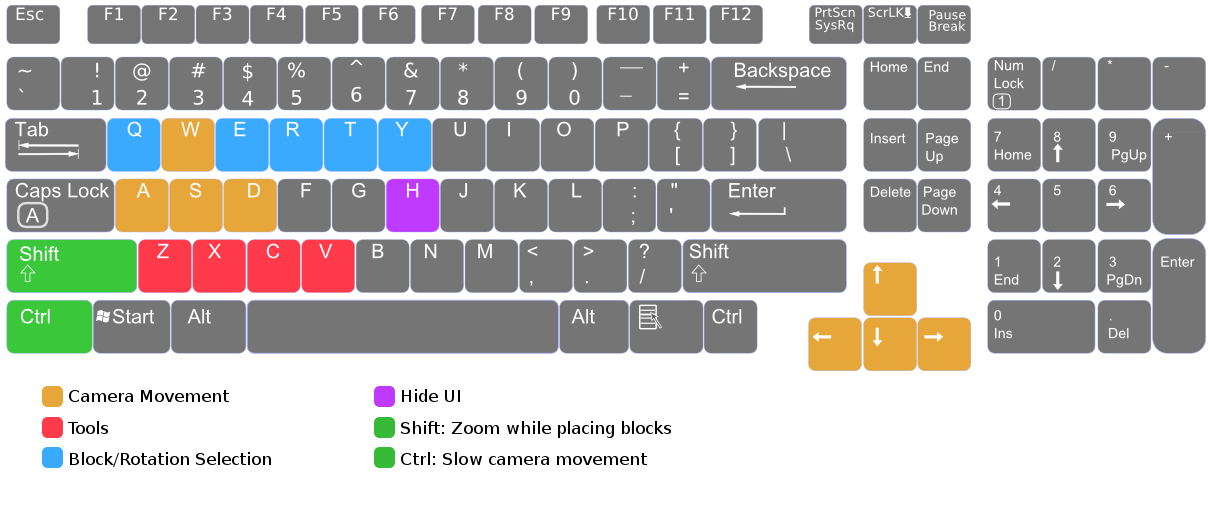
addedAdded shortcuts to make selection of blocks/rotations things faster (shortcuts can be edited in the options) Shortcut [Q]: Select/Change standard block material Shortcut [E]: Select/Change standard block sizes Shortcut [R]: Select/Change "additional" rotation (Standard, Side, Vertical) Shortcut [T]: Select/Change special block Shortcut [Y]: Select/Change inventions
changedMaps and Inventions are now loaded automatically when created in the menu
changedGame detects system language to properly set default shortcuts

Brick Inventions changes

changedHi everyone! The first update for Brick Inventions is out (v1.0.3). The most important change is the addition of shortcuts for selecting blocks and rotations. Here is the full changelog with all the changes and bugfixes: Improvements
addedAdded "Next level"-Button to go to the next level without having to go through the menu.
addedAdded "Reset"-Button to reset the current level on levels where the player can run out of resources
addedAdded shortcuts to make selection of blocks/rotations things faster (shortcuts can be edited in the options) Shortcut [Q]: Select/Change standard block material Shortcut [E]: Select/Change standard block sizes Shortcut [R]: Select/Change "additional" rotation (Standard, Side, Vertical) Shortcut [T]: Select/Change special block Shortcut [Y]: Select/Change inventions
changedMaps and Inventions are now loaded automatically when created in the menu

Hi everyone! The first update for Brick Inventions is out (v1.0.3). The most important change is the addition of shortcuts for selecting blocks and rotations. Here is the full changelog with all the changes and bugfixes: Improvements

  • Added "Next level"-Button to go to the next level without having to go through the menu.

  • Added "Reset"-Button to reset the current level on levels where the player can run out of resources

  • Added shortcuts to make selection of blocks/rotations things faster (shortcuts can be edited in the options)

    • Shortcut [Q]: Select/Change standard block material

    • Shortcut [E]: Select/Change standard block sizes

    • Shortcut [R]: Select/Change "additional" rotation (Standard, Side, Vertical)

    • Shortcut [T]: Select/Change special block

    • Shortcut [Y]: Select/Change inventions

  • Maps and Inventions are now loaded automatically when created in the menu

  • Game detects system language to properly set default shortcuts

Changes:

  • Set resources from 400 to 500 on level 4

Bugfixes:

  • Fixed a bug that caused the sound of rockets to stop after some time.

  • Fixed a bug that opened the chat window when pressing [space], preventing the function to switch between "drag" axis to be called

  • Fixed flickering of the transparent block when the rotation is changed

One of the next things I want to improve in one of the next couple of updates is the tutorial which should be a bit more detailed and should also explain the new shortcuts. If you have anything specific you want to be improved, just write a comment below an I will try to include it in the next patch.

Source

Steam News / 25 March 2016

Open original post

Changelog.gg summarizes and formats this update. How we read updates.