
HomeGamesUpdatesPricingMethodology
Steam News6 May 20251y ago

If You Can't Run "Booth" on MacOS, Try This.

Hi, Lately I've been receiving an increased amount of questions regarding not being able to run "Booth" on a Mac.

Full notes

Full Booth: A Dystopian Adventure update

Read the full published notes in a cleaner layout. The original post stays linked below.

What changed

0 fixes0 additions3 changes0 removals
  • Gameplay
  • Security
changedLately I've been receiving an increased amount of questions regarding not being able to run "Booth" on a Mac.
changedI studied the problem and found that it was due to newer MacOS having a stricter security policy with downloaded software and "Booth" being a game made with a pretty old version of GameMaker.
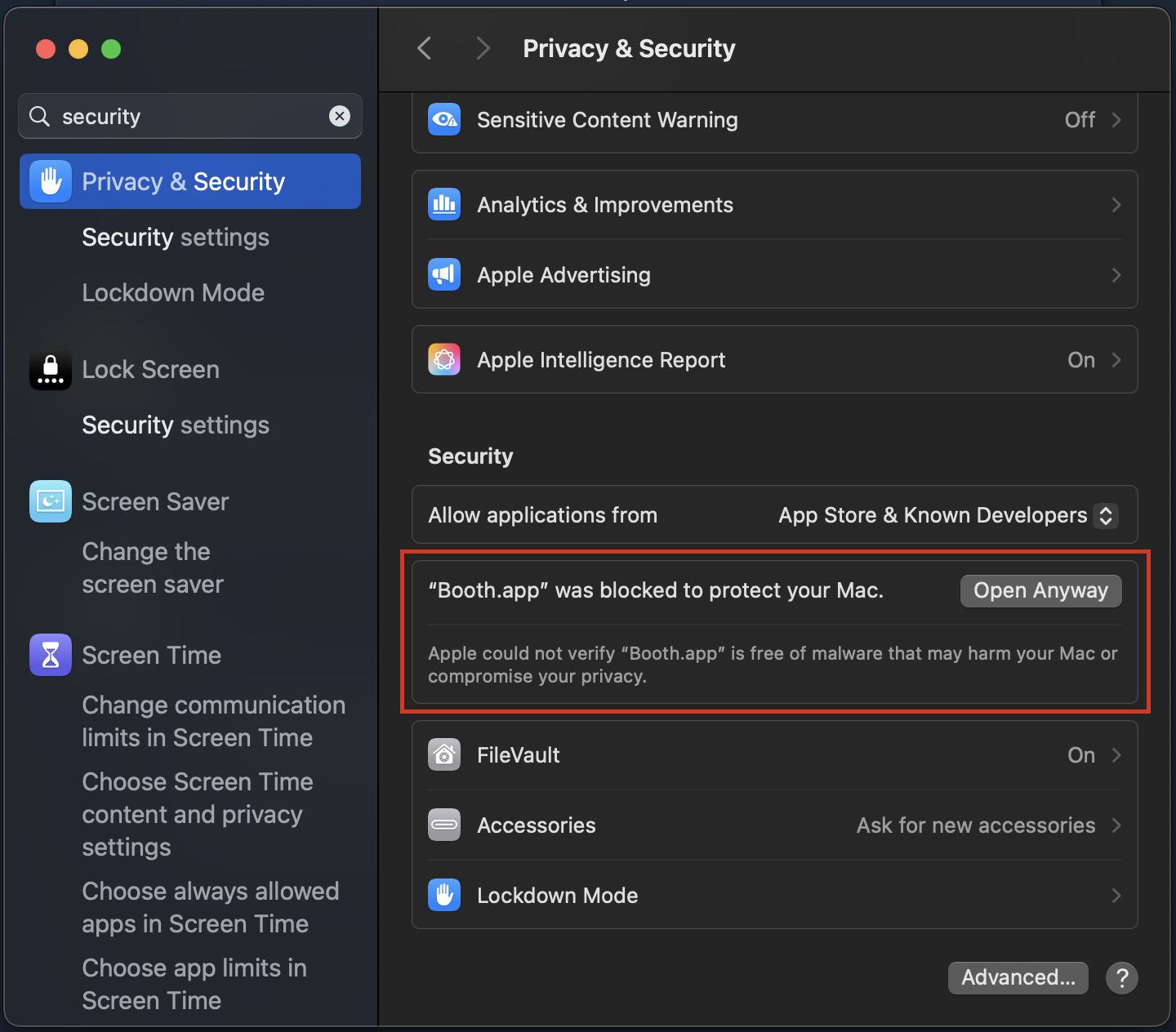
changedOpen your Mac's "System Settings" and find the "Privacy & Security" tab. Inside it you can find a section appeared talking about "Booth" (like the image below).

Booth: A Dystopian Adventure changes

changedLately I've been receiving an increased amount of questions regarding not being able to run "Booth" on a Mac.
changedI studied the problem and found that it was due to newer MacOS having a stricter security policy with downloaded software and "Booth" being a game made with a pretty old version of GameMaker.
changedOpen your Mac's "System Settings" and find the "Privacy & Security" tab. Inside it you can find a section appeared talking about "Booth" (like the image below).

Hi,

Lately I've been receiving an increased amount of questions regarding not being able to run "Booth" on a Mac.

I studied the problem and found that it was due to newer MacOS having a stricter security policy with downloaded software and "Booth" being a game made with a pretty old version of GameMaker.

To solve the "Booth Is Damaged and Can’t Be Opened. You Should Move It To The Trash." problem, follow these steps:

  1. Open "Booth.app" once either through Steam or directly from local files (and the above warning message will show).

  2. Open your Mac's "System Settings" and find the "Privacy & Security" tab. Inside it you can find a section appeared talking about "Booth" (like the image below).

  3. Click "Open Anyway" and "Booth" should run successfully from now on.

Hope this helps!

Love from Iden, GP

Source

Steam News / 6 May 2025

Open original post

Changelog.gg summarizes and formats this update. How we read updates.