
HomeGamesUpdatesPricingMethodology
Steam News1 July 20261mo ago

Beta Release v0.37-b2

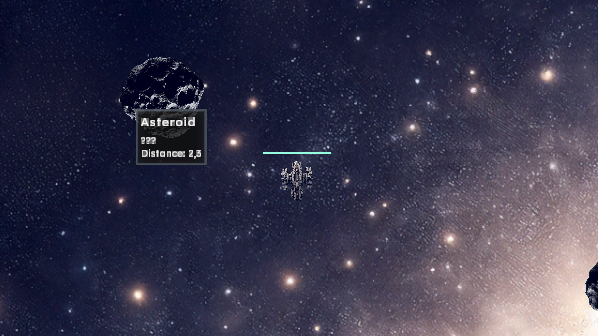
World-Object Tooltips in Sectors Hovering over a world object in a sector now shows a tooltip.

Full notes

Full Astrosphere update

Read the full published notes in a cleaner layout. The original post stays linked below.

What changed

0 fixes0 additions8 changes0 removals
  • UI and audio
  • Gameplay
  • Compatibility
changedWorld-Object Tooltips in Sectors
changedHovering over a world object in a sector now shows a tooltip. The tooltip respects the configured sensor range and ignores the player ship as well as UI elements, so the cursor only locks onto actual sector objects.
changedA scan-aware builder supplies the content: scan-dependent details, current ship status, and up to four aggregated resource entries at once. Owner-related world and UI tooltips still come from the shared TooltipController, with the tooltip canvas wired accordingly.
changedThe right ship image now shows all system slots. Occupied slots use the concrete system icon with a unified colored frame matching the system-type color from the Shipyard. Hovering shows the existing system tooltip.
changedWeapon Range and Weapons On/Off
changedHolding Shift in the sector shows a separate range circle around the actual position of each active player weapon. On controllers, the already-assigned left shoulder button takes over.

Astrosphere changes

changedWorld-Object Tooltips in Sectors
changedHovering over a world object in a sector now shows a tooltip. The tooltip respects the configured sensor range and ignores the player ship as well as UI elements, so the cursor only locks onto actual sector objects.
changedA scan-aware builder supplies the content: scan-dependent details, current ship status, and up to four aggregated resource entries at once. Owner-related world and UI tooltips still come from the shared TooltipController, with the tooltip canvas wired accordingly.
changedThe right ship image now shows all system slots. Occupied slots use the concrete system icon with a unified colored frame matching the system-type color from the Shipyard. Hovering shows the existing system tooltip.
changedWeapon Range and Weapons On/Off

World-Object Tooltips in Sectors

Hovering over a world object in a sector now shows a tooltip. The tooltip respects the configured sensor range and ignores the player ship as well as UI elements, so the cursor only locks onto actual sector objects.

A scan-aware builder supplies the content: scan-dependent details, current ship status, and up to four aggregated resource entries at once. Owner-related world and UI tooltips still come from the shared TooltipController, with the tooltip canvas wired accordingly.

Dynamic Lead for Automatic Projectile Weapons

Automatic projectile weapons now compute an intercept course per shot. They take the position and distance of target and shooter, projectile speed, and the actual target and ship velocity into account.

Scan Requirement for Anomalies

Sector exits and in-sector anomalies only react to the player ship once the anomaly has been scanned. Unscanned anomalies do not trigger anything when flown through — scan first, then interact.

System Slots in the Ship Image

The right ship image now shows all system slots. Occupied slots use the concrete system icon with a unified colored frame matching the system-type color from the Shipyard. Hovering shows the existing system tooltip.

Weapon Range and Weapons On/Off

Holding Shift in the sector shows a separate range circle around the actual position of each active player weapon. On controllers, the already-assigned left shoulder button takes over.

Clicking a weapon marker in the ship sidebar deactivates or reactivates exactly that weapon. The state applies only to the current flight and is not saved.

As always with beta builds

Please test and report any issues on the Discord. Saves from v0.37-b2 may not be backward compatible with v0.37-b1 — back up your save before testing.

Source

Steam News / 1 July 2026

Open original post

Changelog.gg summarizes and formats this update. How we read updates.