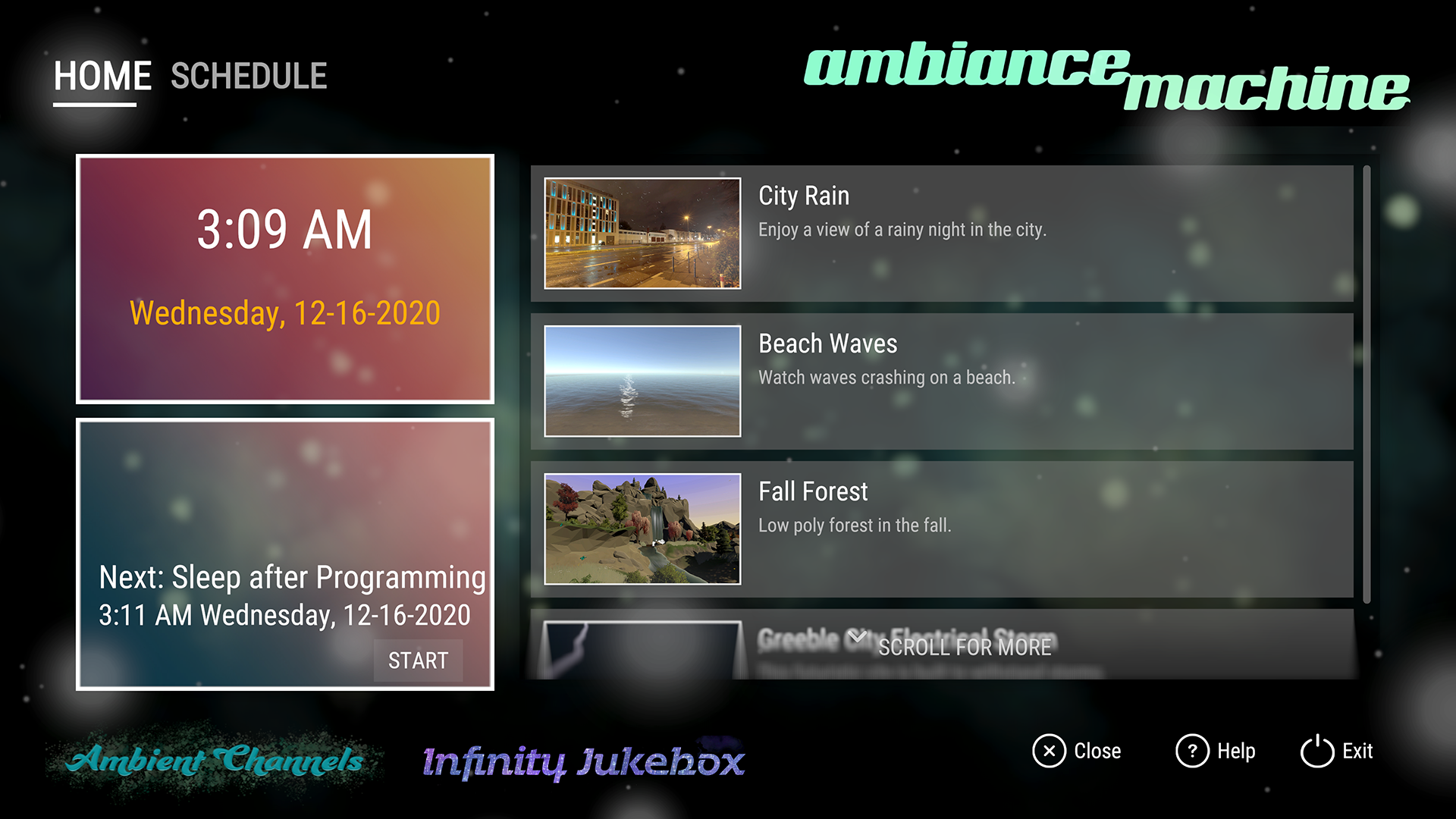
Ambiance Machine In the spirit of using Ambient Channels to help create focus or relaxation time, we previously added a media companion application 'Ambiance Machine'; a combination of simple themed Screensavers, such a
Full notes
Full Ambient Channels update
Read the full published notes in a cleaner layout. The original post stays linked below.
What changed
0 fixes5 additions2 changes0 removals
UI and audio
Events
Balance
Gameplay
changedIn the spirit of using Ambient Channels to help create focus or relaxation time, we previously added a media companion application 'Ambiance Machine'; a combination of simple themed Screensavers, such as a beach scene, a rainy city scene, etc, plus an Event Scheduler. The Event scheduler allows you to setup dated or daily/weekly events which will popup a reminder for you to start the event and then run the selected Episode or screensaver w/music playlist for the duration you specify. When the duration expires, an alarm will go off to tell you the timer is up.
addedIn this update, we've added Internet Radio with 300 starting stations across a number of genres. You can open up Infinity Jukebox (F5) from any Ambient Channel episode and switch from a music playlist to a radio station and then hit F5 to close the jukebox and return to your episode.
addedAmbiance Machine Event Scheduler You can also use Internet Radio with Ambiance Machine's Event Scheduler. If there's a radio program you like, you can use the Event Scheduler to select that radio station and setup the time you want the event to go off at, set the event to Auto Start, and Ambiance Machine will load the event's episode/screensaver + the Internet Radio station at the desired time. (If there's interest, we'll add the ability to add your own radio stations, please let us know in the discussions)
addedAuto Start Event We've also added a new option in Ambiance Machine events, Auto Start. Is there a radio program you want to start at the same time every day? Or maybe you want to create a playlist that starts different Ambient Channels episodes in a row to play for a specific duration. Create events to start at the time you want for the duration you want and check the Auto Start checkbox; have Ambient Channels open and they'll load at the time specified.
added-- December Episodes We've added 3 new episodes for December. We rotated out of free mode the 'Graveyard' and 'Marina Apartments' and added in to free mode 'Christmas in Victoria' and 'Parkland Condos'.
addedCheck out this beautiful family friendly condo. ---- Expanded Hidden Objects / Secret Items modes In the last update, we added 3 Secret Items chapters to all of the episodes, including episodes with Hidden Objects chapters. In this update, the Secret Items mode for new episodes that don't have Hidden Objects games, eg, Cozy Café After Hours and Parkland Condos have 9 Secret Items each, all with their own achievements. Christmas In Victoria 's Hidden Objects chapter contains 100+ items to find plus its 3 Secret Items chapter. Happy Hunting!
Ambient Channels changes
changedIn the spirit of using Ambient Channels to help create focus or relaxation time, we previously added a media companion application 'Ambiance Machine'; a combination of simple themed Screensavers, such as a beach scene, a rainy city scene, etc, plus an Event Scheduler. The Event scheduler allows you to setup dated or daily/weekly events which will popup a reminder for you to start the event and then run the selected Episode or screensaver w/music playlist for the duration you specify. When the duration expires, an alarm will go off to tell you the timer is up.
addedIn this update, we've added Internet Radio with 300 starting stations across a number of genres. You can open up Infinity Jukebox (F5) from any Ambient Channel episode and switch from a music playlist to a radio station and then hit F5 to close the jukebox and return to your episode.
addedAmbiance Machine Event Scheduler You can also use Internet Radio with Ambiance Machine's Event Scheduler. If there's a radio program you like, you can use the Event Scheduler to select that radio station and setup the time you want the event to go off at, set the event to Auto Start, and Ambiance Machine will load the event's episode/screensaver + the Internet Radio station at the desired time. (If there's interest, we'll add the ability to add your own radio stations, please let us know in the discussions)
addedAuto Start Event We've also added a new option in Ambiance Machine events, Auto Start. Is there a radio program you want to start at the same time every day? Or maybe you want to create a playlist that starts different Ambient Channels episodes in a row to play for a specific duration. Create events to start at the time you want for the duration you want and check the Auto Start checkbox; have Ambient Channels open and they'll load at the time specified.
added-- December Episodes We've added 3 new episodes for December. We rotated out of free mode the 'Graveyard' and 'Marina Apartments' and added in to free mode 'Christmas in Victoria' and 'Parkland Condos'.
Ambiance Machine
In the spirit of using Ambient Channels to help create focus or relaxation time, we previously added a media companion application 'Ambiance Machine'; a combination of simple themed Screensavers, such as a beach scene, a rainy city scene, etc, plus an Event Scheduler. The Event scheduler allows you to setup dated or daily/weekly events which will popup a reminder for you to start the event and then run the selected Episode or screensaver w/music playlist for the duration you specify. When the duration expires, an alarm will go off to tell you the timer is up.
Internet Radio
In this update, we've added Internet Radio with 300 starting stations across a number of genres. You can open up Infinity Jukebox (F5) from any Ambient Channel episode and switch from a music playlist to a radio station and then hit F5 to close the jukebox and return to your episode.
Ambiance Machine Event Scheduler You can also use Internet Radio with Ambiance Machine's Event Scheduler. If there's a radio program you like, you can use the Event Scheduler to select that radio station and setup the time you want the event to go off at, set the event to Auto Start, and Ambiance Machine will load the event's episode/screensaver + the Internet Radio station at the desired time. (If there's interest, we'll add the ability to add your own radio stations, please let us know in the discussions)
Auto Start Event We've also added a new option in Ambiance Machine events, Auto Start. Is there a radio program you want to start at the same time every day? Or maybe you want to create a playlist that starts different Ambient Channels episodes in a row to play for a specific duration. Create events to start at the time you want for the duration you want and check the Auto Start checkbox; have Ambient Channels open and they'll load at the time specified.
--- December Episodes We've added 3 new episodes for December. We rotated out of free mode the 'Graveyard' and 'Marina Apartments' and added in to free mode 'Christmas in Victoria' and 'Parkland Condos'.
Christmas in Victoria
A stylized European town covered in snow with Christmas trees and presents to find throughout in our Hidden Objects game.
Cozy Café After Hours
Visit this classic diner after hours and search for secret items.
Parkland Condos
Check out this beautiful family friendly condo. ---- Expanded Hidden Objects / Secret Items modes In the last update, we added 3 Secret Items chapters to all of the episodes, including episodes with Hidden Objects chapters. In this update, the Secret Items mode for new episodes that don't have Hidden Objects games, eg, Cozy Café After Hours and Parkland Condos have 9 Secret Items each, all with their own achievements. Christmas In Victoria's Hidden Objects chapter contains 100+ items to find plus its 3 Secret Items chapter. Happy Hunting!
---- Ambient Channels Collector's Pass 2021 We are going to release our 2021 All Episodes Pass DLC In the next 2 weeks. It provides a way to buy all the episodes rotated through for free in 2021 for a single price. You also get access to every episode in the Ambient Channels catalog for all of 2021. As a bonus, the Collector's Pass for 2021 will also include 7 episodes from 2020. Please see the store page for details: Ambient Channels: Collector's Pass 2020-2021