
HomeGamesUpdatesPricingMethodology
Steam News14 May 20261mo ago

v0.3.5 — Docs, polish, and Auto-solve 'cancel' upgrade

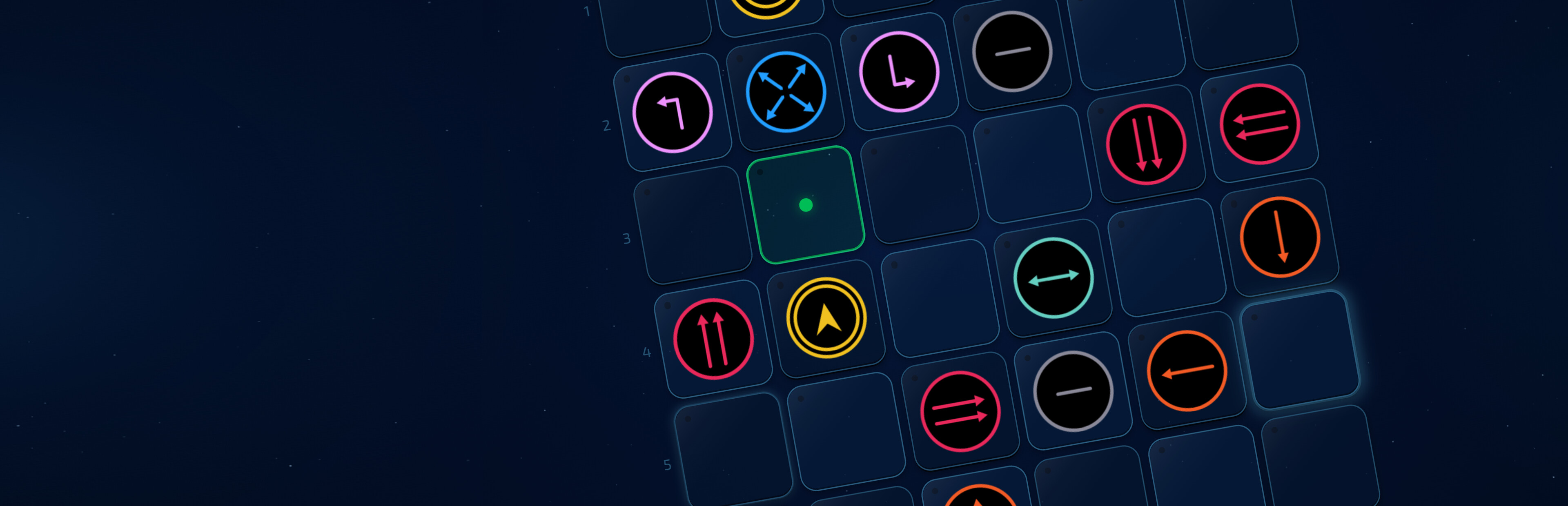
New Move order rule explained in How to Play → Pieces. The hidden priority logic is now documented: pieces that move one step in a fixed direction go first, then everything else.

In this update5

Full notes

Full AfterMove update

Read the full published notes in a cleaner layout. The original post stays linked below.

What changed

1 fix0 additions6 changes0 removals
  • Fixes
  • UI and audio
fixedNewMove order rule explained in How to Play → Pieces. The hidden priority logic is now documented: pieces that move one step in a fixed direction go first, then everything else.
changedFixedAuto-solve now cancels and resets the level when you press 'M', 'ESC', 'R', or the Solve button itself. Previously the animation had to run to completion.
changedFixedKeyboard arrow keys now navigate rows in How to Play pages. Previously only the controller could do this.
changedFixedModal scrollbars (Settings, How to Play, Level Select) widened for easier grab.
changedUI polishL-shape piece sprite refined.
changedUI polishGoal tile glow outline strengthened when a piece is sitting on that tile — easier to see at a glance.

AfterMove changes

fixedMove order rule explained in How to Play → Pieces. The hidden priority logic is now documented: pieces that move one step in a fixed direction go first, then everything else.
changedAuto-solve now cancels and resets the level when you press 'M', 'ESC', 'R', or the Solve button itself. Previously the animation had to run to completion.
changedKeyboard arrow keys now navigate rows in How to Play pages. Previously only the controller could do this.
changedModal scrollbars (Settings, How to Play, Level Select) widened for easier grab.
changedL-shape piece sprite refined.

New

  • Move order rule explained in How to Play → Pieces. The hidden priority logic is now documented: pieces that move one step in a fixed direction go first, then everything else.

  • Piece shadows — a soft drop-shadow under each piece on the board, lifting them visually off the surface. Toggle in Settings → Visual → Effects.

Changed

  • 90 degree to you piece description in How to Play → Pieces, rewritten for clarity. "Press up, it goes left. Press right, it goes up...".

Fixed

  • Auto-solve now cancels and resets the level when you press 'M', 'ESC', 'R', or the Solve button itself. Previously the animation had to run to completion.

  • Keyboard arrow keys now navigate rows in How to Play pages. Previously only the controller could do this.

  • Modal scrollbars (Settings, How to Play, Level Select) widened for easier grab.

UI polish

  • L-shape piece sprite refined.

  • Goal tile glow outline strengthened when a piece is sitting on that tile — easier to see at a glance.

  • Caught/lose overlay sprite now matches the in-game piece shadow style for visual consistency.

    Thanks to everyone playing the demo and sending feedback. Retail still in active development; more updates as the build firms up. Wishlist for launch notification.

-Colin

Source

Steam News / 14 May 2026

Open original post

Changelog.gg summarizes and formats this update. How we read updates.