
HomeGamesUpdatesPricingMethodology
Steam News24 August 20187y ago

Video Memory Error - Beta Hotfix (8/24/2018)

Hey all, Since our latest patch, some users have reported the following issue since updating to this week's game update for Wolfenstein II: “The video driver has run out of dedicated video memory.

Full notes

Full Wolfenstein II: The New Colossus update

Read the full published notes in a cleaner layout. The original post stays linked below.

Repeated intro

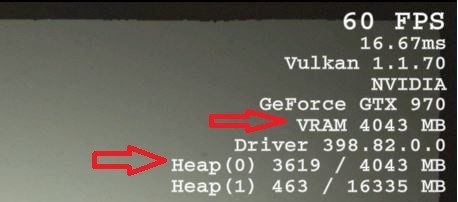
Hey all, Since our latest patch, some users have reported the following issue since updating to this week's game update for Wolfenstein II: “The video driver has run out of dedicated video memory. Your gameplay will be negatively affected.” We apologize for the inconvenience that this latest patch has caused. This message is appearing when attempting to run the game at higher settings than the GPU can handle. We have put a potential hotfix candidate that fixes the messaging prompts into the Public Beta branch. This hotfix allows players to get past the message on load screens and continue playing the game. However, in order to get the message to stop appearing, you’ll need to lower the graphical settings to an appropriate level that the GPU can handle. You can view your VRAM by enabling “Show Performance Metrics” through the Advanced Video options.

What changed

1 fix2 additions3 changes0 removals
  • Compatibility
  • Performance
fixedHey all, Since our latest patch, some users have reported the following issue since updating to this week's game update for Wolfenstein II: “The video driver has run out of dedicated video memory. Your gameplay will be negatively affected.” We apologize for the inconvenience that this latest patch has caused. This message is appearing when attempting to run the game at higher settings than the GPU can handle. We have put a potential hotfix candidate that fixes the messaging prompts into the Public Beta branch. This hotfix allows players to get past the message on load screens and continue playing the game. However, in order to get the message to stop appearing, you’ll need to lower the graphical settings to an appropriate level that the GPU can handle. You can view your VRAM by enabling “Show Performance Metrics” through the Advanced Video options.
changedIf the heap usage exceeds the amount of VRAM available to the GPU, it won't result in an instant crash but hitching and stuttering in frame rate may be observed, and overtime that may cause crashes during gameplay. How to fix:
changedThe minimum requirements for the game is for the GPU to have least a 4GB of VRAM.
addedTo restore default settings that are the most appropriate for the GPU, delete your configuration files located in 'C:\Users[User.Name]\Saved Games\Wolfenstein II The New Colossus\base'.
changedHow to Access Public Beta Branch:
addedTo access the Beta Branch, right click on Wolfenstein II: The New Colossus in your Steam Library and select 'Properties'. Navigate to the 'BETAS' tab, and select the Public Beta from the drop down list.

Wolfenstein II: The New Colossus changes

fixedHey all, Since our latest patch, some users have reported the following issue since updating to this week's game update for Wolfenstein II: “The video driver has run out of dedicated video memory. Your gameplay will be negatively affected.” We apologize for the inconvenience that this latest patch has caused. This message is appearing when attempting to run the game at higher settings than the GPU can handle. We have put a potential hotfix candidate that fixes the messaging prompts into the Public Beta branch. This hotfix allows players to get past the message on load screens and continue playing the game. However, in order to get the message to stop appearing, you’ll need to lower the graphical settings to an appropriate level that the GPU can handle. You can view your VRAM by enabling “Show Performance Metrics” through the Advanced Video options.
changedIf the heap usage exceeds the amount of VRAM available to the GPU, it won't result in an instant crash but hitching and stuttering in frame rate may be observed, and overtime that may cause crashes during gameplay. How to fix:
changedThe minimum requirements for the game is for the GPU to have least a 4GB of VRAM.
addedTo restore default settings that are the most appropriate for the GPU, delete your configuration files located in 'C:\Users[User.Name]\Saved Games\Wolfenstein II The New Colossus\base'.
changedHow to Access Public Beta Branch:

If the heap usage exceeds the amount of VRAM available to the GPU, it won't result in an instant crash but hitching and stuttering in frame rate may be observed, and overtime that may cause crashes during gameplay. How to fix:

  • The minimum requirements for the game is for the GPU to have least a 4GB of VRAM.

  • To restore default settings that are the most appropriate for the GPU, delete your configuration files located in 'C:\Users[User.Name]\Saved Games\Wolfenstein II The New Colossus\base'.

  • Alternatively, changing the graphical preset to a lower value in the Video menu or reducing the 'Resolution' and 'Image Streaming Quality' settings in the Advanced Video options can help alleviate strain on the VRAM.

  • How to Access Public Beta Branch:

  • To access the Beta Branch, right click on Wolfenstein IIThe New Colossus in your Steam Library and select 'Properties'. Navigate to the 'BETAS' tab, and select the Public Beta from the drop down list.

Source

Steam News / 24 August 2018

Open original post

Changelog.gg summarizes and formats this update. How we read updates.