Repeated intro
Hello everyone - here's the latest update for Whiskey Island!
What changed
0 fixes6 additions0 changes0 removals
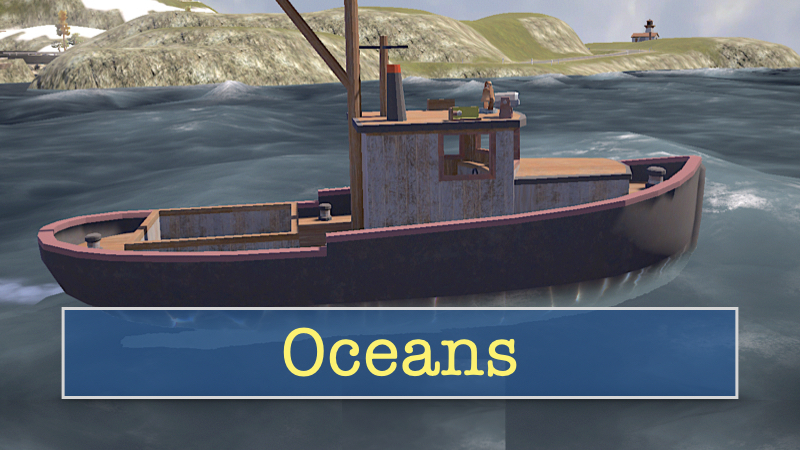
addedFollowing along with the rivers, lakes, and waterfalls that were added last time, I've now added the Ocean around the Island. And apparently, there's quite a breeze blowing out there, as you can see, by the waves crashing about. Good thing there are a few sheltered bays and harbours for boats!
addedThe fishing boat (there's just the one boat for now, which I'm using to develop the marine systems) has been outfitted with a few new items - including navigation lights, a spot light, a bell, and a horn. The boat now has a dashboard with working instruments including a compass. The boat is also buoyant and will bob about happily on the waves, which is lots of fun when challenging the larger waves roiling the sea. And yes - the fishing nets and buoys which mark the best fishing grounds are also buoyant. Still to come, though ... the actual 'splashes' when the boat hits the waves, so enjoy your dry shoes for now.
addedI've also added working dashboards to the trucks and to the aircraft. The aircraft instruments also include a compass, as well as a banking indicator and a turn-slip indicator. Still to come though are instruments for the locomotives.
addedNew support for Game Controllers (from the new Input System and code improvements) also means that aircraft can be flown with Joysticks, Gamepads, or even Steering Wheel controllers if you wish! And as it happens, any of these controller types can also be used to drive vehicles, vessels, or operate locomotives. There is also a new page in the Help Menu (access that menu via the escape key) to Rebind control inputs.
addedThe vehicles and vessels have a very different feel, I think, when driving with a Steering Wheel controller. And of course the aircraft when using a Joystick controller. Please let me know in the Steam discussion board for Whiskey Island which controllers you like to use .... I'm curious about that and have been wondering lately how they might work with local multiplayer (albeit that's quite a way in the future, if it is a thing to add?).
addedI plan to continue to expanding Game Controller support going forward, as I migrate other player inputs to the new Input System. In the meantime, you'll still need to have the Keyboard and mouse handy for interacting with the UI, and for selecting and operating camera views, etc.
Whiskey Island changes
addedFollowing along with the rivers, lakes, and waterfalls that were added last time, I've now added the Ocean around the Island. And apparently, there's quite a breeze blowing out there, as you can see, by the waves crashing about. Good thing there are a few sheltered bays and harbours for boats!
addedThe fishing boat (there's just the one boat for now, which I'm using to develop the marine systems) has been outfitted with a few new items - including navigation lights, a spot light, a bell, and a horn. The boat now has a dashboard with working instruments including a compass. The boat is also buoyant and will bob about happily on the waves, which is lots of fun when challenging the larger waves roiling the sea. And yes - the fishing nets and buoys which mark the best fishing grounds are also buoyant. Still to come, though ... the actual 'splashes' when the boat hits the waves, so enjoy your dry shoes for now.
addedI've also added working dashboards to the trucks and to the aircraft. The aircraft instruments also include a compass, as well as a banking indicator and a turn-slip indicator. Still to come though are instruments for the locomotives.
addedNew support for Game Controllers (from the new Input System and code improvements) also means that aircraft can be flown with Joysticks, Gamepads, or even Steering Wheel controllers if you wish! And as it happens, any of these controller types can also be used to drive vehicles, vessels, or operate locomotives. There is also a new page in the Help Menu (access that menu via the escape key) to Rebind control inputs.
addedThe vehicles and vessels have a very different feel, I think, when driving with a Steering Wheel controller. And of course the aircraft when using a Joystick controller. Please let me know in the Steam discussion board for Whiskey Island which controllers you like to use .... I'm curious about that and have been wondering lately how they might work with local multiplayer (albeit that's quite a way in the future, if it is a thing to add?).
Following along with the rivers, lakes, and waterfalls that were added last time, I've now added the Ocean around the Island. And apparently, there's quite a breeze blowing out there, as you can see, by the waves crashing about. Good thing there are a few sheltered bays and harbours for boats!
The fishing boat (there's just the one boat for now, which I'm using to develop the marine systems) has been outfitted with a few new items - including navigation lights, a spot light, a bell, and a horn. The boat now has a dashboard with working instruments including a compass. The boat is also buoyant and will bob about happily on the waves, which is lots of fun when challenging the larger waves roiling the sea. And yes - the fishing nets and buoys which mark the best fishing grounds are also buoyant. Still to come, though ... the actual 'splashes' when the boat hits the waves, so enjoy your dry shoes for now.
I've also added working dashboards to the trucks and to the aircraft. The aircraft instruments also include a compass, as well as a banking indicator and a turn-slip indicator. Still to come though are instruments for the locomotives.
Flying the aircraft is much easier now with the Keyboard & Mouse controls - I believe it's much more stable and forgiving which especially helps when trying to land back at the airfield. The default keyboard assignments are the - and = keys or the throttle, and WSAD for pitch and roll. I used the Q and E keys for yaw (and ground steering) because these aircraft don't have the typical bells and whistles (LOL) like the locomotives, trucks, and vessels.
New support for Game Controllers (from the new Input System and code improvements) also means that aircraft can be flown with Joysticks, Gamepads, or even Steering Wheel controllers if you wish! And as it happens, any of these controller types can also be used to drive vehicles, vessels, or operate locomotives. There is also a new page in the Help Menu (access that menu via the escape key) to Rebind control inputs.
The vehicles and vessels have a very different feel, I think, when driving with a Steering Wheel controller. And of course the aircraft when using a Joystick controller. Please let me know in the Steam discussion board for Whiskey Island which controllers you like to use .... I'm curious about that and have been wondering lately how they might work with local multiplayer (albeit that's quite a way in the future, if it is a thing to add?).
Just a note on the way the Joystick controller is set up for vehicles, vessels, and locomotives ... I used the throttle slider (dial) to provide both forward and reverse motion, with the middle dedent position as the neutral position. Unlike the antique aircraft on Whiskey Island, the vehicles, vessels, and locomotives can go in both directions, so moving the slider forward applies forward speed (or braking if going in reverse) and moving it backward applies reverse speed (or braking if going forward). This set up also allowed me to keep the main Joystick 'stick' free to use on planned future features, such as operating cranes, cargo hoists, firetruck ladders, and other things that would benefit from the stick's multiple axis control. The aircraft, however, use the full throttle range of the slider for forward motion.
I plan to continue to expanding Game Controller support going forward, as I migrate other player inputs to the new Input System. In the meantime, you'll still need to have the Keyboard and mouse handy for interacting with the UI, and for selecting and operating camera views, etc.
OK - thanks everyone - happy to receive positive suggestions, questions, and comments in the discussion board - till next time!