
HomeGamesUpdatesPricingMethodology
Steam News17 December 20256mo ago

Introducing Custom Reactions for Skully!

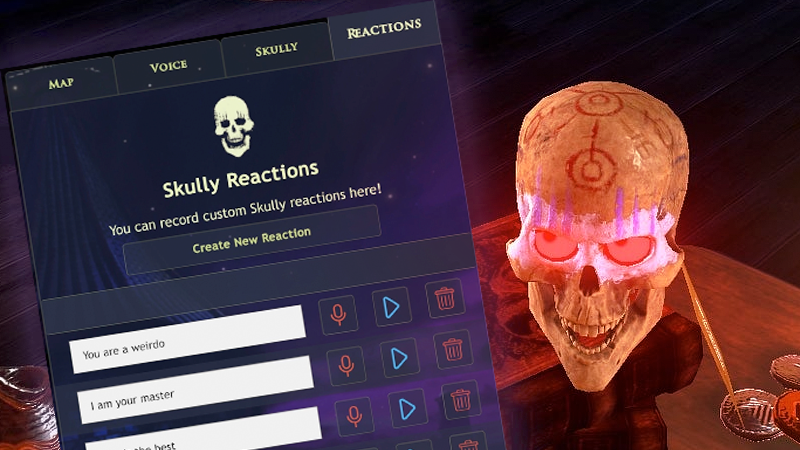
Hello Wizards! Have you ever wished that Skully could react to something specific you said, but he didn’t? Well you will never have that problem again because today we’re introducing Custom Reactions!

In this update1

Full notes

Full Waltz of the Wizard update

Read the full published notes in a cleaner layout. The original post stays linked below.

Repeated intro

Hello Wizards!

What changed

1 fix1 addition7 changes0 removals
  • UI and audio
  • Gameplay
  • Performance
  • Fixes
changedCustom Reactions is a small update just in time for Christmas that lets you define a specific sentence you would like Skully to react to and then record whatever sound you would like Skully to play when you say that.
changedThis is a feature that we hope everyone will find fun and we encourage experimenting with it. You can record your best Skully voice impressions or just use it to play soundclips or sound effects, triggered by what you say.
addedYou can access the new feature in the Menu. Select ‘Codex’ and there you find a new tab called ‘Reactions’ with the controls and more information on how to use the feature.
changedNotes on releaseWe suggest not using special characters like commas or quotes when defining what Skully should react to, since this can throw off the voice recognition! Other Improvements/Fixes
changedNotes on releaseThe Xylophone portal has an updated, fresh look!
changedNotes on releaseImproved loading times on Quest.

Waltz of the Wizard changes

changedCustom Reactions is a small update just in time for Christmas that lets you define a specific sentence you would like Skully to react to and then record whatever sound you would like Skully to play when you say that.
changedThis is a feature that we hope everyone will find fun and we encourage experimenting with it. You can record your best Skully voice impressions or just use it to play soundclips or sound effects, triggered by what you say.
addedYou can access the new feature in the Menu. Select ‘Codex’ and there you find a new tab called ‘Reactions’ with the controls and more information on how to use the feature.
changedWe suggest not using special characters like commas or quotes when defining what Skully should react to, since this can throw off the voice recognition! Other Improvements/Fixes
changedThe Xylophone portal has an updated, fresh look!

Have you ever wished that Skully could react to something specific you said, but he didn’t? Well you will never have that problem again because today we’re introducing Custom Reactions!

Custom Reactions is a small update just in time for Christmas that lets you define a specific sentence you would like Skully to react to and then record whatever sound you would like Skully to play when you say that.

Custom Reactions is available right now on all platforms — Quest, Steam, Steam Deck, PlayStation and iOS!

This is a feature that we hope everyone will find fun and we encourage experimenting with it. You can record your best Skully voice impressions or just use it to play soundclips or sound effects, triggered by what you say.

You can access the new feature in the Menu. Select ‘Codex’ and there you find a new tab called ‘Reactions’ with the controls and more information on how to use the feature.

Go wild and let us know what you create (for example by tagging Aldin on YouTube or Skully on TikTok! That’s @AldinDynamics on YouTube and @SkullyforReal on TikTok) — we love seeing the creativity of the community!

Notes on release

  • Using Quest with Link does not support SteamVR’s virtual keyboard, so you’ll have to switch to Screen Mode to type in phrases and record.

  • We suggest not using special characters like commas or quotes when defining what Skully should react to, since this can throw off the voice recognition!

    Other Improvements/Fixes

  • The Xylophone portal has an updated, fresh look!

  • Improved loading times on Quest.

  • Improved look of landing menu in VR.

  • Fixed Spectral Sword VR gesture not triggering correctly.

  • Plus, various other bug-fixes and improvements.

  • Type to Talk (VR!): The "Type to Talk" feature now works in VR. Note: It does currently not work on Quest Link due to the lack of a virtual system keyboard on Quest Link.

Source

Steam News / 17 December 2025

Open original post

Changelog.gg summarizes and formats this update. How we read updates.