
HomeGamesUpdatesPricingMethodology
Steam News23 May 20261mo ago

Update v1.3.0

Release Notes: New Features and Improvements Added phono preamp next to turntable with volume control and clipping indicator Added keyboard shortcut to load next queued track (Shift + N) Added "Up to Eleven" achievement

In this update5

Full notes

Full Vinyl Desktop update

Read the full published notes in a cleaner layout. The original post stays linked below.

What changed

1 fix3 additions4 changes0 removals
  • Gameplay
  • Fixes
  • UI and audio
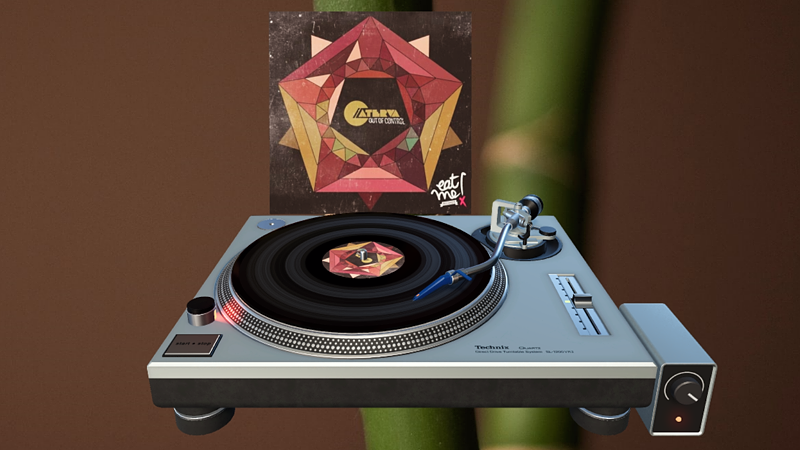
addedNew Features and ImprovementsAdded phono preamp next to turntable with volume control and clipping indicator
addedNew Features and ImprovementsAdded keyboard shortcut to load next queued track (Shift + N)
addedNew Features and ImprovementsAdded "Up to Eleven" achievement
changedNew Features and ImprovementsImproved built-in documentation by adding animated images
fixedBug FixesFixed next vinyl record being loaded while the current one is grabbed
changedControlling VolumeClick and hold the Left Mouse Button and move the mouse up or down to increase / decrease the volume, or scroll the mouse wheel up / down while hovering the mouse over the knob. Steam post image

Vinyl Desktop changes

addedAdded phono preamp next to turntable with volume control and clipping indicator
addedAdded keyboard shortcut to load next queued track (Shift + N)
addedAdded "Up to Eleven" achievement
changedImproved built-in documentation by adding animated images
fixedFixed next vinyl record being loaded while the current one is grabbed

Release Notes:

New Features and Improvements

  • Added phono preamp next to turntable with volume control and clipping indicator

  • Added keyboard shortcut to load next queued track (Shift + N)

  • Added "Up to Eleven" achievement

  • Improved built-in documentation by adding animated images

Bug Fixes

  • Fixed next vinyl record being loaded while the current one is grabbed

Notes:

Controlling Volume

The volume of the turntable can be controlled using the rotary knob on the phone preamp next to it.

Click and hold the Left Mouse Button and move the mouse up or down to increase / decrease the volume, or scroll the mouse wheel up / down while hovering the mouse over the knob. Steam post image

The volume control can be moved to the other side of the turntable or hidden, using the Volume Control setting in the menu.

The red indicator light on the preamp illuminates when the output volume exceeds 0 dB and is digitally clipping.

To avoid audio distortion in the output signal it is recommended to lower the volume until the red clipping indicator light stops illuminating.

Source

Steam News / 23 May 2026

Open original post

Changelog.gg summarizes and formats this update. How we read updates.