
HomeGamesUpdatesPricingMethodology
Steam News16 November 20223y ago

Update v0.1.5

I received a report that the game crashes on VR mode. I’m sorry for the inconvenience. In response to this, I modified the game. Now it will export the information for debugging when it crashes.

Full notes

Full VDoll update

Read the full published notes in a cleaner layout. The original post stays linked below.

What changed

0 fixes0 additions4 changes0 removals
  • Performance
changedI received a report that the game crashes on VR mode. I’m sorry for the inconvenience. In response to this, I modified the game. Now it will export the information for debugging when it crashes.
changedHowever, the crash doesn’t occur in my environment, so I need someone’s help. If anyone could help me, please send me the information the game exports when it crashes and the type of the VR device you use.
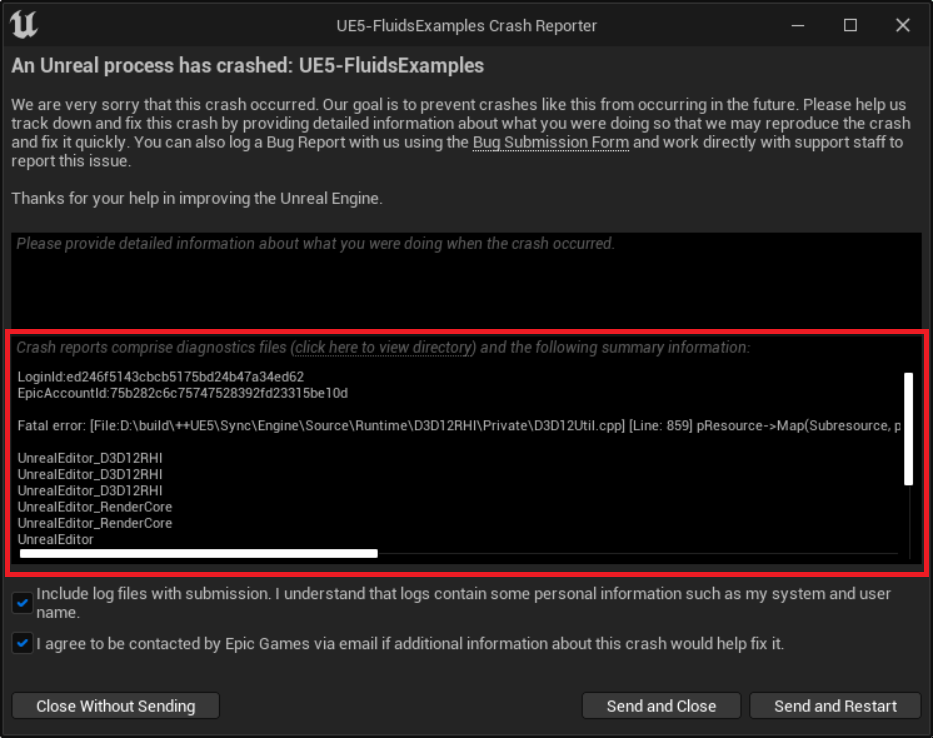
changedA window will appear when the game crashes. Please send me the content in the window to the forum, e-mail or DM of Twitter.
changedC:/Users/{your-computer-name}/AppData/Local/XSim/Saved/Crashes/UECC-Windows-********/CrashContext.runtime-xml

VDoll changes

changedI received a report that the game crashes on VR mode. I’m sorry for the inconvenience. In response to this, I modified the game. Now it will export the information for debugging when it crashes.
changedHowever, the crash doesn’t occur in my environment, so I need someone’s help. If anyone could help me, please send me the information the game exports when it crashes and the type of the VR device you use.
changedA window will appear when the game crashes. Please send me the content in the window to the forum, e-mail or DM of Twitter.
changedC:/Users/{your-computer-name}/AppData/Local/XSim/Saved/Crashes/UECC-Windows-********/CrashContext.runtime-xml

I received a report that the game crashes on VR mode. I’m sorry for the inconvenience. In response to this, I modified the game. Now it will export the information for debugging when it crashes.

However, the crash doesn’t occur in my environment, so I need someone’s help. If anyone could help me, please send me the information the game exports when it crashes and the type of the VR device you use.

First, please check if the version is v0.1.5. When you start the game on non-VR mode, the version shows on the top right of the screen. The version should be v0.1.5.

A window will appear when the game crashes. Please send me the content in the window to the forum, e-mail or DM of Twitter.

If the window doesn’t appear, the information is exported to the following path. Please send me the content of this file. Xml file is just a text data, so you can open it by any type of notepad.

C:/Users/{your-computer-name}/AppData/Local/XSim/Saved/Crashes/UECC-Windows-********/CrashContext.runtime-xml

In addition, please tell me the type of the VR device you use.

Twitter https://twitter.com/foxpunchgame

e-mail foxpunchgame@gmail.com

Source

Steam News / 16 November 2022

Open original post

Changelog.gg summarizes and formats this update. How we read updates.