Greetings, Principals! If you recall in our 8th Dev Diary entry, we’ve talked about Principal Tasks and how it has helped testers get the hang of their duties and goals around the Academy.
Full notes
Full Valthirian Arc: Hero School Story 2 update
Read the full published notes in a cleaner layout. The original post stays linked below.
Repeated intro
Greetings, Principals!
What changed
0 fixes1 addition4 changes0 removals
Gameplay
UI and audio
Performance
Events
Store
changedIf you recall in our 8th Dev Diary entry, we’ve talked about Principal Tasks and how it has helped testers get the hang of their duties and goals around the Academy. Well today, we’ll be talking about our updated notification system.
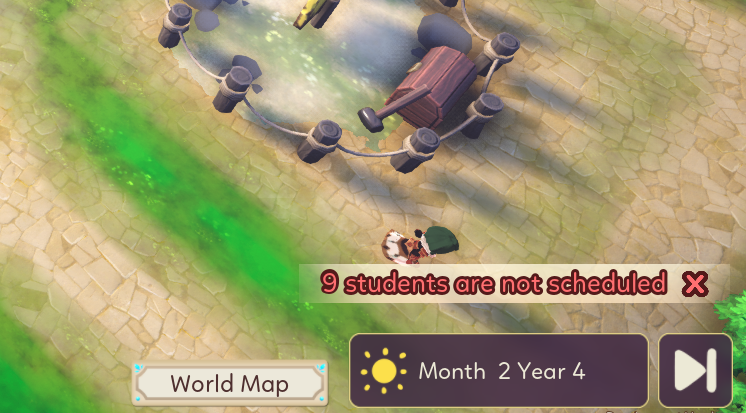
changedNotifications, as you can guess, will notify Players about important events in the game and tasks that need immediate action. These notifications will appear in the Notification panel in the Academy HUD, some as temporary pop ups, while more pressing matters will be listed in the Notification List until resolved. Of course, you can still dismiss them altogether if it bothers you. Your academy, your rules.
changedImportant notifications are mostly there to remind you about unscheduled students or event triggers. Warnings are about upcoming events and countdowns or about students getting kicked out of class. Normal notification tells you about student’s mood or performance, or just telling you about your achievements, and building lots. The daily life aspect of being a principal, if you will. Favorite notifications, are basically not that different from normal notifications, but it highlights your favorite students specifically. Because there’s always that angelic student that outshine the rest, isn’t there?
addedAs you progress through your principal journey, more events will pop up. Most recent events will always be placed on top of the list. Important levels being prioritized first. Actions when notification are click depend on the nature of the notification itself. If it’s about students getting kicked out, then of course clicking the notification will direct you to the student schedule tab and mood. New building notifications when clicked, will open up the building list. Warning or event notifications will show you the calendar and things you have to prepare for that event.
changedIf you recall in our 8th Dev Diary entry, we’ve talked about Principal Tasks and how it has helped testers get the hang of their duties and goals around the Academy. Well today, we’ll be talking about our updated notification system.
changedNotifications, as you can guess, will notify Players about important events in the game and tasks that need immediate action. These notifications will appear in the Notification panel in the Academy HUD, some as temporary pop ups, while more pressing matters will be listed in the Notification List until resolved. Of course, you can still dismiss them altogether if it bothers you. Your academy, your rules.
changedImportant notifications are mostly there to remind you about unscheduled students or event triggers. Warnings are about upcoming events and countdowns or about students getting kicked out of class. Normal notification tells you about student’s mood or performance, or just telling you about your achievements, and building lots. The daily life aspect of being a principal, if you will. Favorite notifications, are basically not that different from normal notifications, but it highlights your favorite students specifically. Because there’s always that angelic student that outshine the rest, isn’t there?
addedAs you progress through your principal journey, more events will pop up. Most recent events will always be placed on top of the list. Important levels being prioritized first. Actions when notification are click depend on the nature of the notification itself. If it’s about students getting kicked out, then of course clicking the notification will direct you to the student schedule tab and mood. New building notifications when clicked, will open up the building list. Warning or event notifications will show you the calendar and things you have to prepare for that event.
If you recall in our 8th Dev Diary entry, we’ve talked about Principal Tasks and how it has helped testers get the hang of their duties and goals around the Academy. Well today, we’ll be talking about our updated notification system.
Notifications, as you can guess, will notify Players about important events in the game and tasks that need immediate action. These notifications will appear in the Notification panel in the Academy HUD, some as temporary pop ups, while more pressing matters will be listed in the Notification List until resolved. Of course, you can still dismiss them altogether if it bothers you. Your academy, your rules.
When notifications are clicked, they will do an action based on the type of notification they are. There are 4 types of notification categorized based on their urgency levels:
Important Notification
Warning Notification
Favorite Notification
Normal Notification
Important notifications are mostly there to remind you about unscheduled students or event triggers. Warnings are about upcoming events and countdowns or about students getting kicked out of class. Normal notification tells you about student’s mood or performance, or just telling you about your achievements, and building lots. The daily life aspect of being a principal, if you will. Favorite notifications, are basically not that different from normal notifications, but it highlights your favorite students specifically. Because there’s always that angelic student that outshine the rest, isn’t there?
As you progress through your principal journey, more events will pop up. Most recent events will always be placed on top of the list. Important levels being prioritized first. Actions when notification are click depend on the nature of the notification itself. If it’s about students getting kicked out, then of course clicking the notification will direct you to the student schedule tab and mood. New building notifications when clicked, will open up the building list. Warning or event notifications will show you the calendar and things you have to prepare for that event.
These notifications serve not only as a reminder to help you manage your students, but also as shortcuts to streamline your job as principal. We want to make sure players enjoy their principal journey and not thinking the micro-managing aspect of this game as a chore. We’ll definitely keep improving those aspect as the game is being developed and we’re looking forward to your reception to our work.
That’s all for today’s Dev Diary, thanks as always for following along and we’ll see you in the next one, Principals!