
In this update5
Full notes
Full Unity-Chan: Desktop Companion update
Read the full published notes in a cleaner layout. The original post stays linked below.
What changed
- Store
- UI and audio
- Gameplay
Unity-Chan: Desktop Companion changes
Hey hey! 👋
Today is Halloween, the time of spooky ghosts and creepy skeletons... and partying in cool costumes! 🎃
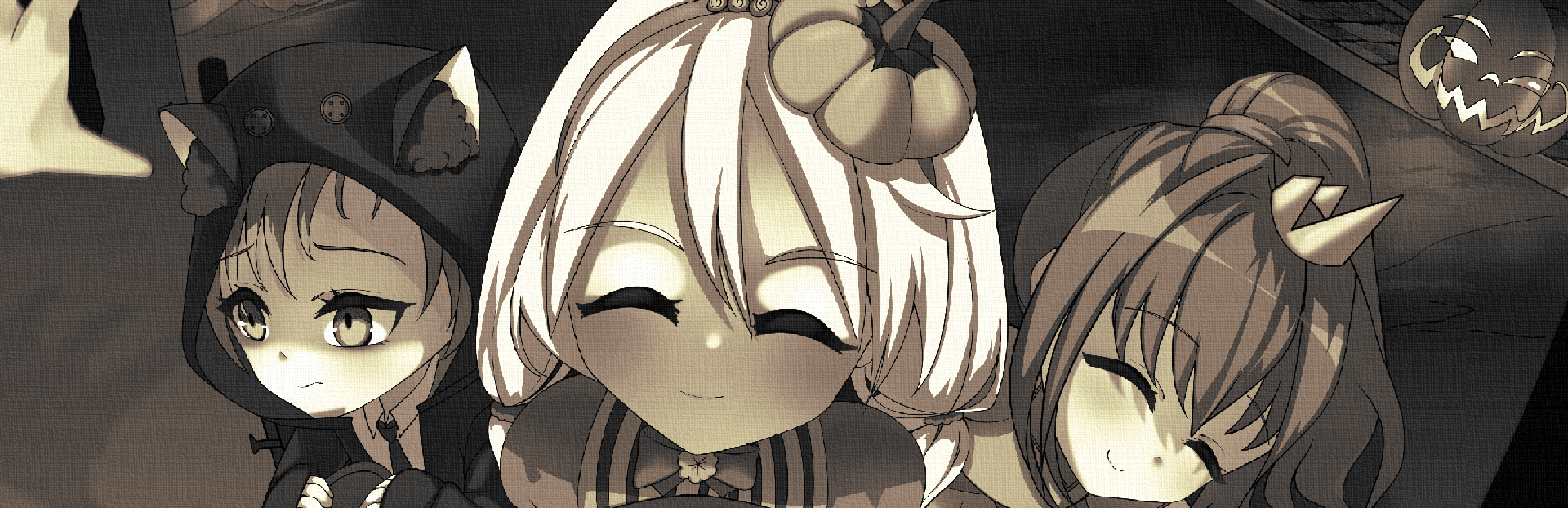
To commemorate such a cute moment, here's an artwork of them surprising yet another neighbor. How could you resist giving them all the treats!?
Steam post image Art made by Uruka (X)
On our left, the shy girl is Yuko Kanbayashi. She actually has cat ears even without the costume, since she's a neko girl! She didn't feel like dressing up too much, so she is a cat girl in a cat hoodie. She loves playing indie games and sleeping (even when they all hang out). She's also currently the most tech-savvy girl of the trio!
On the opposite side is Misaki Fujiwara - both in position on the artwork and passion for costumes! She loved creating costumes so much that it stuck with her to this day, and her main passion became fashion and costume design! She's also the one who gave Unity-chan her nickname.
And in the center here's our star - Kohaku Otori, also known as Unity-chan! Always the bravest and most active of them, she chose herself as the one asking for treats in the center. She is the type who doesn't hesitate and thinks fast, but also can be quite stubborn at times!
Now onto the game status
I know I didn't post for quite a while, and I apologize for that. Some who visited the store in September might have seen that there were quite big issues with game presence on store - for a month it was completely delisted! But luckily it is back now!
Long story short: game got delisted because, during tests, it was found that AI can generate NSFW answers (which wasn't my intent!). So I reappealed to the decision, changed the built-in AI model, and added needed filtering so such things won't be possible in the future. And thankfully they brought back my game to the store and we continue the game verification!
I didn’t want to make a public statement because everything was uncertain, and I didn’t know what the final outcome would be and didn't want to give false hope in case things went bad way.
To everyone who supported me during that hard time, sincerely, THANK YOU! 🧡
But despite the situation that was happening, I didn't stop developing the game! I focused a lot on creating a stable demo. After some playtests and feedback I am getting really close to making it public!
The demo will contain desktop mode only (so no visiting Unity-chan in her room as for now!) with all things around it, such as:
All chat systems, including microphone support
Mod support for custom models, overriding personality, etc.
Portrait mode - another way Unity-chan can hang out on your desktop, similar to how streamers have a window showing them in the corner
Various secret interactions that happen either with time or if you do something specific
Special Twitch integration - stream along Unity-chan, and allow viewers to chat with her!
And of course the cutest
distractionassistant herself - Unity-chan!
I'm still not sure when I'll be able to publish it on Steam with review and sorts, but in terms of development it is basically complete.
What things did I add during that time?
Outside of the demo, I was improving the main game too! There wasn't that much in terms of new content, but I added quite a few Quality of Life changes.
Most recent change was adding more support for streamers. I always thought having Unity-chan as a companion during streams is a cool idea to expand upon. After all, one of the inspirations was Neuro-sama - I think the most popular AI VTuber
Now Unity-chan won't interrupt herself - if chat is very active, Unity-chan will finish her previous answer and queue next instead of changing response mid-way. It also applies if the player, for some reason, spams the chat with Unity-chan on their own (but why would you do that? O.o)
Panic "Stop Yapping" button - while I added a very extensive filter system, chat on stream can be very creative in terms of making AI talk strange stuff. To give streamer more control they can completely stop current Unity-chan answer. I also added global hot-key for that too!
Set chat command - by default, Unity-chan can answer to any chat message. But if your chat is very active or you want to separate regular chat to chat directed at Unity-chan, you can now set it so Unity-chan will read only messages that start i.e. with "Ask Unity:"
Global hotkeys
Game now responds to new key shortcuts to quickly control it without needing to browse through UI windows. Those also work if the game is not focused!
As for now there are 3 hotkeys:
ALT + End - Panic mode, as described in previous point it makes Unity-chan stop telling current response in case she tells something you don't want her to continue
CTRL + ALT + C - Switch Call to Unity-chan, so you can quickly enable and disable microphone input. May be useful if you want to temporarily mute your mic.
ALT + M - silent / focus mode, with this mode Unity-chan will not start chats on her own and be quiet. Definitely useful if you don't appreciate her yapping, or just are busy working and want to use her more as an assistant than distraction :D
All those things can be accessed via UI, plus Call and Silent modes now have status indicators on the top of main screen
[carousel]
[/carousel]
Additionally there were some very needed fixes, like setting the game to another monitor screen, fixing ragdoll so Unity-chan doesn't spaghettify herself, or stoping her from escaping the portrait frame completely out of bounds in Portrait mode. Small things, but also steps forward to stable and (hopefully) enjoyable experience of Unity-Chan: Desktop Companion! :>
Thank you for reading and Happy Halloween! 🎃 BOOO! 👻
(hope I didn't scare you too much with ghost jumpscare, sorry!)
JacopoDev
Source
Changelog.gg summarizes and formats this update. How we read updates.