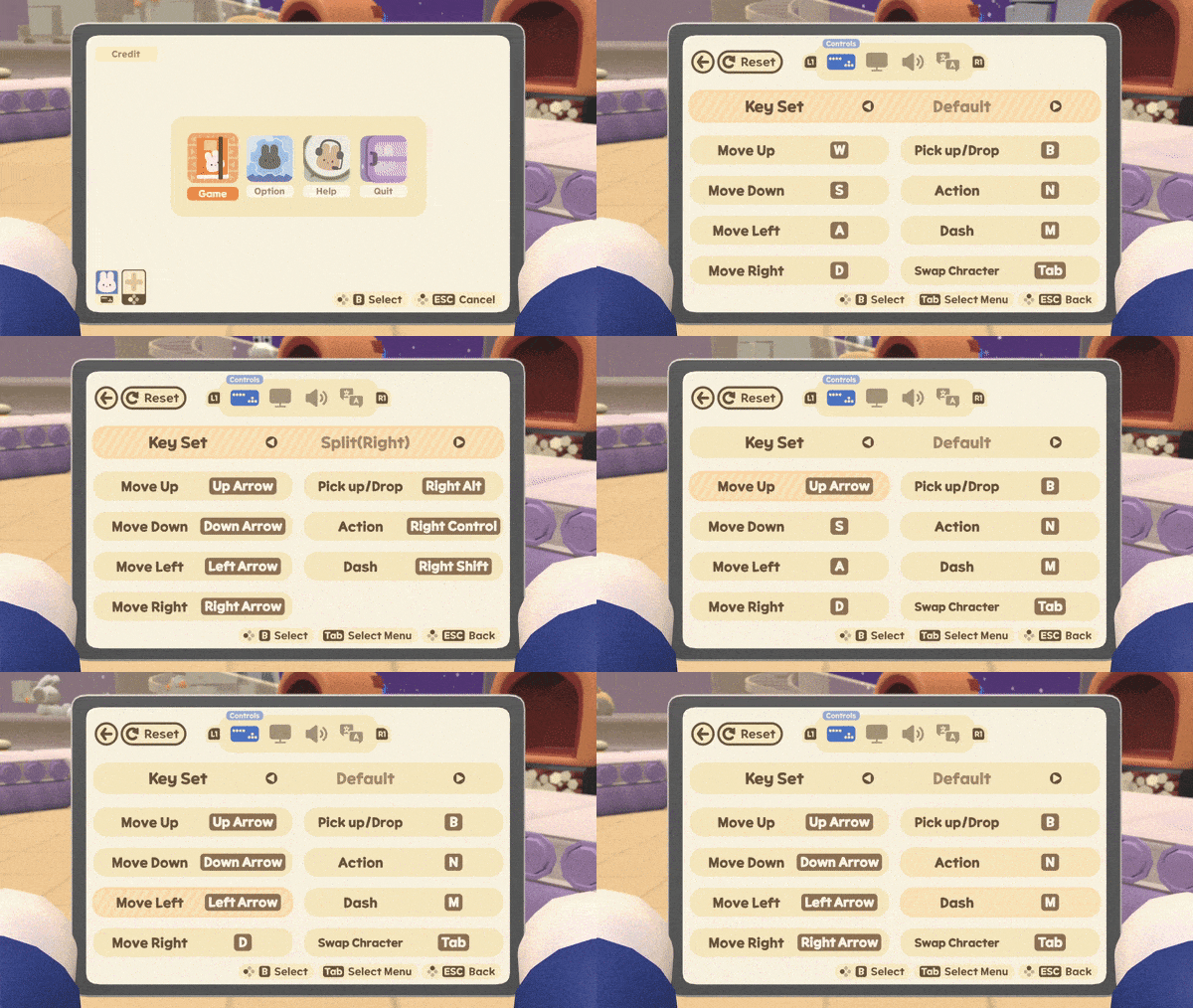
🐰Key Binding System has been added. - Single mode, 1P, 2P keyboard settings are now available. - Keyboard customization is possible in the key tab - option in the lobby window.
Full notes
Full Turn the Line! update
Read the full published notes in a cleaner layout. The original post stays linked below.
What changed
3 fixes3 additions1 change0 removals
Gameplay
UI and audio
Performance
added🐰Key Binding System has been added. - Single mode, 1P, 2P keyboard settings are now available. - Keyboard customization is possible in the key tab - option in the lobby window. - Single mode, keyboard split left, keyboard split right key setting is possible.
fixed🐰Tutorial has been enhanced. - During the tutorial, step-by-step buttons are now displayed. - The orange box indicating each step has been modified to make it more visible. - Fixed typos in the tutorial when playing single player.
addedThe icon representing the bake has been modified to be a flame icon. - When an automatic machine first appears, an icon has been added to indicate what kind of machine it is.
addedWhen the conveyor belt is full and stopped, a notification pop-up has been added to inform you of the situation.
fixed🐰Other fixes - Key helpers on the tutorial and pause now show only the connected control keys. - When a gamepad was connected, the keyboard UI operation was impossible has been fixed, - English is default language now on. (Other language will be added soon.)
fixed🐰Bugs fixed - The problem of flickering when oil appears in Chapter 3 has been fixed. - The problem in which the oil disappears as the cleaning bunny bot passes by did not appear has been fixed. - When an object is thrown near a tile, Fixed an issue where objects would sometimes climb on tiles instead of flying away. - Fixed an issue where part of the background was cut off on Ultra Wide (21:9) monitors.
Turn the Line! changes
added🐰Key Binding System has been added. - Single mode, 1P, 2P keyboard settings are now available. - Keyboard customization is possible in the key tab - option in the lobby window. - Single mode, keyboard split left, keyboard split right key setting is possible.
fixed🐰Tutorial has been enhanced. - During the tutorial, step-by-step buttons are now displayed. - The orange box indicating each step has been modified to make it more visible. - Fixed typos in the tutorial when playing single player.
addedThe icon representing the bake has been modified to be a flame icon. - When an automatic machine first appears, an icon has been added to indicate what kind of machine it is.
addedWhen the conveyor belt is full and stopped, a notification pop-up has been added to inform you of the situation.
fixed🐰Other fixes - Key helpers on the tutorial and pause now show only the connected control keys. - When a gamepad was connected, the keyboard UI operation was impossible has been fixed, - English is default language now on. (Other language will be added soon.)
🐰Key Binding System has been added. - Single mode, 1P, 2P keyboard settings are now available. - Keyboard customization is possible in the key tab - option in the lobby window. - Single mode, keyboard split left, keyboard split right key setting is possible.
🐰Tutorial has been enhanced. - During the tutorial, step-by-step buttons are now displayed. - The orange box indicating each step has been modified to make it more visible. - Fixed typos in the tutorial when playing single player.
The icon representing the bake has been modified to be a flame icon. - When an automatic machine first appears, an icon has been added to indicate what kind of machine it is.
When the conveyor belt is full and stopped, a notification pop-up has been added to inform you of the situation.
🐰Other fixes - Key helpers on the tutorial and pause now show only the connected control keys. - When a gamepad was connected, the keyboard UI operation was impossible has been fixed, - English is default language now on. (Other language will be added soon.)
🐰Bugs fixed - The problem of flickering when oil appears in Chapter 3 has been fixed. - The problem in which the oil disappears as the cleaning bunny bot passes by did not appear has been fixed. - When an object is thrown near a tile, Fixed an issue where objects would sometimes climb on tiles instead of flying away. - Fixed an issue where part of the background was cut off on Ultra Wide (21:9) monitors.
🐰known bugs - Problems where some achievements are not counted - We will improve content slowly, putting content update first. - After the game ends, the shortest time is not updated