
HomeGamesUpdatesPricingMethodology
Steam News24 May 20251y ago

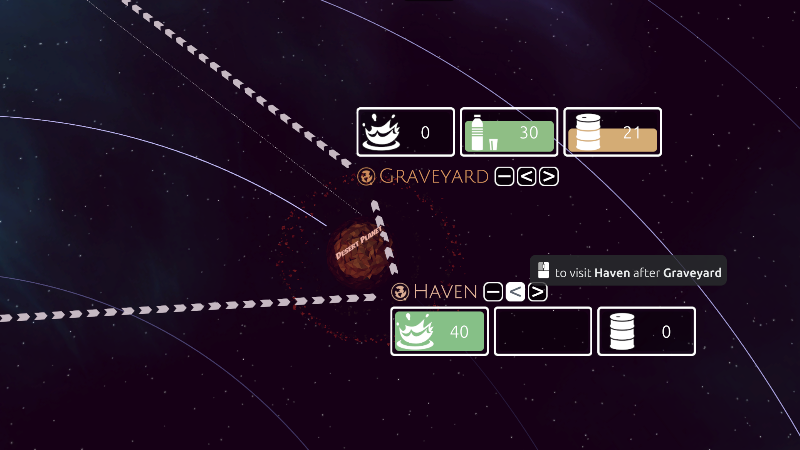
Reordering colonies in a trade route

This v1.0.12 update builds on last weeks QoL additions and focuses on the trade routes. You can now change the order of trade stops within a trade route. This should help with untangling and optimizing trade routes.

Full notes

Full Trappist update

Read the full published notes in a cleaner layout. The original post stays linked below.

What changed

2 fixes3 additions3 changes1 removal
  • Gameplay
  • UI and audio
addedYou can now change the order of trade stops within a trade route. This should help with untangling and optimizing trade routes.
changedSomething else you might notice, the trade routes now use small arrows (instead of dashes) to give a visual indication of the direction of the trade loop. And when you start a new trade route, or resume a paused route, the cargo ship will always start at the nearest colony.
addedAdd buttons to reorder trade stops within a trade route.
changedScale the trade route line width based on the camera distance and UI scale (ctrl+- and ctrl+=).
removedOn removing the current target stop from a trade route, the cargo ship will immediately continue to the next stop.
fixedFix missing tooltip due to an exception while calculating the consumption rate. Especially noticeable when first transferring population to an empty colony while the game is paused.

Trappist changes

addedYou can now change the order of trade stops within a trade route. This should help with untangling and optimizing trade routes.
changedSomething else you might notice, the trade routes now use small arrows (instead of dashes) to give a visual indication of the direction of the trade loop. And when you start a new trade route, or resume a paused route, the cargo ship will always start at the nearest colony.
addedAdd buttons to reorder trade stops within a trade route.
changedScale the trade route line width based on the camera distance and UI scale (ctrl+- and ctrl+=).
removedOn removing the current target stop from a trade route, the cargo ship will immediately continue to the next stop.

This v1.0.12 update builds on last weeks QoL additions and focuses on the trade routes.

You can now change the order of trade stops within a trade route. This should help with untangling and optimizing trade routes.

Something else you might notice, the trade routes now use small arrows (instead of dashes) to give a visual indication of the direction of the trade loop. And when you start a new trade route, or resume a paused route, the cargo ship will always start at the nearest colony.

Thank you all for your feedback!

The changelog for v1.0.12:

  • Add buttons to reorder trade stops within a trade route.

  • Trade route lines now show the direction of the trade route.

  • Scale the trade route line width based on the camera distance and UI scale (ctrl+- and ctrl+=).

  • Hide trade route lines while the main menu is displayed.

  • On starting or resuming a trade route, the cargo ship will start at the nearest colony.

  • On removing the current target stop from a trade route, the cargo ship will immediately continue to the next stop.

  • Fix missing tooltip due to an exception while calculating the consumption rate. Especially noticeable when first transferring population to an empty colony while the game is paused.

  • Fix the "Move to Colony Hub" action on the colony panel when underwater on Zima.

  • Add cheat code (shift + F6) to warp a selected ship to the cursor location. To Enable cheat codes open the console with ~ and type "flag cheatcodes".

  • Prevent the "spawn cargo ship" cheat code (F6) from spawning ships in invalid locations.

Source

Steam News / 24 May 2025

Open original post

Changelog.gg summarizes and formats this update. How we read updates.