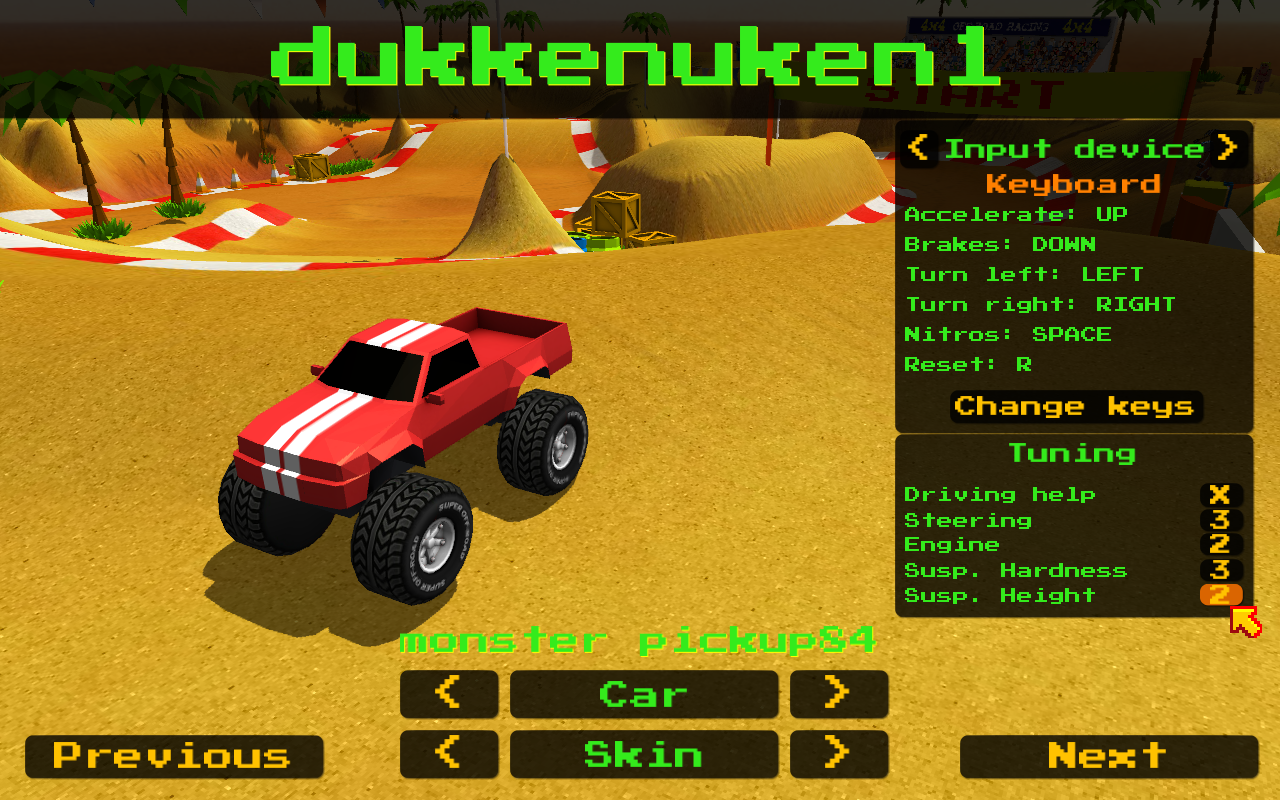
New version 0.8.18 is out ! It has a new feature: car tuning It can be used in all modes (championships and offline) and you can set: Driving help: [on/off] Affects anti-roll bars, rotation torque in the chassis to make
Full notes
Full ThunderWheels update
Read the full published notes in a cleaner layout. The original post stays linked below.
What changed
0 fixes2 additions0 changes0 removals
Gameplay
Workshop
addedNew version 0.8.18 is out ! It has a new feature: car tuning
addedIt can be used in all modes (championships and offline) and you can set: Driving help: [on/off] Affects anti-roll bars, rotation torque in the chassis to make the car turn faster and lowers mass center. Those are "helping measures" most of them affecting the steering. Now you will be able to turn it off! Steering: Controls how fast the wheels turns when you press keys or joystick buttons. Engine: Controls engine torque and maximum speed Susp. Hardness: Affects spring and damper suspension Susp. Height: Affects suspension travel and car height, also modifies how spring and damper works since a longer spring travel will produce a stronger total force in the car. All default values are shown in yellow and once you modify one of them it will be shown in white. Each setting will be saved for each user & car so you can use it for example to make your "expert friend" drive a bit slower in Party Mode and level all the players so there isn't much difference between them (asked in the forums). Also "Driving help" was mentioned in the forums, a player asked us to have some kind of "pro driving simulation". With this game it doesn't have any sense because it is an arcade ! and bumps + top-down view imposes many restrictions in how simulation is done because it could be really frustrating if it is too realistic, but now you can turn off the driving help if you want ;) Also we're releasing a bugfix in the ThunderShop now v0.8.2, it will detect if the user didn't accepted Steam Subscriber Agreement, if you didn't your tracks will not visible in the community and the ThunderShop will give you a warning and a link to accept it. Also we have a brand new video tutorial showing how to create and upload a track to Steam Workshop : https://steamcommunity.com/sharedfiles/filedetails/?id=1309208454 The video is in youtube with a small index in the footer if you are impatient or want to skip some parts.
ThunderWheels changes
addedNew version 0.8.18 is out ! It has a new feature: car tuning
addedIt can be used in all modes (championships and offline) and you can set: Driving help: [on/off] Affects anti-roll bars, rotation torque in the chassis to make the car turn faster and lowers mass center. Those are "helping measures" most of them affecting the steering. Now you will be able to turn it off! Steering: Controls how fast the wheels turns when you press keys or joystick buttons. Engine: Controls engine torque and maximum speed Susp. Hardness: Affects spring and damper suspension Susp. Height: Affects suspension travel and car height, also modifies how spring and damper works since a longer spring travel will produce a stronger total force in the car. All default values are shown in yellow and once you modify one of them it will be shown in white. Each setting will be saved for each user & car so you can use it for example to make your "expert friend" drive a bit slower in Party Mode and level all the players so there isn't much difference between them (asked in the forums). Also "Driving help" was mentioned in the forums, a player asked us to have some kind of "pro driving simulation". With this game it doesn't have any sense because it is an arcade ! and bumps + top-down view imposes many restrictions in how simulation is done because it could be really frustrating if it is too realistic, but now you can turn off the driving help if you want ;) Also we're releasing a bugfix in the ThunderShop now v0.8.2, it will detect if the user didn't accepted Steam Subscriber Agreement, if you didn't your tracks will not visible in the community and the ThunderShop will give you a warning and a link to accept it. Also we have a brand new video tutorial showing how to create and upload a track to Steam Workshop : https://steamcommunity.com/sharedfiles/filedetails/?id=1309208454 The video is in youtube with a small index in the footer if you are impatient or want to skip some parts.
New version 0.8.18 is out ! It has a new feature: car tuning
It can be used in all modes (championships and offline) and you can set: Driving help: [on/off] Affects anti-roll bars, rotation torque in the chassis to make the car turn faster and lowers mass center. Those are "helping measures" most of them affecting the steering. Now you will be able to turn it off! Steering: Controls how fast the wheels turns when you press keys or joystick buttons. Engine: Controls engine torque and maximum speed Susp. Hardness: Affects spring and damper suspension Susp. Height: Affects suspension travel and car height, also modifies how spring and damper works since a longer spring travel will produce a stronger total force in the car. All default values are shown in yellow and once you modify one of them it will be shown in white. Each setting will be saved for each user & car so you can use it for example to make your "expert friend" drive a bit slower in Party Mode and level all the players so there isn't much difference between them (asked in the forums). Also "Driving help" was mentioned in the forums, a player asked us to have some kind of "pro driving simulation". With this game it doesn't have any sense because it is an arcade ! and bumps + top-down view imposes many restrictions in how simulation is done because it could be really frustrating if it is too realistic, but now you can turn off the driving help if you want ;) Also we're releasing a bugfix in the ThunderShop now v0.8.2, it will detect if the user didn't accepted Steam Subscriber Agreement, if you didn't your tracks will not visible in the community and the ThunderShop will give you a warning and a link to accept it. Also we have a brand new video tutorial showing how to create and upload a track to Steam Workshop: https://steamcommunity.com/sharedfiles/filedetails/?id=1309208454 The video is in youtube with a small index in the footer if you are impatient or want to skip some parts.