
HomeGamesUpdatesPricingMethodology
Steam News30 March 20215y ago

Have RealAI Train on Your Custom Map

The Contest The most subscribed game board uploaded to the steam workshop will be trained on by RealAI and be released in the next patch.

In this update4

Full notes

Full The Lost Game: Royal Game Of Ur update

Read the full published notes in a cleaner layout. The original post stays linked below.

What changed

0 fixes1 addition6 changes0 removals
  • Workshop
  • Gameplay
  • Maps
changedThe ContestThe most subscribed game board uploaded to the steam workshop will be trained on by RealAI and be released in the next patch. Make sure to read the "Contest Eligibility" portion so that you know how to design your board!
changedHow To Make a BoardTile Placement
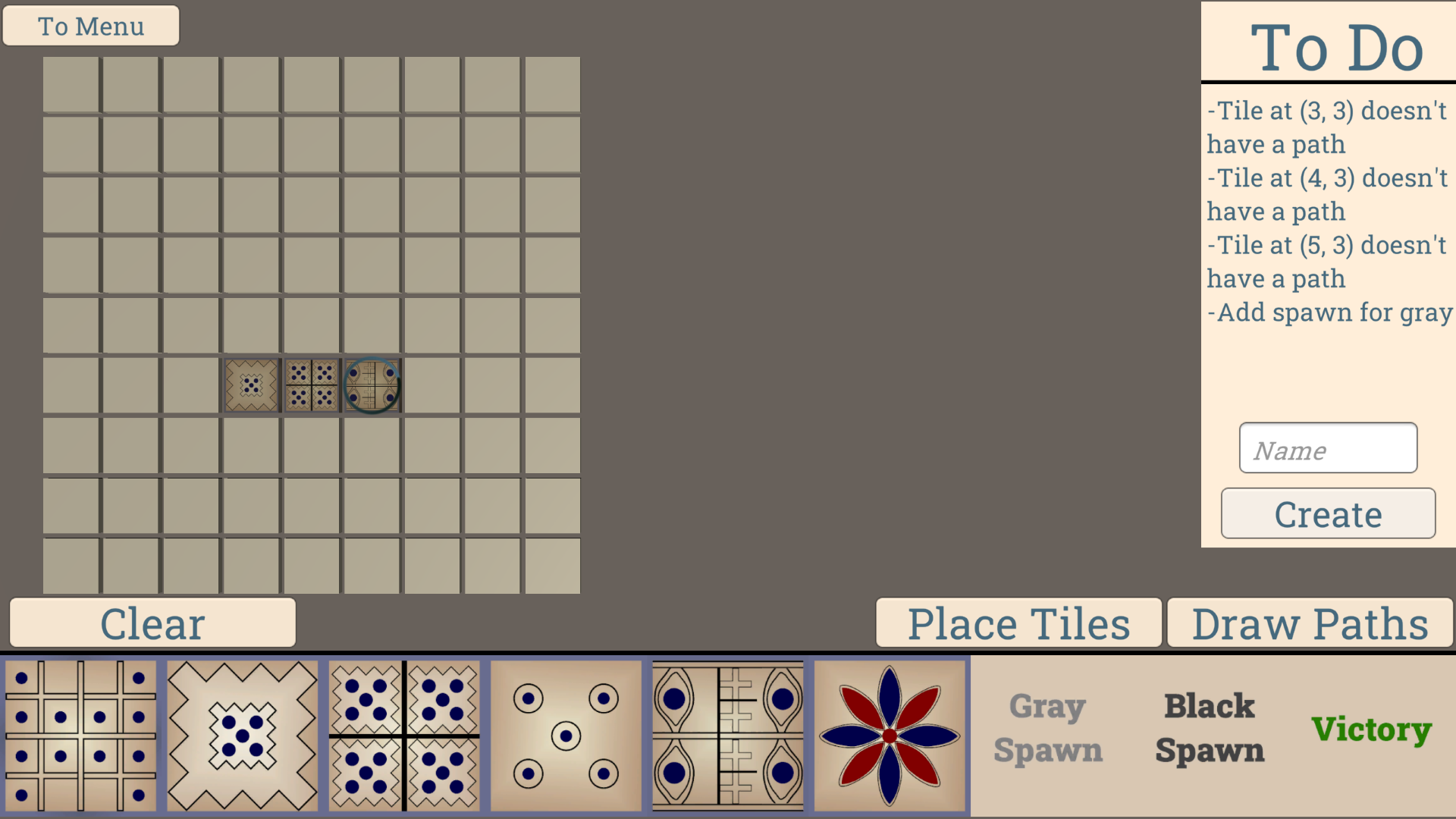
changedHow To Make a BoardEnter the Level Editor through the main menu. You will see many tiles and an empty 9x9 field. Click on the field and then click on a tile to place that tile in the field. Repeat until you make a nice-looking board. There are a few things that you should make sure of. Firstly, gray and black should each have 1 spawn. Second, there should be at least 1 victory tile where players must rush their pieces to. Lastly, each player must have a clear path to at least 1 victory tile.
addedHow To Make a BoardAbove we can see a nice-looking board. The next step is to add paths to the board. Let's click on Draw paths. Now we are presented with options "Gray Path", "Joint Path", "Black Path" which describes which player can traverse the path we are about to create. Select the tile where you want your path to start and then select the tile you want your path to go to. Then click on one of the Path buttons. This creates a path. Paths can only go up down left and right. A tile can go in multiple directions but a path cannot be two-way.
changedHow To Make a BoardIt's tempting to pick random tiles for your custom board. This is especially true because only the flower tile provides a gameplay difference. However, we want to be able to have the player visually know the path that they can take on a board they are not familiar with. However, we also don't want to spam the same exact tile over and over again.
changedContest EligibilityNo loops allowed Like many evil bosses, RealAI has a weakness. This one's weakness is loops. The map above is an example of one that RealAI could not solve. What is a loop? Well, it's when one part of the puzzle leads back to a previous part of the puzzle. Making it so that theoretically, one could move infinitely through the loop. No loops allowed.

The Lost Game: Royal Game Of Ur changes

changedThe most subscribed game board uploaded to the steam workshop will be trained on by RealAI and be released in the next patch. Make sure to read the "Contest Eligibility" portion so that you know how to design your board!
changedTile Placement
changedEnter the Level Editor through the main menu. You will see many tiles and an empty 9x9 field. Click on the field and then click on a tile to place that tile in the field. Repeat until you make a nice-looking board. There are a few things that you should make sure of. Firstly, gray and black should each have 1 spawn. Second, there should be at least 1 victory tile where players must rush their pieces to. Lastly, each player must have a clear path to at least 1 victory tile.
addedAbove we can see a nice-looking board. The next step is to add paths to the board. Let's click on Draw paths. Now we are presented with options "Gray Path", "Joint Path", "Black Path" which describes which player can traverse the path we are about to create. Select the tile where you want your path to start and then select the tile you want your path to go to. Then click on one of the Path buttons. This creates a path. Paths can only go up down left and right. A tile can go in multiple directions but a path cannot be two-way.
changedIt's tempting to pick random tiles for your custom board. This is especially true because only the flower tile provides a gameplay difference. However, we want to be able to have the player visually know the path that they can take on a board they are not familiar with. However, we also don't want to spam the same exact tile over and over again.

The Contest

The most subscribed game board uploaded to the steam workshop will be trained on by RealAI and be released in the next patch. Make sure to read the "Contest Eligibility" portion so that you know how to design your board!

How To Make a Board

Tile Placement

Enter the Level Editor through the main menu. You will see many tiles and an empty 9x9 field. Click on the field and then click on a tile to place that tile in the field. Repeat until you make a nice-looking board. There are a few things that you should make sure of. Firstly, gray and black should each have 1 spawn. Second, there should be at least 1 victory tile where players must rush their pieces to. Lastly, each player must have a clear path to at least 1 victory tile.

Basic Path Creation

Above we can see a nice-looking board. The next step is to add paths to the board. Let's click on Draw paths. Now we are presented with options "Gray Path", "Joint Path", "Black Path" which describes which player can traverse the path we are about to create. Select the tile where you want your path to start and then select the tile you want your path to go to. Then click on one of the Path buttons. This creates a path. Paths can only go up down left and right. A tile can go in multiple directions but a path cannot be two-way.

When Tiles Meet Paths

It's tempting to pick random tiles for your custom board. This is especially true because only the flower tile provides a gameplay difference. However, we want to be able to have the player visually know the path that they can take on a board they are not familiar with. However, we also don't want to spam the same exact tile over and over again.

Notice how in the picture above, the types of tiles the gray player can use and the types of tiles the black player can use. The gray player has 2 tiles for themselves, they are the jagged tile and the 4 jagged tile. Meanwhile, the black player has the 5 circles and the grid tile to themselves. Meanwhile, the 4 eyes and flower tiles are for both players to use.

Path Splitting

A path cannot have multiple types of outputs. It either outputs gray, black, or joint. So the question is, how do I take a joint path and split it into a black and gray path? Even the classical board needs path splitting to work. In order to split a path, start with a joint path output and then pick either black or gray after that joint path. Look at the classical board above. We see near the end, the joint path must split to gray and black. So we have a joint path going up and down. Then after the joint path, we apply black and gray. This has the effect of creating a split path.

Contest Eligibility

Keep it interesting

The board should not be trivial to solve. If there's only 1 valid path. Then there's not much point in training an AI to beat it.

No loops allowed Like many evil bosses, RealAI has a weakness. This one's weakness is loops. The map above is an example of one that RealAI could not solve. What is a loop? Well, it's when one part of the puzzle leads back to a previous part of the puzzle. Making it so that theoretically, one could move infinitely through the loop. No loops allowed.

All Boards are Automatically Considered

On the last day of April (PST) I will take a look at the most popular boards on the Steam Workshop. The most subscribed one that follows the rules is guaranteed to be trained with RealAI in the next patch. Additionally, if there is a board that I think would be interesting with RealAI, I will train the AI for it regardless of its popularity. In the end, we may see 1-3 boards being trained for.

Good luck, and happy creating!

Source

Steam News / 30 March 2021

Open original post

Changelog.gg summarizes and formats this update. How we read updates.