
In this update3
Full notes
Full Tee Time Golf update
Read the full published notes in a cleaner layout. The original post stays linked below.
What changed
- Gameplay
- Store
- Events
- UI and audio
Tee Time Golf changes
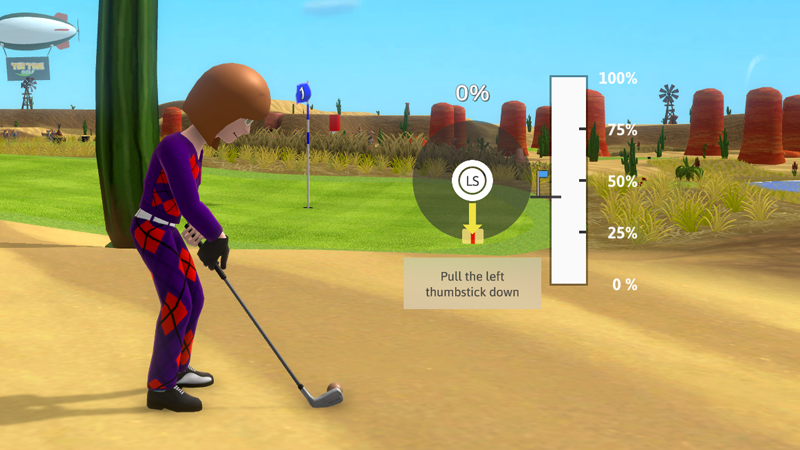
New Thumbstick Swing Meter
Many fans requested the ability to swing with the gamepad thumbstick. In this update, we make this dream come true.
Here is how it works:
Step 1: Press A to pull up your swing meter.
Step 2: Pull down on the left thumbstick to set which direction the ball will curve.
The further away from center you pull back your thumbstick, the more the ball flight will curve. The red marker gives visual guidance on where to pull the thumbstick to hit a straight shot.
Step 3: Push forward on the left thumbstick to set power and initial ball flight direction.
Try to time the push forward with the desired power. The little flag icon will give a hint on how hard to hit the ball. It doesn't take into consideration wind and other course conditions, you have to figure those parts out. ;-)
If you push the thumbstick directly forward into the red marker, the ball flight will start directly to where the golfer is aimed. The further from center you push the thumbstick forward, the further the initial ball flight will be from the target.
Step 4: Enjoy your hole-in-one!
Tips
Hitting a Draw: Pull back the thumbstick to the left and push forward.
Hitting a Fade: Pull back the thumbstick to the right and push forward.
The thumbstick swing meter is now the default if you have a gamepad. If you have preference for the traditional 3-click swing meter, you can always change back in the gameplay settings.
VR Quality of Life Improvements
We have a few things in this update I'm sure VR players will enjoy.
VR One Hand Mode (Now a setting)
Previously, to play VR in one hand mode you had to turn off one of the controllers. This worked well for the most part, however, this proved challenging for the Oculus headset players. In this update, there is now a setting where you can specify which hand you would like to use without needing to turn off a controller.
Switch between Right Handed or Left Handed with Ease
Previously, the option to switch between left and right hand swings was buried in menus. In the pic above, you can now see how quick and easy it is to switch between left and right hand swings.
Club Lengths are now Saved
Previously, each time you play the game you had to reset your club length preferences. This proved extremely frustrating for our taller players. Now, the game will save these settings between play sessions.
Other Improvements
Existing challenges unlock more gear. If you have already beat some of these challenges, you will get will already be available for you in the store.
Camera now locks onto the player when completing a challenge (with fireworks if you win).
UI Improvements
A cool new Barkers Crest blimp.
Source
Changelog.gg summarizes and formats this update. How we read updates.