
Full notes
Full Steel Rats™ update
Read the full published notes in a cleaner layout. The original post stays linked below.
What changed
0 fixes0 additions1 change0 removals
- Gameplay
changedthere is a workaround known to fix the issueSorry for the inconvenience and we hope that from now on you can fully experience gameplay of Steel Rats.
Steel Rats™ changes
changedSorry for the inconvenience and we hope that from now on you can fully experience gameplay of Steel Rats.
Hi guys, some of you have encountered a problem with a controller. The issue is related to the Steam bug, that might be hard to fix from our side. Since
there is a workaround known to fix the issue
, I suggest sticking to it. Mentioned workaround:
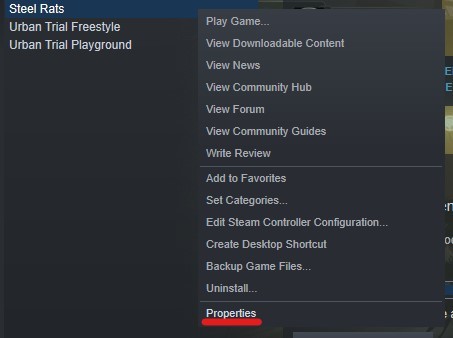
- Open Steam Library.
- Find and Right-click on the Steel Rats.
- Choose the "Properties" as shown on the first screen
- In GENERAL tab open the drop down list under the "Steam Input Per-Game Setting".
- Select Forced On as shown on the second screen.
Sorry for the inconvenience and we hope that from now on you can fully experience gameplay of Steel Rats.
Source
Changelog.gg summarizes and formats this update. How we read updates.