Update 1.7 Public Beta Testing: .osu & .osz import and more!
I'm currently in the testing phase for the next update for Steel Century Groove and am ready to open it up to players before it goes live. I'd love to get your feedback and hear about any bugs you encounter.
In this update1
Full notes
Full Steel Century Groove update
Read the full published notes in a cleaner layout. The original post stays linked below.
What changed
0 fixes5 additions2 changes0 removals
Compatibility
Gameplay
UI and audio
Maps
addedI'm currently in the testing phase for the next update for Steel Century Groove and am ready to open it up to players before it goes live. I'd love to get your feedback and hear about any bugs you encounter. This update introduces the ability to import .osz or .osu files , allowing you to have more manual control of custom music charts. You can create Steel Century Groove specific charts that precisely identify each stem, or you can import an already-made chart designed for osu!, osu!mania, osu!taiko, etc. and the game will use that as a guide to improve its automatic charting. You can customize all this in the Fine Tune menu for each track, but the defaults are set up such that you can just download a .osz (such as from here ), drop it in like any other song, and start playing! The update also introduces a new Monument Arena level with destructible skyscrapers , playable in Arcade Mode, endgame modes, and the Cassie Spectacular boss battle. And of course, lots of other improvements, polish, and bug fixes. To opt-in to the beta branch, find the game in your library, right click or select the gear icon, choose "Properties...", select "Game Versions & Betas", then choose the option "public_beta".
addedInstructions for .osu/.osz importAdd the .osz file to a folder that you have set up for Custom Music
addedInstructions for .osu/.osz importAdd the .osu file into the same folder as the music file you would like to use it for
addedInstructions for .osu/.osz importTo specify that it should be used for a particular difficulty, add an underscore and the name of the difficulty, e.g. "mymusic_veryhard.osu".
changedInstructions for .osu/.osz importStems Import: Use "Automatic" for non-Steel Century Groove specific files. The other two options will allow you to use Combo Starts or Finish Hit Sounds to indicate exactly where stems should start or end. Either option is sufficient. You don't need to specify both start and ends. A stem still cannot exceed 12 notes. Technically, stems can overlap, but it doesn't feel good to play!
addedInstructions for .osu/.osz importExtra Allowed Density: Use this to increase the amount of note density from the Automatic/Loose import setting, compared to the normal baseline for your difficulty level. There is also a new setting for this in the options menu, which will add on top of this track-specific one. And you can now also specify this added density even for non .osu tracks.
Steel Century Groove changes
addedI'm currently in the testing phase for the next update for Steel Century Groove and am ready to open it up to players before it goes live. I'd love to get your feedback and hear about any bugs you encounter. This update introduces the ability to import .osz or .osu files , allowing you to have more manual control of custom music charts. You can create Steel Century Groove specific charts that precisely identify each stem, or you can import an already-made chart designed for osu!, osu!mania, osu!taiko, etc. and the game will use that as a guide to improve its automatic charting. You can customize all this in the Fine Tune menu for each track, but the defaults are set up such that you can just download a .osz (such as from here ), drop it in like any other song, and start playing! The update also introduces a new Monument Arena level with destructible skyscrapers , playable in Arcade Mode, endgame modes, and the Cassie Spectacular boss battle. And of course, lots of other improvements, polish, and bug fixes. To opt-in to the beta branch, find the game in your library, right click or select the gear icon, choose "Properties...", select "Game Versions & Betas", then choose the option "public_beta".
addedAdd the .osz file to a folder that you have set up for Custom Music
addedAdd the .osu file into the same folder as the music file you would like to use it for
addedTo specify that it should be used for a particular difficulty, add an underscore and the name of the difficulty, e.g. "mymusic_veryhard.osu".
changedStems Import: Use "Automatic" for non-Steel Century Groove specific files. The other two options will allow you to use Combo Starts or Finish Hit Sounds to indicate exactly where stems should start or end. Either option is sufficient. You don't need to specify both start and ends. A stem still cannot exceed 12 notes. Technically, stems can overlap, but it doesn't feel good to play!
I'm currently in the testing phase for the next update for Steel Century Groove and am ready to open it up to players before it goes live. I'd love to get your feedback and hear about any bugs you encounter. This update introduces the ability to import .osz or .osu files, allowing you to have more manual control of custom music charts. You can create Steel Century Groove specific charts that precisely identify each stem, or you can import an already-made chart designed for osu!, osu!mania, osu!taiko, etc. and the game will use that as a guide to improve its automatic charting. You can customize all this in the Fine Tune menu for each track, but the defaults are set up such that you can just download a .osz (such as from here), drop it in like any other song, and start playing! The update also introduces a new Monument Arena level with destructible skyscrapers, playable in Arcade Mode, endgame modes, and the Cassie Spectacular boss battle. And of course, lots of other improvements, polish, and bug fixes. To opt-in to the beta branch, find the game in your library, right click or select the gear icon, choose "Properties...", select "Game Versions & Betas", then choose the option "public_beta".
Instructions for .osu/.osz import
.osz (easiest):
Add the .osz file to a folder that you have set up for Custom Music
In the Custom Music menu, check the box next to the track
Allow it to analyze, and you're ready to play!
.osu:
Add the .osu file into the same folder as the music file you would like to use it for
Make sure to name it the same thing as the music file, but with the .osu extension
To specify that it should be used for a particular difficulty, add an underscore and the name of the difficulty, e.g. "mymusic_veryhard.osu".
Fine Tuning .osu/.osz tracks
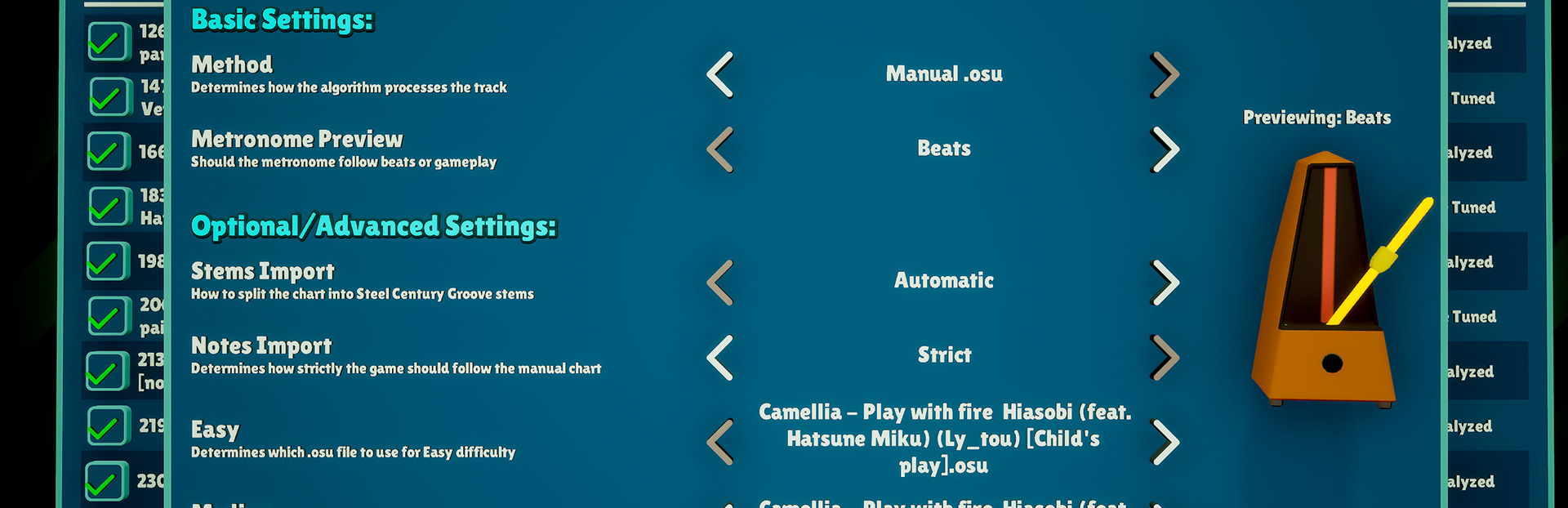
Stems Import: Use "Automatic" for non-Steel Century Groove specific files. The other two options will allow you to use Combo Starts or Finish Hit Sounds to indicate exactly where stems should start or end. Either option is sufficient. You don't need to specify both start and ends. A stem still cannot exceed 12 notes. Technically, stems can overlap, but it doesn't feel good to play!
Notes Import: "Automatic" will try to intelligently pick a subset of the notes in the chart to match the density allowed in Steel Century Groove for your difficulty level. "Loose" will import only the tempo data and use the regular Steel Century Groove algorithm for the rest. "Strict" will try to import every note that it can. This is the best option if you're using a Steel Century Groove specific file.
AddedExtra Allowed DensityUse this to increase the amount of note density from the Automatic/Loose import setting, compared to the normal baseline for your difficulty level. There is also a new setting for this in the options menu, which will add on top of this track-specific one. And you can now also specify this added density even for non .osu tracks.
Difficulty Assignment: For .osz files, the game will automatically try to map the included chart versions to each Steel Century Groove difficulty, but you can also manually assign them here.
To see the full patch notes, visit the discussion here.