
In this update4
Full notes
Full Starcom: Unknown Space update
Read the full published notes in a cleaner layout. The original post stays linked below.
What changed
- UI and audio
- Gameplay
- Performance
- Balance
- Workshop
Starcom: Unknown Space changes
Greetings Commanders,
It's been several months since my last news update. Coming up on the seven year anniversary of Starcom: Nexus entering Early Access, the end of the year, and a current big sale on Starcom: Unknown Space, this seems like a good time to give an update on what I've been up to and what my current plans are.
As you may recall, Unknown Space had its 1.0 release in September 2024 after about 20 months in Early Access. Then I spent the next nine months working on bug fixes, some content updates, localization, Steam Deck verification, etc.
This past summer, after a much needed break, I started thinking about what I wanted to do next: take a longer break, start work on another Starcom game, work on a different kind of game, or something else.
Around that time I posted a survey asking people for their input on what they liked and wanted to see in a potential sequel. As a reminder, that survey is here if you haven't filled it out yet:
Finding that I was getting itchy to work on "something" I decided that I might as well be spending my time investigating ways I could improve Starcom if I decided to do another game.
I've spent the largest chunk of time investigating architecture decisions, i.e., the core game logic that the various gameplay systems like movement, combat, etc., are built from. That's because those are the hardest decisions to revise later.
The ECS Experiment
I invested a solid 10 weeks into creating a prototype of some of the gameplay in ECS (Entity Component System), which is one part of DOTS (Data-Oriented Technology Stack), Unity's new-ish high-performance development pattern.
Unfortunately, I ended up abandoning most of that work. There were a lot of reason for this, and maybe I'll do a long-form video or post eventually, but here's the summary:
The ECS model is extremely performant. While I'm very happy with Unknown Space's performance, there are a number of places where I had to make trade-offs to ensure it was playable on a wide range of systems. E.g., limiting the size of player ships, maximum number of active projectiles, detail level of simulation, etc. Obviously that's always going to be true for any game. But if a different architecture could allow substantially more performance, it could allow me to experiment with systems and mechanics that aren't possible otherwise, plus just adding "more" to existing systems.
How much more depends a lot on what kind of gameplay is going on, but based on a simple performance test, an ECS version of a test project could maybe handle 4-5x the number of entities and colliders as the existing architecture while maintaining the same framerate. That's likely overly optimistic because in reality the game would have a lot of systems that don't benefit as much from it, but it definitely would be significant boost.
Okay, so why would I choose not to take advantage of this?
Because while everything was much faster to run, everything was taking substantially longer to develop. Some of it was due to the fact that it's a new system that I'm unfamiliar with. But it's also the case that while ECS is optimized for "performance by default", a lot of functionality that is easy to do in the traditional Unity architecture becomes much harder in ECS, even if you were equally proficient with both.
Why? There are several reasons:
ECS is a lower-level system. In order to achieve performance and parallelization, it places a number of constraints on what kinds of data it can operate on and how. E.g., no reference data types (so no classes/objects).
It tends to offer less generalized tools with the expectation that the developer will need to create the higher-level functionality exactly tailored to their gameplay.
It has undergone substantial changes in its design since its first version. Searching for how to do something often results in outdated examples.
There are a vast number of resources out there on (non-ECS) Unity. Most common gamedev problems have well-known solutions in Unity, while for ECS there are much fewer.
The Unity Editor has a lot of great tools to visualize, inspect and modify gamestate during play. Most of this functionality was designed for the standard MonoBehaviour model and either doesn't work, or doesn't work as well, with ECS entities.
The Hit Box Problem
To give a specific example, in Starcom: Unknown Space, ships are composed of modules organized onto a hexagonal grid. You can break off parts of enemy ships by focusing on specific modules, disabling their engines, cleaving off a vulnerable section etc.
How this works is a little bit complicated, but it starts with the question: when a projectile collides with an enemy ship, how do we know what module was hit?
Starcom trivia: From the perspective of the physics system, ships are almost entirely composed of spheres. Spheres are the fastest shape for collision detection and very closely approximate hexagons:
And this question is relatively easy to answer in traditional Unity: Behind the scenes, the engine has reorganized the individual colliders on all the modules into a single compound collider, but it will call the OnTriggerEnter method on the projectile and tell it "this is the GameObject that corresponds to the Collider you entered". Which means we can get any component on that specific GameObject.
The simplified MonoBehaviour code (aka, classic Unity) on the projectile might look like this:
[c] private void OnTriggerEnter(Collider other)[/c]
[c] {[/c]
[c] if(other.gameObject != null)[/c]
[c] {[/c]
[c] IHealth health = other.GetComponent ();[/c]
[c] if(health != null && IsHostile(health))[/c]
[c] {[/c]
[c] health.TakeDamage(dmg, factionId, transform.position);[/c]
[c] SpawnImpactVFX();[/c]
[c] }[/c]
[c] }[/c]
[c] }[/c]
By comparison, my ECS version ended up looking like this (included as an image because it would make the post ridiculously long as formatted text):
You may notice that there's an "unsafe" block necessary to access the collider's pointer, something I've never had to use previously. This was a solution I'm unlikely to have found on my own: the code necessary to get the collider key I discovered in a forum post. The documentation for ColliderKey simply describes it as "an opaque key which packs a path to a specific leaf of a collider hierarchy into a single integer," a phrasing which suggests Unity didn't intend for gamedevs to try and unpack it.
Plus, we also have to assemble the compound collider ourselves in a way that lets us match specific collider spheres back to the corresponding module:
This is one of the more egregious examples of "easy in normal Unity, very hard in ECS", but I would say the majority of functionality I managed to implement required significantly more work to implement than the MonoBehaviour version, and these are features I've already built before and knew precisely how I wanted to work.
You can imagine then how much much faster it would be to iterate on design in regular Unity than in ECS. If I have an idea for some new combat mechanic, I generally can hammer out a clumsy prototype in a few hours to see if it actually works in a way that can be polished into something fun.
The same feature in ECS could take several days or more.
My job is to deliver enjoyable experiences to players. Performance can be helpful in giving more options to create fun interactions, but it's nowhere near as important as how quickly I can test out and iterate on a design. To the extent that if I ever needed to use ECS for a new project, it would probably still be quicker to build a version with MonoBehaviours first to figure out all the design requirements.
So apart from that less than successful experiment, what else have I worked on?
New Path: Optimized MonoBehaviours
Well, for the past month plus I've been working on creating an architecture that still uses MonoBehaviours for most logic, but aims to optimize the more performance critical paths.
Which started with me performance profiling Unknown Space in a variety of scenarios.
Profiler View of Combat:
Mostly, the game has already been optimized to the point that there's not "just one thing" that could be easily changed that would dramatically improve performance. But there are a number of operations that are very fast in isolation, but if you do them hundreds or thousands of times per frame, they add up.
If you're curious, here are the areas that I've determined the CPU spends a significant chunk of time in Unknown Space, not necessarily in order:
Updating individual ship systems, e.g., plasma firing, repair system, etc. How much CPU this uses is extremely dependent on what actually is happening. If there are dozens of drone fighters flying around, then the drone system takes a good chunk of time. If the player has dozens of plasma turrets blazing, then the plasma system takes a good chunk of time.
Physics simulation: This covers almost everything in the game that moves, as well as detecting and in some cases resolving collisions: projectiles, ships, asteroids, etc. Internally on the Unity side this uses a version of Nvidia's Physx engine, but telling the engine what to simulate, how, and how often is a huge part of optimization.
Updating AI agents: Choosing targets, giving fleets orders, steering, etc.
The VFX system: This is mostly on Unity's side and compared to their old Shuriken system it's incredibly fast because it's almost entirely on the GPU, but updating thousands of particles does have some cost.
Visualization system: This is the system that determines "who can see what". This is pretty inexpensive, but happens a lot, particularly in the context of the AI.
The Edgedar system: (Edgedar is what I call the icons hugging the edge of the screen. Edge + Radar) You might not expect this to be CPU expensive, but it needs to update potentially dozens of icons every frame including figuring out whether they are onscreen, where a ray to them would intersect the screenbounds, etc. Again, not super expensive, but could be ~0.3 ms every frame.
Simulating thermal flow: This only applies to the player and doesn't happen every frame, but for large ships can get moderately expensive.
Again, all pretty fast in most cases. 0.3 ms is a less than a third of a millisecond. But from the game's anonymous analytics, I know roughly half of all players are playing the game faster than 60 frames per second. A significant percentage are playing faster than 120 FPS. At 120 frames per second, there's only 8 milliseconds total to run the physics simulation, process game logic and render everything.
These already reflect a lot of optimization work on my end picking off the lowest hanging fruit. For example, very few systems are updated every frame. In theory, pretty much the only things that need to be updated every frame are a) things that directly update position visible to the player, and b) things that are in response to player input. Apart from those, most systems use some kind of scheduler. For things that don't depend on precise timing, I use an end of frame scheduler that keeps a running total of the average frame rate and tries to shift tasks from slow frames later into faster frames.
Despite deciding not to use ECS, there are a number of ways to improve performance by changing the overall system designs, including using some of the other non-ECS parts of the DOTS stack:
Burstable-code: Burst is a special compiler that Unity uses that can produce very optimized CPU native code. It only works on static methods, and can only use specific data types (no objects). But if there's some expensive method that can be done within those constraints, it can give a pretty significant boost.
Parallelization: Unity uses threading for some internal tasks, like rendering, physics, audio, etc. But managed game code runs only on the main thread. So even if you have a CPU with a dozen cores, many of them may be idle, even in the most intense parts of the game. The reason for this is that it is very difficult to synchronize data access across threads, and bugs caused by errors here are among the hardest to track down. Unity's Job System gives a way to do this safely. I used this some in Unknown Space for a couple of high-cost operations, but there are quite a few tasks that could benefit from this if I redesigned how I approached them.
Data order
It is usually the case that doing operations on the same data sequentially is going to be faster than doing operations "randomly".
The main reason is CPU caching
if you've just accessed some data, it will be in one of the CPU's caches, which are much faster than going to regular memory. Unlike the other optimizations, this one is much harder to quantify its improvements because it depends very much on how data actually gets accessed. If you create a simple test scenario that loops over some synthetic data, your data will probably always be in one of the caches. But if you deliberately shuffle your access, that won't be realistic either: there's likely some pattern to how objects are created and accessed in "the real world".
Here's a specific example of these optimizations I've started work on:
The existing game has a faction manager that determines if two entities are friendly, neutral or hostile based on two numeric values: their static and dynamic dispositions toward each other. The dynamic component is the result of combat damage and decays over time. It is periodically updated by the above mentioned scheduler. Whenever some system needs to know if two factions are friends or enemies, it asks the faction manager. Which does two dictionary lookups (very fast) and adds the results together.
To access the faction manager, the asker usually needs to resolve some reference chain. e.g., ship.gameWorld.Factions, (very, very fast). There are also some null-reference guards (also very, very fast).
But in intense combat situations, every projectile needs to check whether the thing its collider intersects with is a friend or not. Every AI needs to evaluate whether every target in range is friend or foe. Hundreds of very fast calls add up to only being "quite fast". Which still has worked pretty well!
Still, there are ways the system can be changed to speed this up:
Changing to a system where projectiles are centrally managed and the test for "DoesDamageTo" is optimized into a BurstCompiled static method that only has to do a single indexed NativeArray lookup could shave off maybe 2% of the CPU use in combat, which is where it matters the most.
If we skip using triggers for projectile contacts and switch to using raycasts, we can make sure plasma hits are all handled together, increasing the likelihood that the answer to the question "are these two entities friends" is already in the CPU cache, while simultaneously avoiding "tunneling" where a trigger moves through a target across two timesteps.
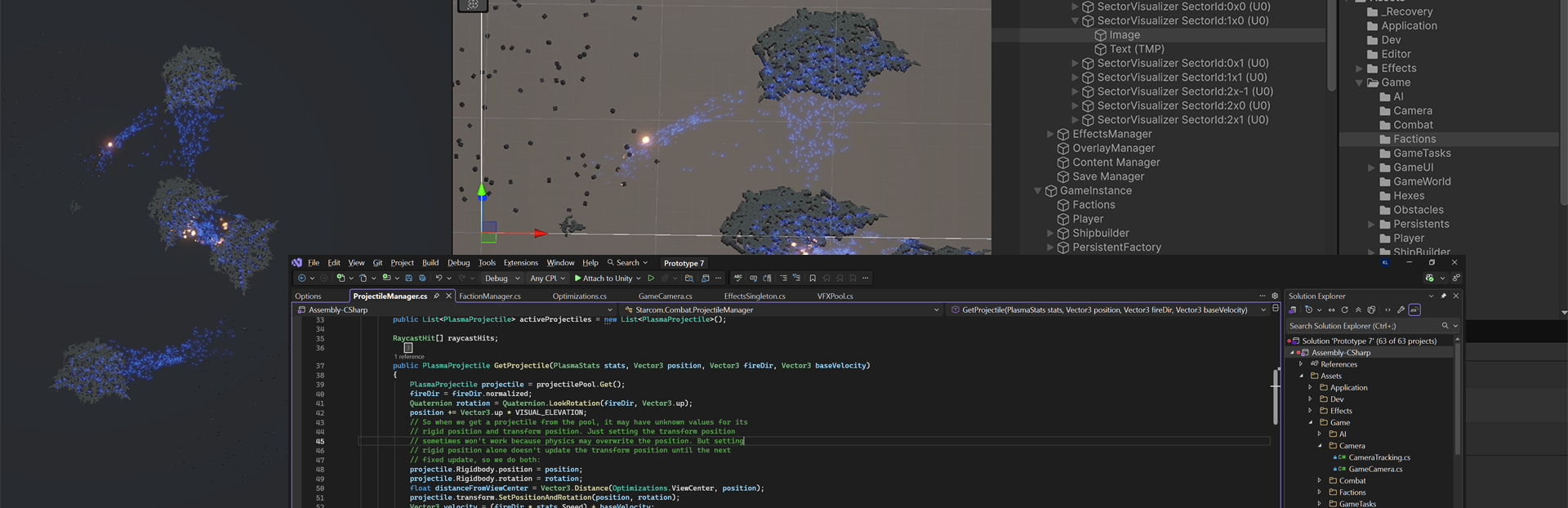
Stress test of several of these new systems and some AIs that don't along with anyone:
Finally, with this design we could have the disposition decay happen off the main thread entirely, since the lookups are now NativeArrays, (although disposition decay wasn't a major performance cost to begin with).
Incidentally, nobody working on a game should start with these kinds of micro-optimizations. I've released two Starcom games where the previous method was good enough. I have a very good idea what I need these systems to do and how they will be used, so I'm pretty confident this optimization won't lock me into a pattern I'll need to change or lead to weird corner case bugs.
Okay, this turned out to be a longer update than I expected. Since I've gone from weekly news updates to a more irregular schedule, there's more to talk about. If there's some gamedev topic you're interested in hearing more about, or just have a question, let me know in the comments below.
Finally, apart from architecture work, I've spent some time writing down gameplay and story ideas. Which brings me back around to a reminder, if you haven't yet, please take a minute to fill out the survey and tell me what you'd like to see in a future Starcom game:
Thanks for reading!
Kevin
Source
Changelog.gg summarizes and formats this update. How we read updates.