If you already have "STAR BARON - VR Beast combat game" in your library you can get access to open beta-test of VIVE compatible version right now.
Full notes
Full STAR BARON – VR BEAST COMBAT GAME update
Read the full published notes in a cleaner layout. The original post stays linked below.
What changed
0 fixes1 addition3 changes0 removals
Compatibility
addedIf you already have "STAR BARON - VR Beast combat game" in your library you can get access to open beta-test of VIVE compatible version right now. Follow few simple steps How to activate the beta branch NOTE: You must have ‘STAR BARON - VR Beast combat game ’ added to your Steam library, already! 1) Right click ‘STAR BARON - VR Beast combat game’ and open Properties
changedEnter this access code in order to activate beta: Review4290BeastGame
changedAfter those steps you will be able to change your Beta participation settings through Steam account settings
changedSteam should start downloading this version of the game. Once it has finished, you will be able to try the latest Beta build.
STAR BARON – VR BEAST COMBAT GAME changes
addedIf you already have "STAR BARON - VR Beast combat game" in your library you can get access to open beta-test of VIVE compatible version right now. Follow few simple steps How to activate the beta branch NOTE: You must have ‘STAR BARON - VR Beast combat game ’ added to your Steam library, already! 1) Right click ‘STAR BARON - VR Beast combat game’ and open Properties
changedEnter this access code in order to activate beta: Review4290BeastGame
changedAfter those steps you will be able to change your Beta participation settings through Steam account settings
changedSteam should start downloading this version of the game. Once it has finished, you will be able to try the latest Beta build.
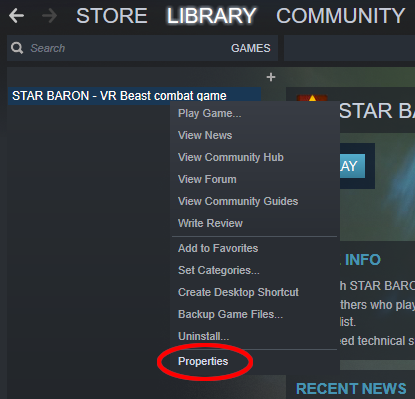
If you already have "STAR BARON - VR Beast combat game" in your library you can get access to open beta-test of VIVE compatible version right now. Follow few simple steps How to activate the beta branch NOTE: You must have ‘STAR BARON - VR Beast combat game ’ added to your Steam library, already! 1) Right click ‘STAR BARON - VR Beast combat game’ and open Properties
Click on "BETAS" tab
Enter this access code in order to activate beta: Review4290BeastGame
After those steps you will be able to change your Beta participation settings through Steam account settings
Steam should start downloading this version of the game. Once it has finished, you will be able to try the latest Beta build.