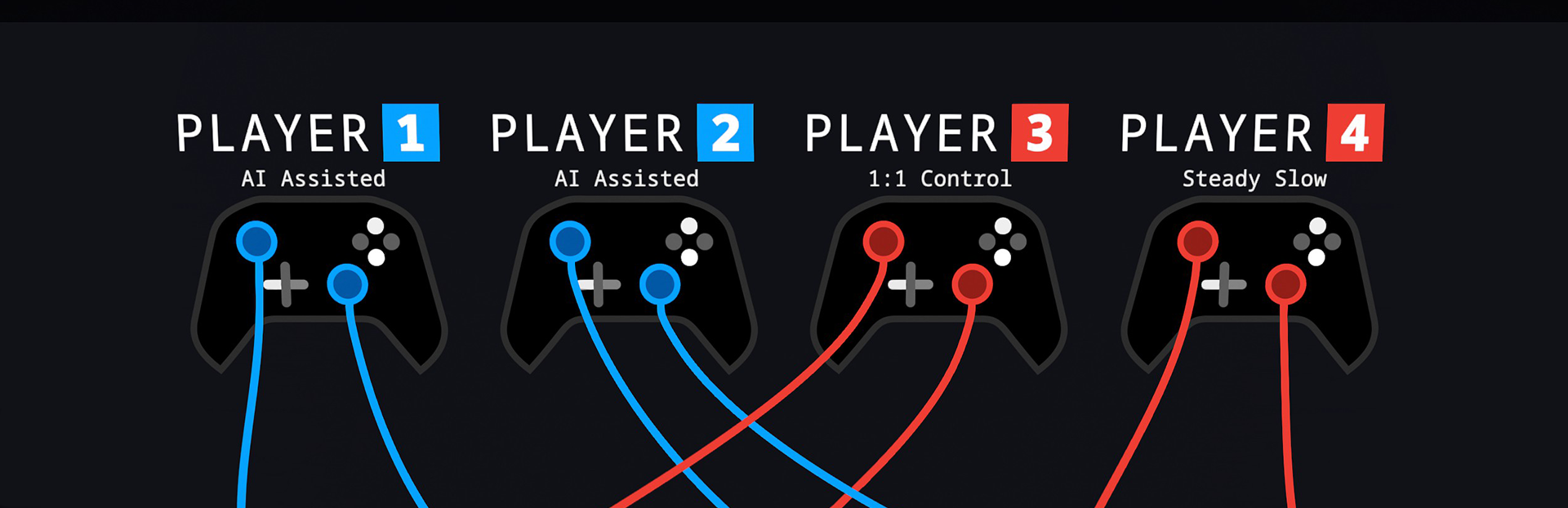
Update: AI Assisted Rod Control Mode! 🎉 I am excited to announce a brand-new way to play Spinshot Party—perfect for those who want to kick back and enjoy the game without the need for complex controls!
In this update2
Full notes
Full Spinshot Party update
Read the full published notes in a cleaner layout. The original post stays linked below.
What changed
0 fixes3 additions2 changes0 removals
Gameplay
UI and audio
addedUpdate: AI Assisted Rod Control Mode! 🎉I am excited to announce a brand-new way to play Spinshot Party—perfect for those who want to kick back and enjoy the game without the need for complex controls! 🎮
added⚽ Introducing: AI Assisted Rod Control Mode! ⚽Now, Spinshot Party can be played even more casually, making it perfect for friends and family who aren’t familiar with gamepads! With our new AI-Assisted mode, players no longer need to manually control the rods. Here’s how it works:
changed⚽ Introducing: AI Assisted Rod Control Mode! ⚽At the controller setup, simply press the Y-Button to toggle through the various control modes.
changed⚽ Introducing: AI Assisted Rod Control Mode! ⚽In this mode, the PC will handle the rod movement for you, so all you need to focus on is kicking the ball with the trigger buttons. 🎯 If you want to make some fine adjustments to the rods, you can still do so using the analog sticks, but it’s totally optional.
addedWhat Does This Mean? 🤔I hope you enjoy this new mode and can’t wait to hear your feedback. Happy Kicking! ⚽
Spinshot Party changes
addedI am excited to announce a brand-new way to play Spinshot Party—perfect for those who want to kick back and enjoy the game without the need for complex controls! 🎮
addedNow, Spinshot Party can be played even more casually, making it perfect for friends and family who aren’t familiar with gamepads! With our new AI-Assisted mode, players no longer need to manually control the rods. Here’s how it works:
changedAt the controller setup, simply press the Y-Button to toggle through the various control modes.
changedIn this mode, the PC will handle the rod movement for you, so all you need to focus on is kicking the ball with the trigger buttons. 🎯 If you want to make some fine adjustments to the rods, you can still do so using the analog sticks, but it’s totally optional.
addedI hope you enjoy this new mode and can’t wait to hear your feedback. Happy Kicking! ⚽
Update: AI Assisted Rod Control Mode! 🎉
I am excited to announce a brand-new way to play Spinshot Party—perfect for those who want to kick back and enjoy the game without the need for complex controls! 🎮
⚽ Introducing: AI Assisted Rod Control Mode! ⚽
Now, Spinshot Party can be played even more casually, making it perfect for friends and family who aren’t familiar with gamepads! With our new AI-Assisted mode, players no longer need to manually control the rods. Here’s how it works:
At the controller setup, simply press the Y-Button to toggle through the various control modes.
Select AI Assisted and let the magic happen! 🪄
In this mode, the PC will handle the rod movement for you, so all you need to focus on is kicking the ball with the trigger buttons. 🎯 If you want to make some fine adjustments to the rods, you can still do so using the analog sticks, but it’s totally optional.
What Does This Mean? 🤔
Even More Casual Fun: Perfect for relaxed gaming sessions.
No More Multitasking: Focus on the fun, not the controls!
I hope you enjoy this new mode and can’t wait to hear your feedback. Happy Kicking! ⚽