
In this update10
Full notes
Full Speed Rivals - Slot Racing update
Read the full published notes in a cleaner layout. The original post stays linked below.
What changed
- Compatibility
- Gameplay
- UI and audio
Speed Rivals - Slot Racing changes
🚨 PRIVATE BETA IS LIVE — Next Big Editor Update 🚨
We’ve just opened a private beta for the biggest Track Builder update so far. If you own Speed Rivals, you can jump in right now and help us test everything before the official release.
This beta is especially important because we’re building a better tutorial for new players — so your feedback directly shapes how we teach the editor.
✅ How to Join the Beta (Steam)
Library → Speed Rivals → Manage (⚙️) → Properties
Go to Betas
Under Private Betas, enter this access code: SpeedRivals26
Select: betatrackbuilder
Let Steam update the game and launch it
🆕 What’s in the Beta?
🌍 1) Build in 4 Scenarios
The first thing you’ll do in the editor now is choose one of 4 environments to build in. Each scenario changes the vibe of your track and diorama.
📍 2) Move the Start Piece Anywhere (including elevation)
You can now move the initial piece across the whole scenario — not only on the ground plane, but also up/down in height for bigger, more creative layouts.
⚙️ 3) New Settings Menu (Track + Room + Camera)
A brand-new control panel that lets you configure:
Number of rails
Laps
Difficulty
Track visuals: rail + curb textures
Room look: atmosphere + filters
Camera options / visual feel
🛣️ 4) The Classic Track Builder (still here)
The core track building flow you already know is still included — now better integrated with the new systems.
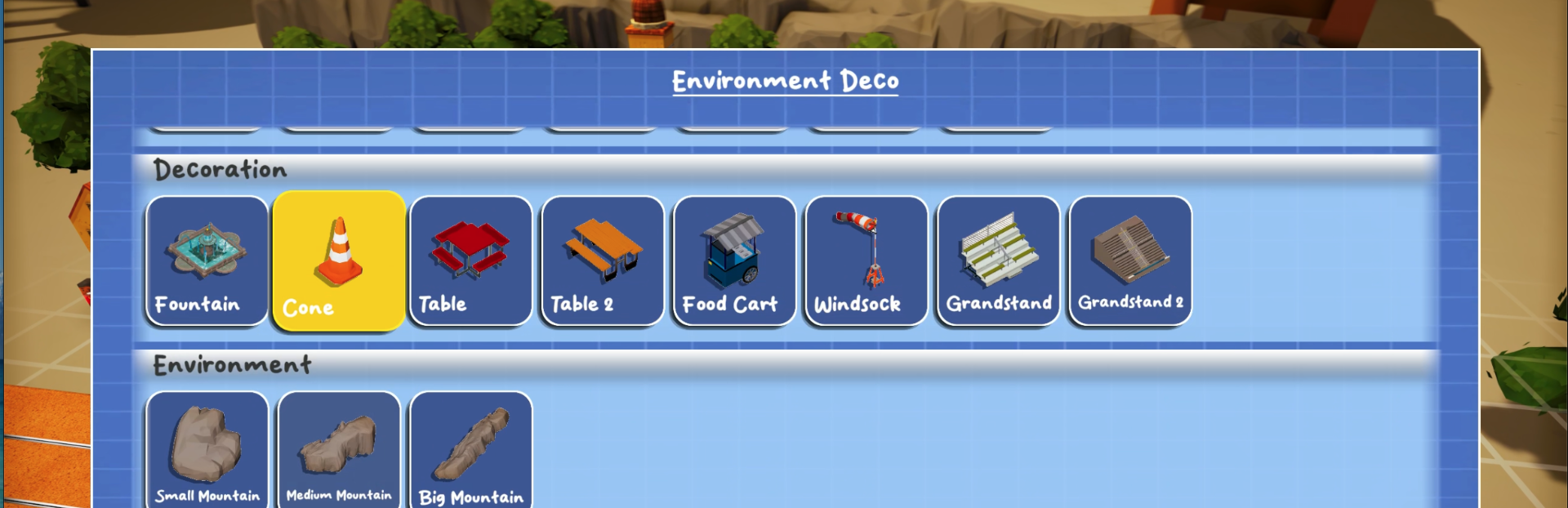
🧩 5) NEW: Decoration Editor (Diorama Mode) — the big feature
Decorate your diorama like you’re building a miniature model:
Place props and miniatures
Fine-tune position
In the edit menu: rotate, tilt, and scale
Create almost anything — we can’t wait to see what you build
🧪 What We Need From You (Tutorial Feedback)
Please tell us:
Did the new flow make sense? (scenario → move start → settings → track → decorations)
What felt confusing or missing?
Any bugs, weird behavior, or friction points?
If possible, include steps to reproduce + a screenshot/video.
💬 Where to Leave Feedback
Join our Discord for full details, announcements, and feedback channels:
Thanks for helping us polish the update — and we can’t wait to see your creations 🏁
Source
Changelog.gg summarizes and formats this update. How we read updates.