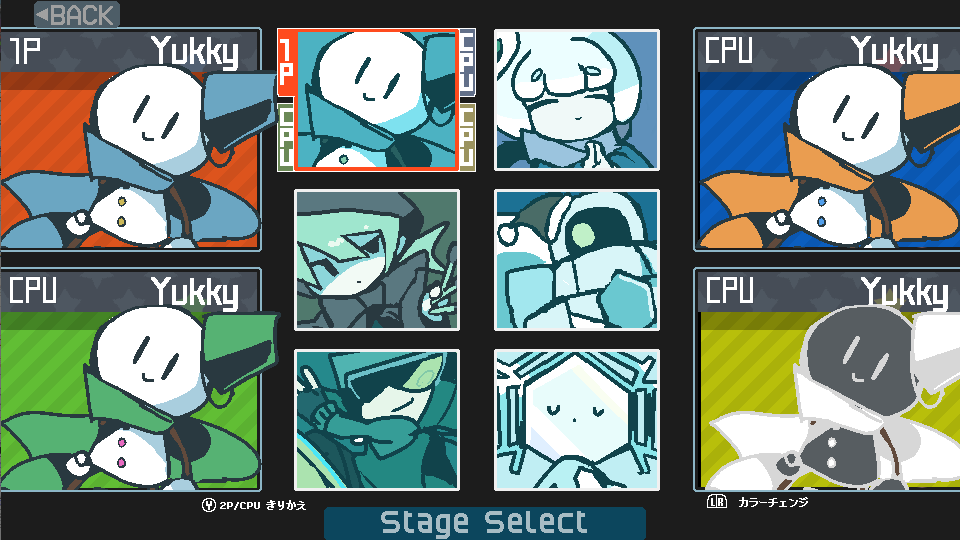
SnowFighters1.0.2Update:CPU added to 4-player battle!
◆ You can now use the CPU in 4player mode! -By default, the CPU is automatically set except for 1P. -The CPU cursor can be operated with the 1P controller.
Full notes
Full SnowFighters update
Read the full published notes in a cleaner layout. The original post stays linked below.
What changed
1 fix2 additions0 changes0 removals
UI and audio
Gameplay
added◆ You can now use the CPU in 4player mode! -By default, the CPU is automatically set except for 1P. -The CPU cursor can be operated with the 1P controller. -When switching the CPU to the player, press the move key or button on each controller. -When returning from the player to the CPU, press the Y button on each controller.
added◆ You can now choose the character color of the CPU! -You can change the color of the CPU by pressing the L / R buttons on the 1P controller while controling the CPU cursor.
fixed◆ Fixed CPU behavior! -Fixed a bug that caused strange movements on slopes -Fixed a bug that stopped in place in walking motion -Fixed a bug for each EX behavior -Changed the specifications the EX weapon is not used immediately.
SnowFighters changes
added◆ You can now use the CPU in 4player mode! -By default, the CPU is automatically set except for 1P. -The CPU cursor can be operated with the 1P controller. -When switching the CPU to the player, press the move key or button on each controller. -When returning from the player to the CPU, press the Y button on each controller.
added◆ You can now choose the character color of the CPU! -You can change the color of the CPU by pressing the L / R buttons on the 1P controller while controling the CPU cursor.
fixed◆ Fixed CPU behavior! -Fixed a bug that caused strange movements on slopes -Fixed a bug that stopped in place in walking motion -Fixed a bug for each EX behavior -Changed the specifications the EX weapon is not used immediately.
◆ You can now use the CPU in 4player mode! -By default, the CPU is automatically set except for 1P. -The CPU cursor can be operated with the 1P controller. -When switching the CPU to the player, press the move key or button on each controller. -When returning from the player to the CPU, press the Y button on each controller.
◆ You can now choose the character color of the CPU! -You can change the color of the CPU by pressing the L / R buttons on the 1P controller while controling the CPU cursor.
◆ Fixed CPU behavior! -Fixed a bug that caused strange movements on slopes -Fixed a bug that stopped in place in walking motion -Fixed a bug for each EX behavior -Changed the specifications the EX weapon is not used immediately.