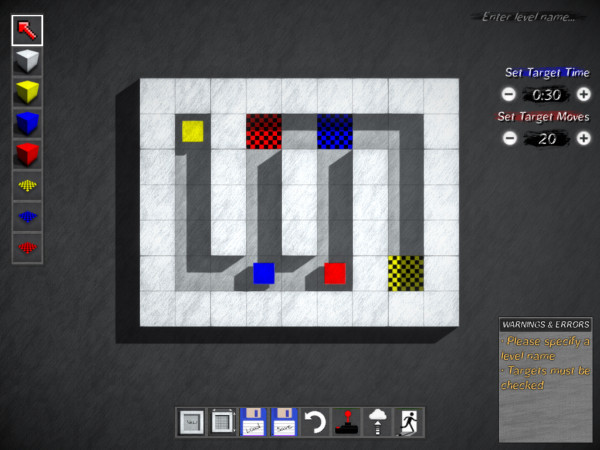
The new version of Slide!! has just been released and there are a lot of new features: Built-in level editor Steam Workshop integration Turbo Mode!
Full notes
Full Slide!! update
Read the full published notes in a cleaner layout. The original post stays linked below.
What changed
0 fixes3 additions2 changes0 removals
Gameplay
Workshop
addedThe new version of Slide!! has just been released and there are a lot of new features:
changedSteam Workshop integration
changedVarious bug fixes and improvements
addedWe hope the level editor is as user-friendly as can be but we will add guides and tutorials as needed. You can upload your levels to Steam Workshop directly from the editor but you must first play test them to prove that the "target time" and "target moves" are achievable.
addedYou can "Get Levels" from the Steam Workshop while in-game. Go to the PLAY menu and select "Downloaded Levels". There is a button labelled "GET LEVELS" and this will open the Steam overlay and take you straight to the Workshop. Subscribe to as many levels as you want and Steam will automatically download the levels to your machine. Go back to the game and click on "Refresh" to see the levels and then start playing! We look forward to playing your creations! This new version also includes "Turbo Mode". This makes time go at double speed which is useful if you want to experiment to find solutions to a level. When you have found a solution you can turn Turbo Mode off (via the Pause screen) and this will allow you to set the best possible time for a level.
Slide!! changes
addedThe new version of Slide!! has just been released and there are a lot of new features:
changedSteam Workshop integration
changedVarious bug fixes and improvements
addedWe hope the level editor is as user-friendly as can be but we will add guides and tutorials as needed. You can upload your levels to Steam Workshop directly from the editor but you must first play test them to prove that the "target time" and "target moves" are achievable.
addedYou can "Get Levels" from the Steam Workshop while in-game. Go to the PLAY menu and select "Downloaded Levels". There is a button labelled "GET LEVELS" and this will open the Steam overlay and take you straight to the Workshop. Subscribe to as many levels as you want and Steam will automatically download the levels to your machine. Go back to the game and click on "Refresh" to see the levels and then start playing! We look forward to playing your creations! This new version also includes "Turbo Mode". This makes time go at double speed which is useful if you want to experiment to find solutions to a level. When you have found a solution you can turn Turbo Mode off (via the Pause screen) and this will allow you to set the best possible time for a level.
The new version of Slide!! has just been released and there are a lot of new features:
Built-in level editor
Steam Workshop integration
Turbo Mode!
Various bug fixes and improvements
We hope the level editor is as user-friendly as can be but we will add guides and tutorials as needed. You can upload your levels to Steam Workshop directly from the editor but you must first play test them to prove that the "target time" and "target moves" are achievable.
You can "Get Levels" from the Steam Workshop while in-game. Go to the PLAY menu and select "Downloaded Levels". There is a button labelled "GET LEVELS" and this will open the Steam overlay and take you straight to the Workshop. Subscribe to as many levels as you want and Steam will automatically download the levels to your machine. Go back to the game and click on "Refresh" to see the levels and then start playing! We look forward to playing your creations! This new version also includes "Turbo Mode". This makes time go at double speed which is useful if you want to experiment to find solutions to a level. When you have found a solution you can turn Turbo Mode off (via the Pause screen) and this will allow you to set the best possible time for a level.