
HomeGamesUpdatesPricingMethodology
Steam News19 April 20262mo ago

Update 1.17

All UFO catcher machines in Akihabara are moved to a different building. New bird plush toys (6 designs), new cat plush toys (3 designs).

Full notes

Full Shoujo City update

Read the full published notes in a cleaner layout. The original post stays linked below.

What changed

1 fix2 additions0 changes0 removals
  • Gameplay
  • Fixes
addedAll UFO catcher machines in Akihabara are moved to a different building. New bird plush toys (6 designs), new cat plush toys (3 designs).
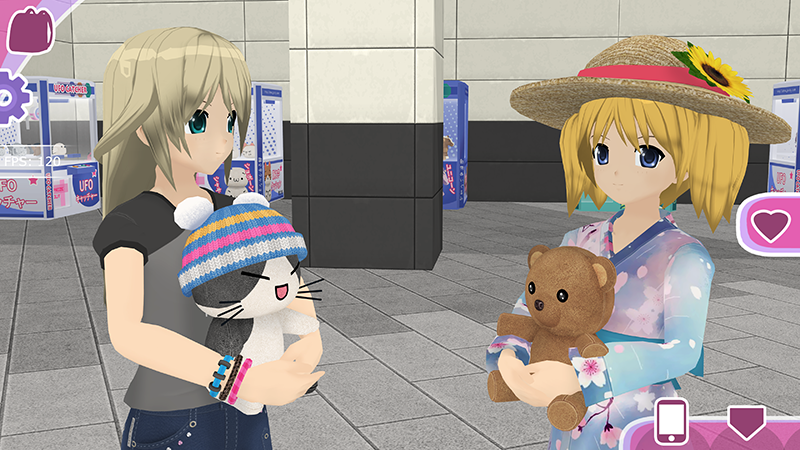
addedAll plush toys, mini-figurines, and a few other collectible items now can be placed in "hand" slot.
fixedFixed the issue of the same photos shared between save slots 1 and 2. Now different save slots correctly save and load different photos (note: since you can change save slots mid-game, photos still can be displayed incorrectly. If you want to keep two different walkthroughs with two different characters, it's recommended to always save them to the same slot, either 1 or 2).

Shoujo City changes

addedAll UFO catcher machines in Akihabara are moved to a different building. New bird plush toys (6 designs), new cat plush toys (3 designs).
addedAll plush toys, mini-figurines, and a few other collectible items now can be placed in "hand" slot.
fixedFixed the issue of the same photos shared between save slots 1 and 2. Now different save slots correctly save and load different photos (note: since you can change save slots mid-game, photos still can be displayed incorrectly. If you want to keep two different walkthroughs with two different characters, it's recommended to always save them to the same slot, either 1 or 2).
  • All UFO catcher machines in Akihabara are moved to a different building. New bird plush toys (6 designs), new cat plush toys (3 designs).

  • All plush toys, mini-figurines, and a few other collectible items now can be placed in "hand" slot.

  • All items that can be held in hands are marked with "paw" icon in inventory.

  • Fixed the issue of the same photos shared between save slots 1 and 2. Now different save slots correctly save and load different photos (note: since you can change save slots mid-game, photos still can be displayed incorrectly. If you want to keep two different walkthroughs with two different characters, it's recommended to always save them to the same slot, either 1 or 2).

Source

Steam News / 19 April 2026

Open original post

Changelog.gg summarizes and formats this update. How we read updates.