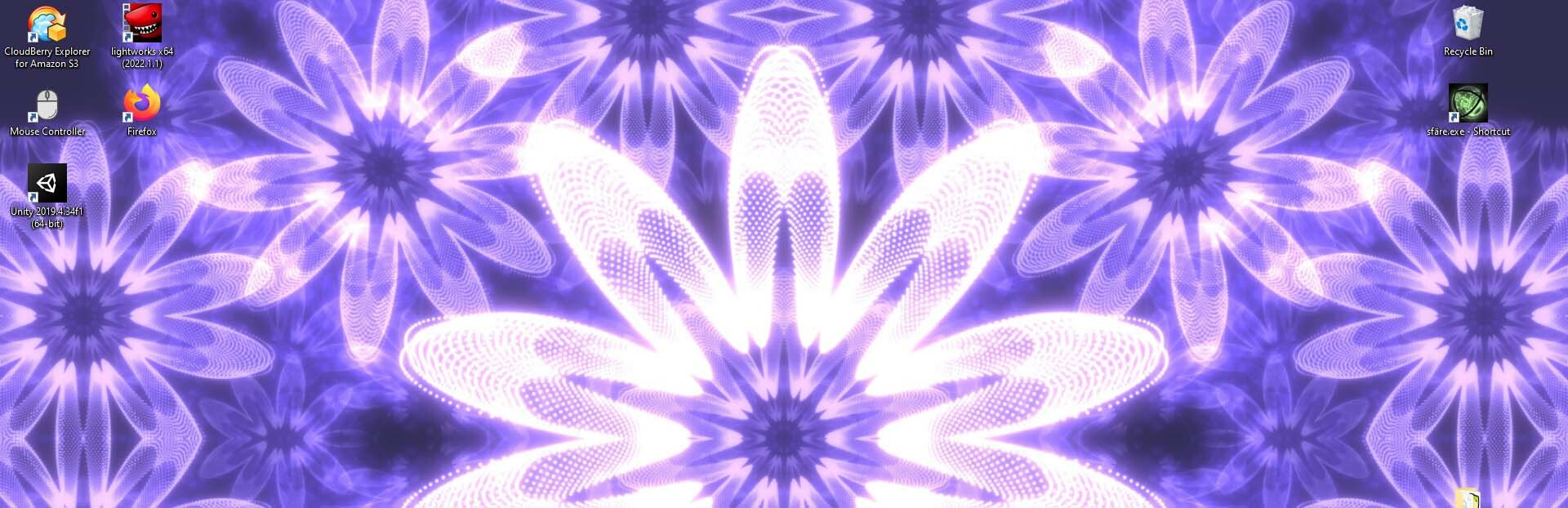
The idea was to allow sfäre to be used as an animated background on your windows desktop. I found a Unity Asset to do just this and I was confident to get it out in no time.
Full notes
Full sfäre update
Read the full published notes in a cleaner layout. The original post stays linked below.
What changed
1 fix1 addition2 changes0 removals
UI and audio
changedThe idea was to allow sfäre to be used as an animated background on your windows desktop. I found a Unity Asset to do just this and I was confident to get it out in no time. The asset allowed me to create a second window for the wallpaper and I really liked the idea of being able to control the wallpaper from this second window.
addedI got most of this working in the editor, but when it came to the release, nothing worked anymore. Turns out the asset was just creating the second window as a preview. Outside of the editor Unity's multi-screen support is pretty terrible. I ended up having to code a large chunk of windows specific code myself. For everything I added in relation to wallpaper mode, I had to test it in release mode as it was not compatible with the Unity editor. Painful. After quite some time I eventually got the second screen working as a wallpaper. I could place it on any desired monitor or over all available monitors. But there was one big problem. The second screen did not allow me to set the resolution, so the image was stretched and it was not pretty.
fixedI did a lot of testing and experimenting and noticed that the primary screen did not have a resolution issue. So to solve my wallpaper problem, I decided to use the primary window as the wallpaper. A lot of work later, I managed to get this working and the resolution issue was fixed. Of course this was not the end. The second display did not work properly. Mouse input was off. Interestingly my own UI did kind of work, but anything that used the more complex Unity UI failed. At this point I nearly gave up, as the whole process was extremely tiring.
changedThere were a lot of other painful things I needed to deal with, e.g. swapping between full screen and windowed mode had to be handled freshly without touching any Unity functions. It's possible there might still be some issues. The resolution of the second screen still does not adjust, but at least it works. I've turned off all complex UI, so in this mode you can't use the settings or the editor.
sfäre changes
changedThe idea was to allow sfäre to be used as an animated background on your windows desktop. I found a Unity Asset to do just this and I was confident to get it out in no time. The asset allowed me to create a second window for the wallpaper and I really liked the idea of being able to control the wallpaper from this second window.
addedI got most of this working in the editor, but when it came to the release, nothing worked anymore. Turns out the asset was just creating the second window as a preview. Outside of the editor Unity's multi-screen support is pretty terrible. I ended up having to code a large chunk of windows specific code myself. For everything I added in relation to wallpaper mode, I had to test it in release mode as it was not compatible with the Unity editor. Painful. After quite some time I eventually got the second screen working as a wallpaper. I could place it on any desired monitor or over all available monitors. But there was one big problem. The second screen did not allow me to set the resolution, so the image was stretched and it was not pretty.
fixedI did a lot of testing and experimenting and noticed that the primary screen did not have a resolution issue. So to solve my wallpaper problem, I decided to use the primary window as the wallpaper. A lot of work later, I managed to get this working and the resolution issue was fixed. Of course this was not the end. The second display did not work properly. Mouse input was off. Interestingly my own UI did kind of work, but anything that used the more complex Unity UI failed. At this point I nearly gave up, as the whole process was extremely tiring.
changedThere were a lot of other painful things I needed to deal with, e.g. swapping between full screen and windowed mode had to be handled freshly without touching any Unity functions. It's possible there might still be some issues. The resolution of the second screen still does not adjust, but at least it works. I've turned off all complex UI, so in this mode you can't use the settings or the editor.
The idea was to allow sfäre to be used as an animated background on your windows desktop. I found a Unity Asset to do just this and I was confident to get it out in no time. The asset allowed me to create a second window for the wallpaper and I really liked the idea of being able to control the wallpaper from this second window.
I got most of this working in the editor, but when it came to the release, nothing worked anymore. Turns out the asset was just creating the second window as a preview. Outside of the editor Unity's multi-screen support is pretty terrible. I ended up having to code a large chunk of windows specific code myself. For everything I added in relation to wallpaper mode, I had to test it in release mode as it was not compatible with the Unity editor. Painful. After quite some time I eventually got the second screen working as a wallpaper. I could place it on any desired monitor or over all available monitors. But there was one big problem. The second screen did not allow me to set the resolution, so the image was stretched and it was not pretty.
I did a lot of testing and experimenting and noticed that the primary screen did not have a resolution issue. So to solve my wallpaper problem, I decided to use the primary window as the wallpaper. A lot of work later, I managed to get this working and the resolution issue was fixed. Of course this was not the end. The second display did not work properly. Mouse input was off. Interestingly my own UI did kind of work, but anything that used the more complex Unity UI failed. At this point I nearly gave up, as the whole process was extremely tiring.
I took a short break, but then came back to it and started analyzing mouse input. I found out how Unity was transmitting the mouse position and managed to figure out how to correct for it.
There were a lot of other painful things I needed to deal with, e.g. swapping between full screen and windowed mode had to be handled freshly without touching any Unity functions. It's possible there might still be some issues. The resolution of the second screen still does not adjust, but at least it works. I've turned off all complex UI, so in this mode you can't use the settings or the editor.