
Full notes
Full Rust update
Read the full published notes in a cleaner layout. The original post stays linked below.
What changed
- Maps
- Gameplay
- UI and audio
- Store
MAP MARKERS
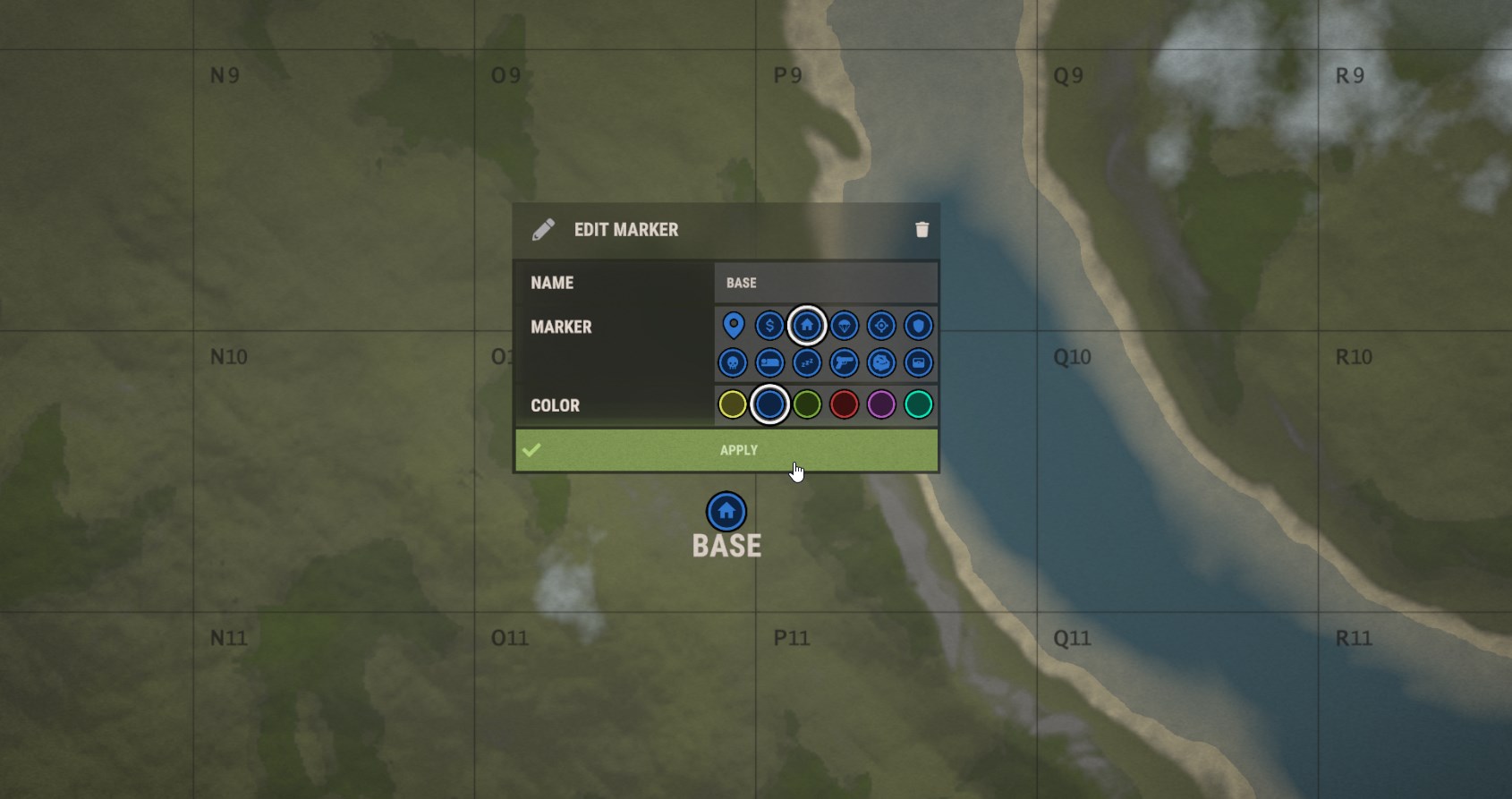
Map markers have received an upgrade this month, with the maximum amount of markers increasing to 5 and a new set of controls to help you store useful information along with your map.
Placing more markers is as simple as using the RMB as normal, and markers are deleted in the same way. If you have reached the maximum number of markers (5 by default) you will need to delete another marker to make room.
To edit a marker simply click on it with the LMB and use the controls that pop up. You can select from multiple colour and icons as well as adding a label. Note that the label will be slimmed down to three characters when displayed on the compass.
If you are the leader of a team all of your teammates will see all of your markers, as well as their own.
PINGS
Pings are a new system to help you more effectively communicate to your teammates when using reconnaissance tools like cameras, drones and the binoculars.
While using any of those items (and holding down RMB when using the binoculars) you can double tap (KEYBIND) to pop down a ping. All of your teammates will see this ping, even if you are not the team leader.
Single tapping the ping key will place a contextual ping when possible, for example placing a node ping when aiming at a node, a loot ping when aiming at a storage entity or a gun ping when aiming at a dropped weapon.
Double pressing the ping key will place a red hostile ping, designed to represent danger.
You can also hold the ping key down to access a radial menu with all of the ping options in case you need more flexibility.
Single tapping while looking at a ping will cancel it, otherwise the ping will expire in 10 seconds.
DOUBLE HORSE SADDLE
The new double saddle item lets two players mount and ride a horse. This is in addition to the old single seater saddle, so the choice is yours!
Wild horses spawn with a single seater saddle and you can swap it for a double seater via the horse radial menu, if you have the required saddle item (and the other way around!).
Both saddle items are available for purchase from the stablemaster or via crafting.
WORLD MODEL REFRESH
The new refresh for the world models has finally arrived. Finally, you will be able to tell if you have dropped HV, Incendiary, or Normal Rockets! Alongside the world model refresh new world models have been created for the different types of shotgun shells.
Some of the items that have had a world model refresh are :
Road Sign Gloves
Snap Trap
High-Velocity Rocket
Incendiary Rocket
Shotgun Ammo
Hopefully, soon there won't be any more brown burlap sacks on the island!
COMPUTER STATION UI
I've made a few improvements to the computer station UI this month.
You can now use arrow keys or mouse wheel to switch between selected entities. The UI will also now show the health of the entity you're currently controlling.
We have an existing console variable - vehicleDismountHoldTime - that can be set to a value above zero to enable hold-to-dismount on vehicles. This is now also used if you're remote-controlling a drone at the computer station. Setting it even to something small
Source
Changelog.gg summarizes and formats this update. How we read updates.