
In this update3
Full notes
Full Rust update
Read the full published notes in a cleaner layout. The original post stays linked below.
What changed
- Gameplay
- Server
- UI and audio
- Maps
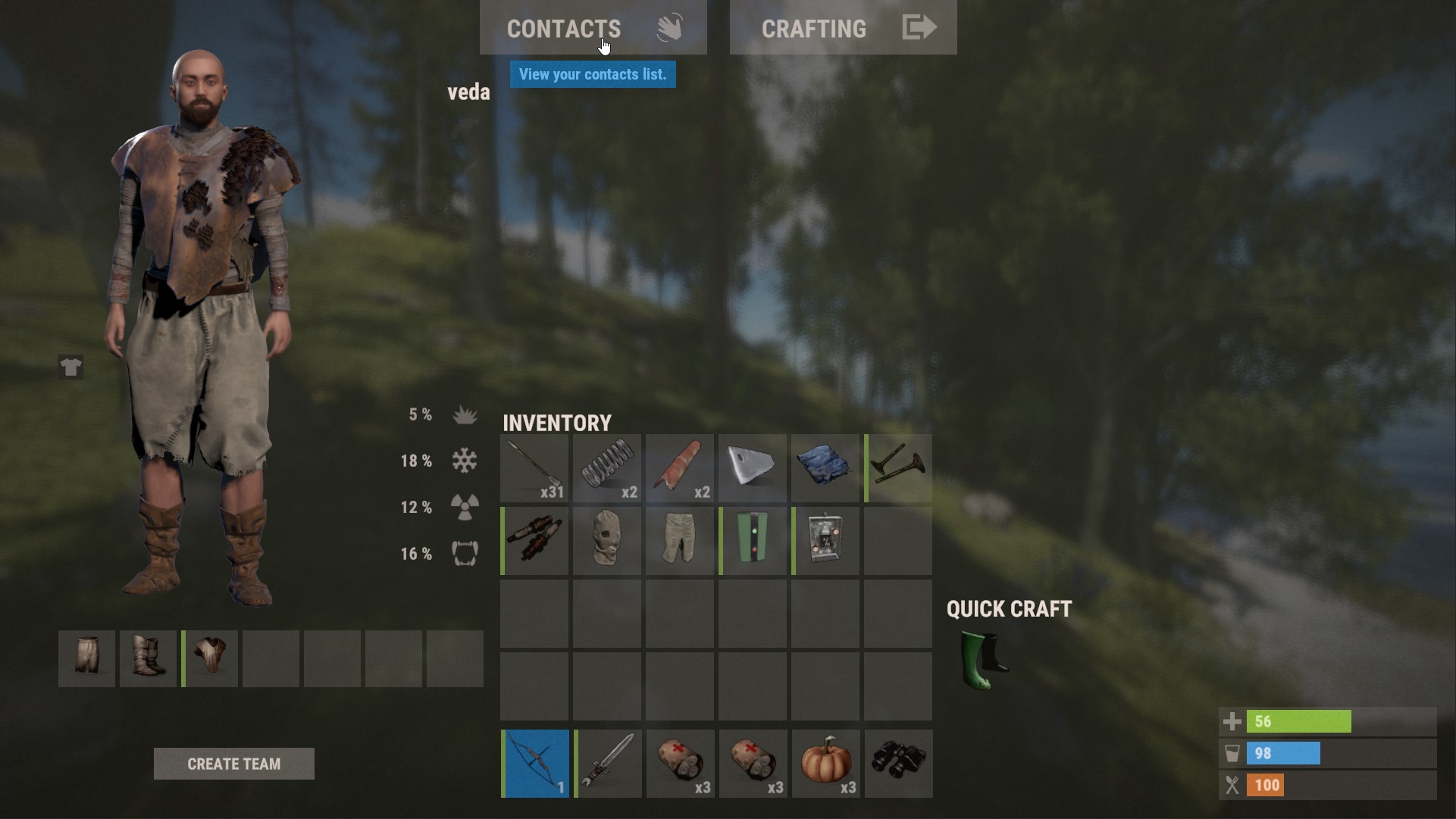
Contact System
We've added a new system for keeping track of the players you interact with.
You'll find a new tab on your inventory screen which will open the contacts panel. From there you'll be able to use the various controls to flag a player as either friendly or enemy. This will change how their name tag shows up when you encounter them in the world. Players are automatically added to the 'seen' category if you've been in close proximity for several seconds.
Any player who kills you will be added to your Enemy list.
You can select any contact from the list and filter by category (friendly/seen/enemy) as well as assign a contact to a category.
Binoculars have also received a buff, and will allow you to see a colored pip above players indicating if they are an enemy or a friend.
There is a rudimentary reputation system in the works which will very slightly shade your nametag either blue or red based on how likely you are to kill on sight. This system is a work in progress and will be expanded upon in the future.
Any server can disable the contacts system with the convar relationshipmanage.contacts false
The nametag system has also changed and you can now display your name plate at long distances to anyone you are looking at by using the 'wave' gesture. We hope this will allow players to avoid killing other 'friendly' players and grant the ability to signal your intentions.
As for the majority of hardcore rust players who kill everyone on sight anyway, you may as well pretend this system does not exist as it will not affect you. However for those less inclined to destroy and kill every living thing that passes infront of them. This system might help you find some like-minded players to team up with.
Wire Colour Coding
This was suggested on Reddit and we all felt like it was a good idea so I added the ability to colour code your electrical wires and hoses this month.
Simply hold Reload while holding the Wire Tool/Hose Tool to select which colour you’d like to use.
Demo Shot System
This month we’re adding the first iteration of a more advanced feature set for viewing and manipulating demos. This has primarily been built to improve our internal production tools, but considering the rich and diverse community of Rust content creators out there we’d love for this to be a tool that all of you can use.
Once you load a demo with “demo.hud” turned on, you’ll see a variety of new options including a shot manager and scrubbable timeline. Pressing the ALT key at any time will switch control between the demo UI and debug camera.
You can now create and manage 'shots' within demos, which are individual recordings of camera motion as well as properties such as FOV and DOF. These shots can then be played back in-sync with the demo scene.
To create a shot, simply press the “New Shot” button, give it a name and then hit record - your live camera movement will now be recorded. To end a shot recording, press the Escape key.
For added management, shots can be sorted into folders, moved between folders, renamed and deleted all from the in-game interface. Folders can also be renamed/deleted by right clicking on them in the shot list.
This current shot system is the first stage of a comprehensive cinematic toolset we’ve planned out.
Source
Changelog.gg summarizes and formats this update. How we read updates.