Repeated intro
Hello Renovators, we have a big update for both display and graphics settings that will allow you to tweak performance and visual quality to a much greater degree.
What changed
0 fixes3 additions4 changes0 removals
- UI and audio
- Events
- Gameplay
changedHello Renovators, we have a big update for both display and graphics settings that will allow you to tweak performance and visual quality to a much greater degree.
addedUpdates for Display settings: -Added NVIDIA DLSS features: NIS, Frame Generation, Dynamic Vibrance, Ray Reconstruction and DLSS Sharpness for supported RTX cards. -Updated AMD FSR. -Added XeSS support for anyone who has an Intel graphics card. -Added NVIDIA Reflex support. -Added gamma settings. -Added color blindness settings. For anyone who may have color blindness, this will allow you to tweak the settings to a fine degree to match your needs. Includes support for: Deuteranope, Protanope, Tritanope and a severity setting. -Added Field Of View setting. -Updated Frame Rate Limit to a slider instead of a switcher and increased the max value to 580.
addedUpdates for Graphics settings: -Moved FSR and DLSS settings to Display settings. -Moved Antialiasing Type to Display settings. -Removed Dynamic Resolution as it's not properly supported on desktop systems yet. -Moved Anti-Aliasing quality to Graphics settings. -Updated Motion Blur. -Added Bloom. -Added Lens Flair. -Added Sharpness. -Added Amibent Occlusion. -Added Global Illumination Quality switcher. -Added Reflection Method switcher. -Added Lumen quality settings. -Added Reflection Quality settings. -Added option for Hardware Ray Tracing. -Added quality options for Hardware Ray Tracing.
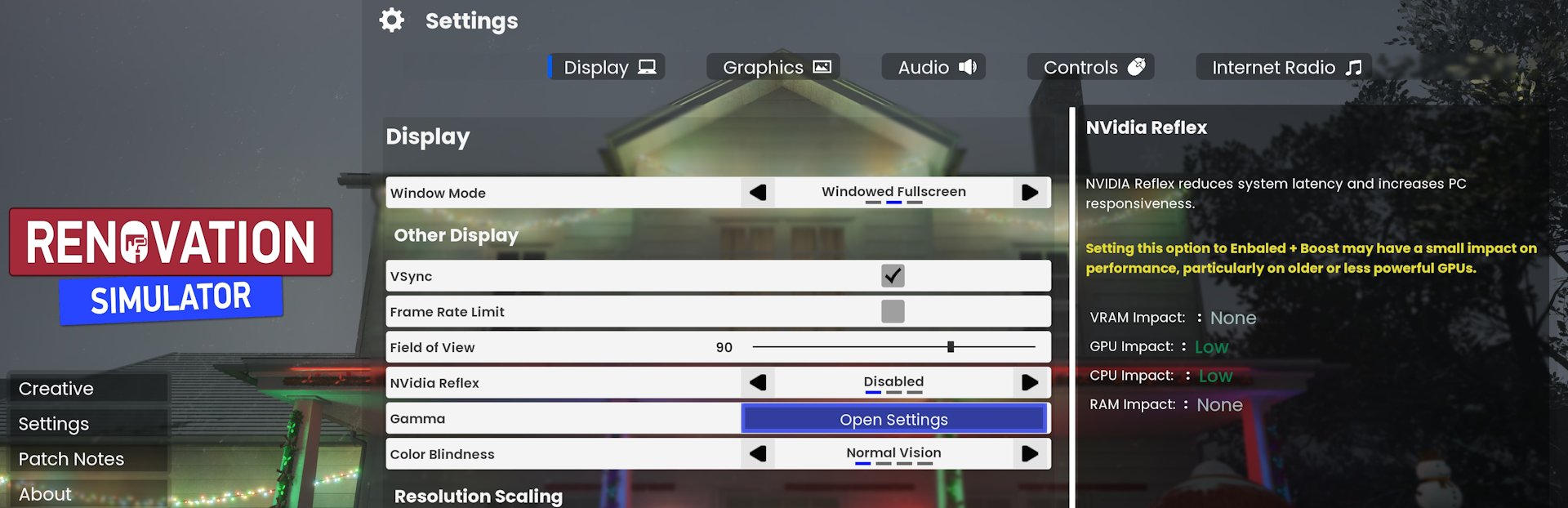
addedGeneral Updates: -Changed default interaction key to 'E' from 'F'. -Changed default flashlight key to 'F' from 'L'. -Added a settings detail panel for graphics and display settings. Most settings will have a description and metrics on how it affects your system. Just click on a setting to get it's details in the panel. -Changed layout of Settings to support the settings details panel on the right for graphics and display pages. -Turn the time to 9PM (2100 hours) for a surprise! Event goes from 9-10PM every night until January 10th . Happy New Year!
changedFixes: -Escape (Pause Menu, default), Tab (Game Menu, default) and Q (Inventory, default) will now open and close their respective menues without haveing to click the 'Continue' or 'Close' buttons. Unless of course you really, really want to.
changedImportant: We highly reccomend people reset their display, graphics and audio settings. They won't reflect the correct settings initially. This will ensure the settings displayed are correct. You can then update them to your liking. This only needs to be done once.
Renovation Simulator changes
changedHello Renovators, we have a big update for both display and graphics settings that will allow you to tweak performance and visual quality to a much greater degree.
addedUpdates for Display settings: -Added NVIDIA DLSS features: NIS, Frame Generation, Dynamic Vibrance, Ray Reconstruction and DLSS Sharpness for supported RTX cards. -Updated AMD FSR. -Added XeSS support for anyone who has an Intel graphics card. -Added NVIDIA Reflex support. -Added gamma settings. -Added color blindness settings. For anyone who may have color blindness, this will allow you to tweak the settings to a fine degree to match your needs. Includes support for: Deuteranope, Protanope, Tritanope and a severity setting. -Added Field Of View setting. -Updated Frame Rate Limit to a slider instead of a switcher and increased the max value to 580.
addedUpdates for Graphics settings: -Moved FSR and DLSS settings to Display settings. -Moved Antialiasing Type to Display settings. -Removed Dynamic Resolution as it's not properly supported on desktop systems yet. -Moved Anti-Aliasing quality to Graphics settings. -Updated Motion Blur. -Added Bloom. -Added Lens Flair. -Added Sharpness. -Added Amibent Occlusion. -Added Global Illumination Quality switcher. -Added Reflection Method switcher. -Added Lumen quality settings. -Added Reflection Quality settings. -Added option for Hardware Ray Tracing. -Added quality options for Hardware Ray Tracing.
addedGeneral Updates: -Changed default interaction key to 'E' from 'F'. -Changed default flashlight key to 'F' from 'L'. -Added a settings detail panel for graphics and display settings. Most settings will have a description and metrics on how it affects your system. Just click on a setting to get it's details in the panel. -Changed layout of Settings to support the settings details panel on the right for graphics and display pages. -Turn the time to 9PM (2100 hours) for a surprise! Event goes from 9-10PM every night until January 10th . Happy New Year!
changedFixes: -Escape (Pause Menu, default), Tab (Game Menu, default) and Q (Inventory, default) will now open and close their respective menues without haveing to click the 'Continue' or 'Close' buttons. Unless of course you really, really want to.
Updates for Display settings
-Added NVIDIA DLSS features: NIS, Frame Generation, Dynamic Vibrance, Ray Reconstruction and DLSS Sharpness for supported RTX cards. -Updated AMD FSR. -Added XeSS support for anyone who has an Intel graphics card. -Added NVIDIA Reflex support. -Added gamma settings. -Added color blindness settings. For anyone who may have color blindness, this will allow you to tweak the settings to a fine degree to match your needs.
Includes support for
Deuteranope, Protanope, Tritanope and a severity setting. -Added Field Of View setting. -Updated Frame Rate Limit to a slider instead of a switcher and increased the max value to 580.
Updates for Graphics settings: -Moved FSR and DLSS settings to Display settings. -Moved Antialiasing Type to Display settings. -Removed Dynamic Resolution as it's not properly supported on desktop systems yet. -Moved Anti-Aliasing quality to Graphics settings. -Updated Motion Blur. -Added Bloom. -Added Lens Flair. -Added Sharpness. -Added Amibent Occlusion. -Added Global Illumination Quality switcher. -Added Reflection Method switcher. -Added Lumen quality settings. -Added Reflection Quality settings. -Added option for Hardware Ray Tracing. -Added quality options for Hardware Ray Tracing.
General Updates: -Changed default interaction key to 'E' from 'F'. -Changed default flashlight key to 'F' from 'L'. -Added a settings detail panel for graphics and display settings. Most settings will have a description and metrics on how it affects your system. Just click on a setting to get it's details in the panel. -Changed layout of Settings to support the settings details panel on the right for graphics and display pages. -Turn the time to 9PM (2100 hours) for a surprise! Event goes from 9-10PM every night until January 10th . Happy New Year!
Fixes: -Escape (Pause Menu, default), Tab (Game Menu, default) and Q (Inventory, default) will now open and close their respective menues without haveing to click the 'Continue' or 'Close' buttons. Unless of course you really, really want to.
------------
Important: We highly reccomend people reset their display, graphics and audio settings. They won't reflect the correct settings initially. This will ensure the settings displayed are correct. You can then update them to your liking. This only needs to be done once.
------------
We are currently working on the much anticipated Career Mode and expect an early version out by late February or early March.
Happy holidays to all and which ever holidays you may celebrate, have a safe and fun holiday season. As always, if you have any questions, comments, thoughts or requests please let us know in the discussion forums on Steam or on our discord; https://discord.gg/M9bt6avmjC
Thank you from Argon Gaming!