
Full notes
Full Rebound Raver update
Read the full published notes in a cleaner layout. The original post stays linked below.
What changed
0 fixes3 additions0 changes0 removals
- Gameplay
- UI and audio
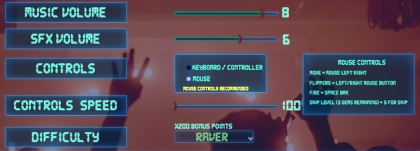
addedSettings added Controls Speed option to modify how fast (Keyboard, Mouse or Gamepad) will move the players Rebounder on the X axis.
addedCan now change Controls and the Controls Speed during play via the Pause Menu.
addedAdded Replay Level button at the Game Over popup prompt. You can immediately restart game at the level you lost.
Rebound Raver changes
addedSettings added Controls Speed option to modify how fast (Keyboard, Mouse or Gamepad) will move the players Rebounder on the X axis.
addedCan now change Controls and the Controls Speed during play via the Pause Menu.
addedAdded Replay Level button at the Game Over popup prompt. You can immediately restart game at the level you lost.
Settings added Controls Speed option to modify how fast (Keyboard, Mouse or Gamepad) will move the players Rebounder on the X axis.
Can now change Controls and the Controls Speed during play via the Pause Menu.
Added Replay Level button at the Game Over popup prompt. You can immediately restart game at the level you lost.
Source
Changelog.gg summarizes and formats this update. How we read updates.