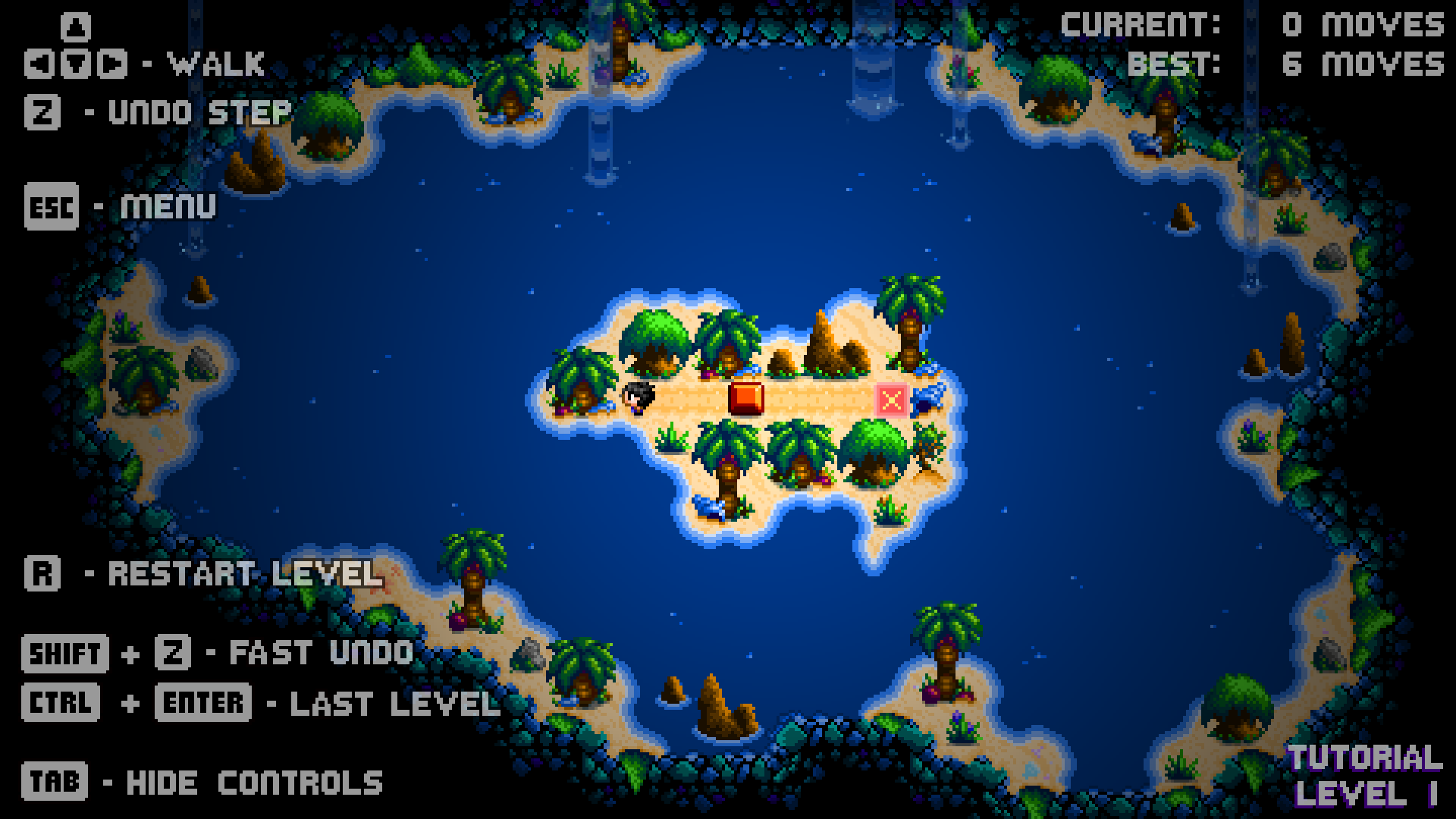
v3.0.8 - UI Layout Update It has been noted that some players were not seeing the "Undo" function and just using "Restart" every time they made a mistake, restarting the entire level, which led to some frustration.
In this update1
Full notes
Full Puzzledorf update
Read the full published notes in a cleaner layout. The original post stays linked below.
What changed
0 fixes0 additions6 changes0 removals
UI and audio
changedv3.0.8 - UI Layout UpdateIt has been noted that some players were not seeing the "Undo" function and just using "Restart" every time they made a mistake, restarting the entire level, which led to some frustration.
changedv3.0.8 - UI Layout UpdateThe in-game UI has now been updated to try and make things clearer, as follows:
changedv3.0.8 - UI Layout UpdateReworded "Undo" to "Undo Step", to show that it is just one step / move that is being undone
changedv3.0.8 - UI Layout UpdateReworded "Restart" to "Restart Level", to show that the entire level will be restarted
changedv3.0.8 - UI Layout UpdateChanged positioning of "Undo Step" and "Restart Level", with "Undo Step" at the top near the movement arrows, in the hope more players will clearly see and use the "Undo Step" feature and not confuse it with "Restart Level".
changedv3.0.8 - UI Layout UpdateHopefully this makes the controls clearer to more players and improves the overall experience.
Puzzledorf changes
changedIt has been noted that some players were not seeing the "Undo" function and just using "Restart" every time they made a mistake, restarting the entire level, which led to some frustration.
changedThe in-game UI has now been updated to try and make things clearer, as follows:
changedReworded "Undo" to "Undo Step", to show that it is just one step / move that is being undone
changedReworded "Restart" to "Restart Level", to show that the entire level will be restarted
changedChanged positioning of "Undo Step" and "Restart Level", with "Undo Step" at the top near the movement arrows, in the hope more players will clearly see and use the "Undo Step" feature and not confuse it with "Restart Level".
v3.0.8 - UI Layout Update
It has been noted that some players were not seeing the "Undo" function and just using "Restart" every time they made a mistake, restarting the entire level, which led to some frustration.
The in-game UI has now been updated to try and make things clearer, as follows:
Reworded "Undo" to "Undo Step", to show that it is just one step / move that is being undone
Reworded "Restart" to "Restart Level", to show that the entire level will be restarted
Changed positioning of "Undo Step" and "Restart Level", with "Undo Step" at the top near the movement arrows, in the hope more players will clearly see and use the "Undo Step" feature and not confuse it with "Restart Level".
Hopefully this makes the controls clearer to more players and improves the overall experience.