
In this update15
Full notes
Full Project Delta update
Read the full published notes in a cleaner layout. The original post stays linked below.
What changed
- Maps
- Gameplay
- Events
- UI and audio
Project Delta changes
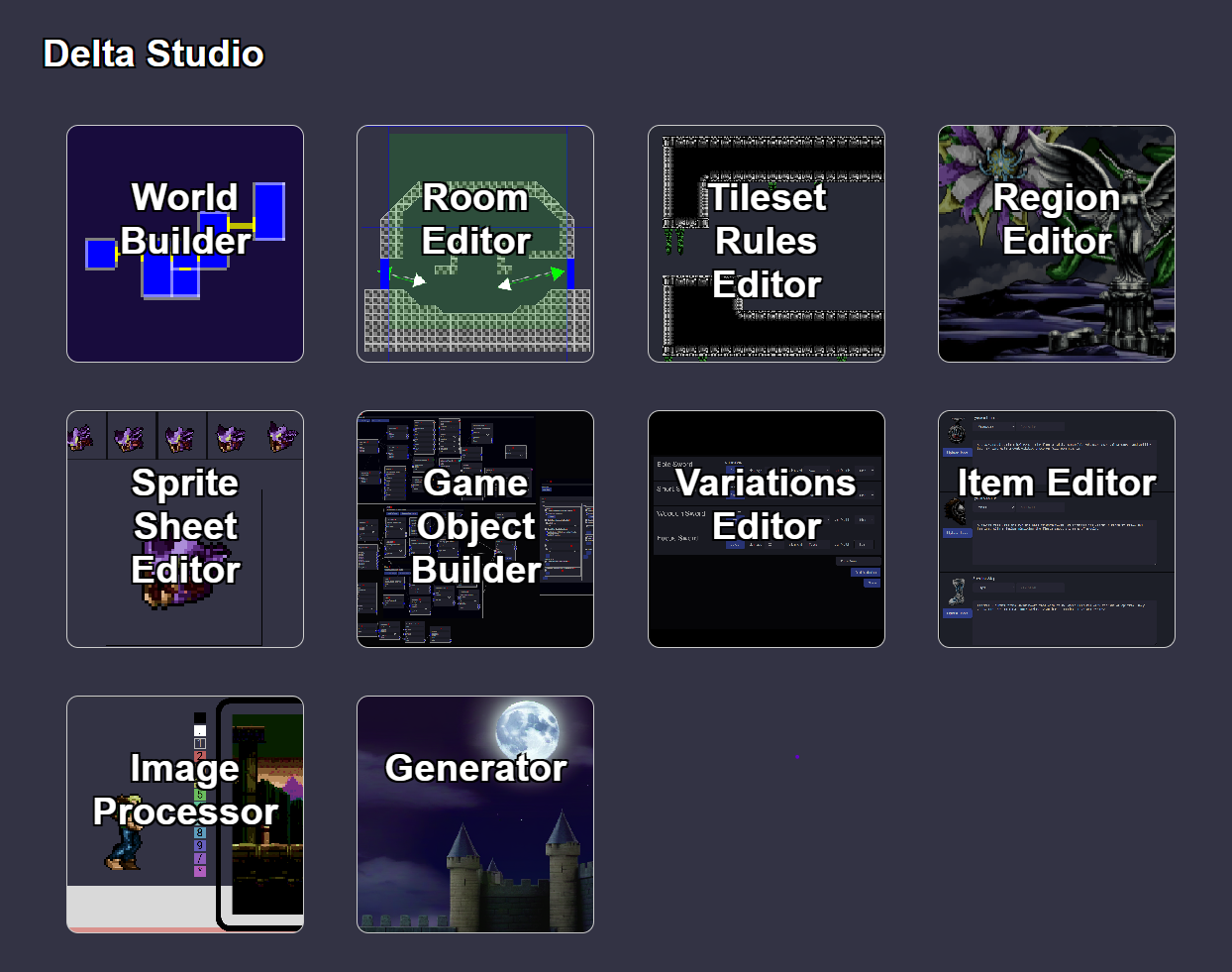
Please note, the Mod Tools Currently in Development, The development of the mod tools began after the Early Access release and are still in early stages. Changes are to be expected to features and editors before made publicly available. Expected in 2024. Please note that the mod tools are not part of the game itself, but a suite of tools that anyone can use to run in browser (on windows) to modify the contents of the game.
World Builder
The heart of the mod tool. Create your own custom metroidvania world intuitively, piece by piece.
Intuitive Map Placement
Drag and drop rooms into place viewing side by side the map and the rooms. Lines connect doors ensuring even when moving rooms around you know the flow of the game.
Doorway Linking Made Easy
Effortlessly connect rooms with doors, ensuring seamless exploration for players.
Populate With Foes and Goods
Add custom enemies and game objects to the world, ensuring your world is as treacherous as it is expansive.
Room Editor
The building blocks of your world. Design the collision layers of rooms and optionally label with routes for use with the base game's generator and route solver.
Tile-Based Collider Placement
A familiar tileset editor for placing colliders. Standard operations like copying, flipping, and rotating are at your disposal.
Node Configuration
Set up room nodes and doors, allowing you to set hidden nodes for creating secret areas.
Route Mapping
Detail the requirements for traversing between nodes, this optional step is useful for randomizers and creating data that can be used for training machine learning models which generate tile configurations from labels alone.
Tileset Rules Editor
Refine every corner of your realm with precision. Customize the rules that govern tileset placement in rooms.
Easy Tileset Upload
Upload your own tilesets, making them readily available for all your room designs. Create a custom tileset rules, or duplicate one that already exists just changing the uploaded sprite.
Collider Pattern Matching
Decide which tile fits each collider pattern, ensuring gameplay and visual consistency across all rooms and saving time by removing the redundancy of basic aesthetic tile placement.
Room Preview
Test your tileset rules on any room, tweaking and refining until every detail aligns with your vision.
Region Editor
Transform every space with layers of depth, breathing life into every corner of your world.
Parallax Customization
Upload images for each layer and define specific properties to capture the depth of a region.
Region Preview
Adjust, refine, and perfect your regions with the ability to load rooms and view how a specific view would look in game, eliminating guesswork from the design process.
Tileset Rules Integration
Apply and blend multiple tileset rules to a region, ensuring visual consistency and enhancing the distinct identity of each area.
Sprite Sheet Editor
Upload sprite sheets and define animations with precision easily allowing the creation of custom enemies and items.
Simple Sprite Upload
Get your artworks game-ready in a snap. Seamlessly upload sprite sheets and initiate the animation process with ease.
Frame Properties
Adjust properties for changing the timing of the animation, as well as set triggers that could be used for events in the game that occur only on specific frames.
Game Object Builder
Unleash your inner game developer with our node-based system and craft intricate game objects with ease.
Node-based System
Create new game objects with our flexible node system or modify existing ones allowing for the creation of custom enemies, items, and more.
Contextual Events and Actions
Connect color coded sockets and drag sockets to create nodes, events, or actions related to that socket. Allowing for maintaining flow during design and only providing useful options.
Create and Customize Enemies
Breathe life into your adversaries. Design unique behaviors, patterns, and actions that are as complex or simple as you want.
Entry, Main, and Exit Phases
State machines include by default 3 phases which can be easily utilized to capture the Anticipation, Execution, and Recovery of an action to prevent creating bloated state machines. Use all 3 per state or just 1 or 2.
Variations Editor
"Variety is the very spice of life." Dive deep into customization, fine-tuning game objects to quickly create unique variations of game objects.
Expose Variables
Expose variables from the Game Object Builder to allow for quick adjustments in creating unique variations, allowing you spend less time tinkering and more time creating.
Create Variations
Modify the exposed variables to create variations of the game object, allowing for the creation of unique enemies, items, and more.
Item Editor
Design items that players will cherish, be it for their utility or the stories they tell.
Craft Unique Items
Set details and upload icons for items. Set stats and apply overrides to game object variations that would be spawned when this item is used.
In Game View
Adding items quickly allows them to be used in game and tested, allowing for quick iteration and refinement.
Generator
"Imagination's blueprint." Harness advanced AI tech to produce inspiring visuals tailored to the game's art style. (Comfy UI, SDXL, and rembg to be acquired and installed separately)
AI-Powered Image Creation
Connect to Comfy UI's API and use custom workflows for Stable Diffusion XL to generate unique art assets for the game. Utilize a LoRA (Low Rank Adaptor) specifically trained on art from Project Delta to generate creatures and objects that fit within the artstyle of the world.
Seamless Tiled Parallax Generation
Generate the base of assets you could use for parallax which are seamlessly tiled, allowing for easy parallax creation.
Image Processor
Refine art assets to seamlessly blend with the game's distinctive style.
Quickly Process to the Game's Palette
Resize larger images to be pixel perfect and compare size to the game's player. Then convert the image to the game's specific palette, ensuring a consistent and harmonious visual experience throughout. Finally refine the lighting and contrast to meet your vision before saving the processed image for animation or direct use in game.
Source
Changelog.gg summarizes and formats this update. How we read updates.