
In this update15
Full notes
Full Pixel Troopers update
Read the full published notes in a cleaner layout. The original post stays linked below.
What changed
- Balance
- Gameplay
- Compatibility
- Performance
- UI and audio
- Maps
Pixel Troopers changes
Hello everyone!
How are you all? Did you think I had forgotten about Pixel Troopers? NOOOO, never.
I took my time—quite a lot of time—but I’m still working on Pixel Troopers, and I’ve been listening to your feedback.
Many comments mention that the game is very difficult, or at least that its difficulty curve is too steep from the start. And although I still have another balance patch planned, I think with this update things should be much better for now.
While reviewing the global stats, I noticed that most players give up on the main mode after 2–3 attempts, which is very few. So now the balance should feel much better, and I believe you’ll be able to get further with fewer retries.
So, let’s move on to what’s new in this update.
General
Enemies
All enemies now have reduced stats—both lower damage and lower health. Some of them, however, are now slightly faster. I plan to add scaling difficulty for the insect enemies in a future update, based on the wave number.
Added short descriptions for each class.
Some weapons now have improved first-person animations (BETA).
Added Massacre Mode! It’s still in development, but you can already try it out.
Memory optimization: RAM usage should now be generally lower and only increase when necessary. Previously, most resources were preloaded at startup, making all loading screens and transitions faster—but as a downside, the game constantly used a lot of RAM, even when it wasn’t needed. Since this change, I’ve noticed minimum peaks of around 400MB of RAM. The only tradeoff is that loading screens will now take a bit longer.
Actions
Some actions were modified because they didn’t feel quite right or comfortable before.
Dodge: No longer triggered by Shift + V. Now it’s performed only while sprinting and then pressing CTRL. (You can remap the CTRL key to whatever you like in the Controls section.)
New Action!: Quick Melee. This one’s inspired by L4D—some players mentioned that when surrounded by insects, shooting doesn’t always feel like a good option, and they instinctively tried to melee even though there wasn’t a button for it. Now you can melee regardless of whether you’re holding a weapon!
Sprint: You no longer need to hold SHIFT to sprint; now just press it once to toggle running.
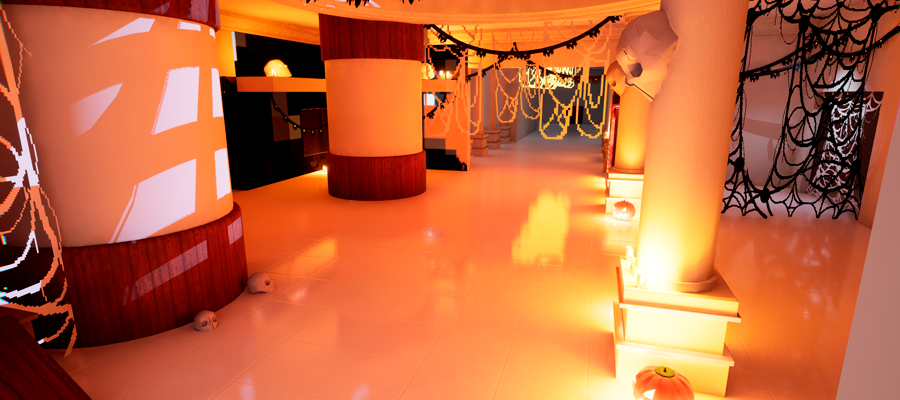
Halloween Theme
Sadly, I wanted to release this update much earlier and with more content, but I couldn’t make it in time. The planned Halloween content ended up being cut down. The only thing currently available are the decorations in the Lunari Center. They’ll remain there at least until Christmas. The cut Halloween content will most likely return next year.
Lunari Center
DeathMatch - CatDay
Steam post imageDid you know this map existed? Yes, it does—just in case you didn’t know—and it’s still in developmentsteamfacepalm.
This update includes small improvements since a common issue was players falling off the map and being unable to return. Now there are ladders and ramps to fix that, adding a bit more verticality instead of just flat movement.
DeathMatch - ARENA
Steam post imageArena—get it? It’s a sand arena, called Arena, because it’s literally an arena. jejejeːsteammockingː
What a bad joke, right? Anyway, this is a new map that’s coming very soon—probably already out by the time you read this. I mention it because while writing this, I realized I hadn’t added it to the game yet XD. So I’ll upload a patch to fix that. It’s nothing major, just a sand arena mainly designed for the Survivor mode, but for now it works fine in Deathmatch too.
DeathMatch - Low Cities
Steam post imageMy flagship map, so to speak. I’ve put a lot of love into this level—it may not look like it, but it’s actually a reference to a very well-known map from a popular Argentine video game. That’s a pretty specific hint.
Well, even though a few engine details slipped into the screenshot, this map has received more visual detail, optimization, and complete textures. Though a few elements are still untextured.
Team DeathMatch - Sir House
Steam post imageMaybe I’m doxxing myself a bit here, but this level now has full textures. Although, honestly, I feel like it hasn’t aged well—maybe I’ll remaster it in the future.
Classic
Steam post imageI noticed that some players looked for this shop when starting the game for the first time, thinking it was an actual store rather than decorative. So, since I also found revisiting the same store boring, I decided to turn it into a real one and added another! Now, shops will rotate as waves progress.
Training
Some people suggested that adding a training level would be useful so players can learn all the controls and features. It’s currently in an EXPERIMENTAL state, and I’m not giving it much priority anymore since all controls are now shown on screen. Also, pressing Escape → Controls already lets you view and customize every action.
UI Elements
A common issue players mentioned is that they had no idea what keys or actions existed, meaning they didn’t know how to access certain features at all.
The solution? Add on-screen buttons. Even though I wasn’t a big fan of this idea (too much information on screen), I eventually gave in and added visible key prompts.
Split Screen
This feature moved from experimental to nearly complete. Most game modes and features now work in split screen. The only issue still pending is resource purchasing in the main game mode. After that, it should work perfectly.
Removal of Unused Assets
Even though the game is now slightly larger in file size, I removed several unused elements and assets. While nothing is guaranteed, this should slightly improve overall performance.
Destruction
In the rebuilt Lunari Center map, I added a destructible crystal. The idea is to set a precedent for adding more destructible objects—like walls, crates, or even secret passages. My plan is to make environments feel more dynamic.
It’s Back
Key Mapping
For those who played Pixel Troopers early on, you might remember this feature existed in the old UI design for Settings. It was a bit awkwardly presented back then, but it worked for remapping keys. Well... it’s back! Why? As mentioned earlier, people recommended bringing it back so players at least know all the available actions. And since I don’t like adding things halfway (even though I still do XD), I decided to go all in—rather than just showing all the keybinds, I made it fully functional again, so you can customize every control as you wish.
Thanks for making it this far!
There’s more content available, but it’s mostly technical stuff—and honestly, I’m getting too lazy to keep writing XD. I hope you enjoy this update! Remember, I read your comments and suggestions; they help a lot to make this project better and more fun! See you next time!!!!
Source
Changelog.gg summarizes and formats this update. How we read updates.