
In this update7
Full notes
Full Pirate Souls update
Read the full published notes in a cleaner layout. The original post stays linked below.
What changed
- Maps
- Compatibility
- Gameplay
- Store
- Performance
- Balance
Pirate Souls changes
This update is about how you hold the game. Pirate Souls has always been a keyboard and mouse MMO. From now on, it is also a controller game, a click to move game, and a game you can drive entirely from the keyboard. Underneath that, we spent a long stretch clearing out the stutter that has been following players around the world map.
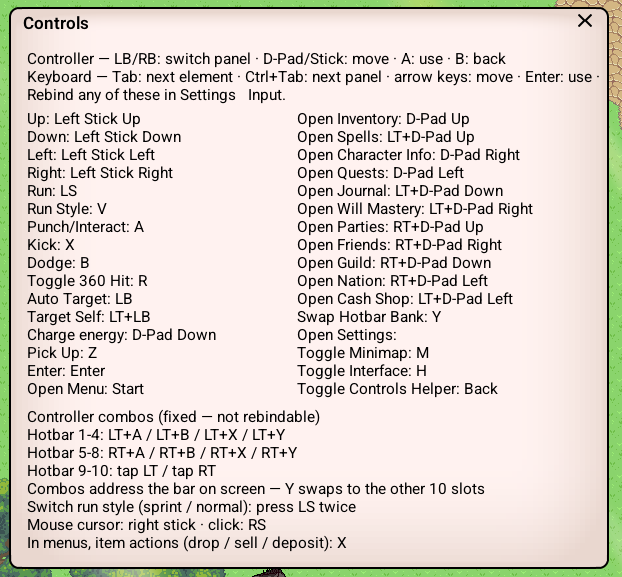
Full controller support
Plug in a gamepad and play. Any pad SDL recognises works, whether it is Xbox, PlayStation, Nintendo or generic, and the game reads which one you connected so the prompts on screen show the right buttons.
Positional layout, so it is correct on every brand.
Left stick moves, clicking it toggles run.
Face buttons attack, kick, dodge and swap hotbar banks.
D-pad opens the windows you reach for most.
Trigger chords put all twenty hotbar slots within reach without cluttering the HUD.
Menus take focus automatically, so shops, banks, trades and dialogs are drivable the moment they open.
Every binding is rebindable in Settings, Input.
Click to Move, and an Auto setting that picks for you
Click to Move joins the input methods: click where you want to go and your character walks there.
If you would rather not choose, the new Auto setting watches what you actually use and switches live. Press a movement key and it is keyboard, click the world and it is click to move, touch the pad and it is controller. Every hint on screen follows, and a line in chat tells you what it switched to.
The game explains itself
Press U for a live list of your current bindings.
Hover a menu icon to see its shortcut. Chat channel icons show the command to talk in them.
Item and spell descriptions show what the buttons do right there, so the same sword reads differently in your bag, on your hotbar and at a shop.
Dialogs, confirmation prompts and login buttons show the keys that work on them.
Walk next to a dropped item and press attack to pick it up.
A large performance pass
Roaming used to hitch at the same moments: crossing a map border, walking into a busy town square, the first time a new creature or a patch of fog appeared. Each turned out to be a different problem.
Maps now stream in over several frames instead of building in one. New creatures wait a few frames and then appear fully loaded rather than freezing the frame they arrive on. Fog, tree shadows and name labels warm up in the background. Loading, warping and respawning do their work behind the fade, so you arrive in a world that is already warm.
On the test tablet the worst frames went from over 100ms to something you would have to hunt for.
Boss fights
Bosses now get a wide health bar across the top of the screen.
Fixes
Usernames and emails are no longer case sensitive at login.
Steam sign in, the build number and the cash shop now work on macOS and Linux.
Website and Discord login now return to the game reliably on macOS.
The Credits and News windows no longer open behind character creation.
Changes
The free recolour items from Jeto have finished their run and are no longer available.
Fair winds, and let us know how the pad feels.
Source
Changelog.gg summarizes and formats this update. How we read updates.