
In this update7
Full notes
Full Omega Crafter update
Read the full published notes in a cleaner layout. The original post stays linked below.
What changed
- Compatibility
- UI and audio
Omega Crafter changes
We’re launching the Omega Crafter API beta on the Omega Crafter beta branch!
Use any programming language to call the API and control in-game elements like Grammi from outside the game, enhancing your Omega Crafter experience.
Note
This feature is currently in beta and is provided as is, with no guarantees of functionality or compatibility.
We strongly recommend that you back up your save data and use this feature at your own risk.
The API can only be called from your local PC and does not support multiplayer.
Because this feature is still under development, the documentation and API responses are currently available only in Japanese.
Detailed instructions for enabling this feature are provided at the end of this announcement.
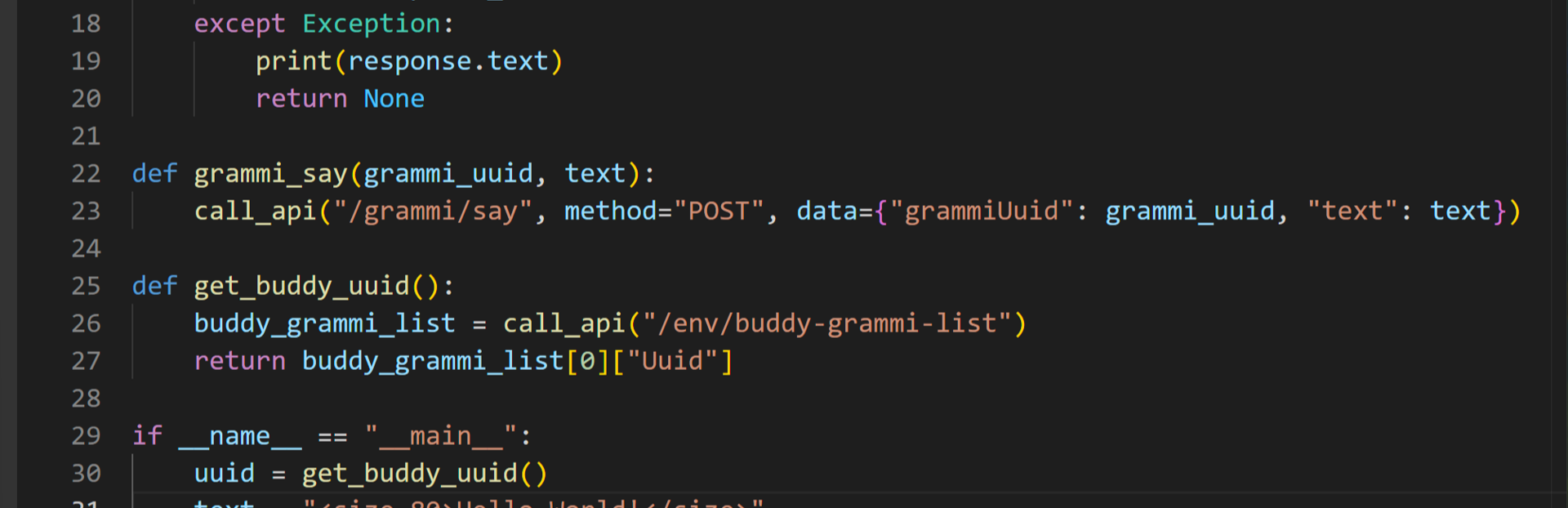
Basic demo: Running a simple script (Python)
Advanced demo: Controlling multiple Grammi units (Python)
With code-driven control, you can build flexible logic using variables and functions, improving both functionality and reusability.
Advanced demo: Using AI agents
This demo accepts player commands such as “Craft 3 stone axes” and completes the task by orchestrating one manager Grammi and two worker Grammi units.
Demo: Using the documentation UI (Swagger UI)
The API specifications are available in the HTML documentation included with the game. Because it uses Swagger UI, you can interactively test the API directly on the page. You can also view the documentation directly on this page.
How to switch to the beta branch
Step 1: Open Settings (gear icon) > Properties.
Step 2: Under Betas > Beta Participation, select the api-experimental branch.
After closing the Properties window, update the game client.
How to view the API specifications
From Settings (gear icon) > Manage > Browse local files, open the folder that appears, then open the file named swagger-ui-standalone.html.
Source
Changelog.gg summarizes and formats this update. How we read updates.