
HomeGamesUpdatesPricingMethodology
Steam News2 May 20242y ago

Test Branch Update (1.1.6)

Changelog If you notice any bug or issue, please report it from the game or reply to this post.

In this update2

Full notes

Full No Plan B update

Read the full published notes in a cleaner layout. The original post stays linked below.

What changed

3 fixes0 additions2 changes0 removals
  • Performance
  • Fixes
  • UI and audio
  • Compatibility
changedImprovementsOptimized memory usage in the main menu
fixedFixesFixed the perks used in a previously failed campaign mission appearing in the new one
fixedFixesFixed some skirmish missions being playable before unlocking them
fixedFixesFixed the cancel button still present in the squad selection menu after deleting the currently selected squad
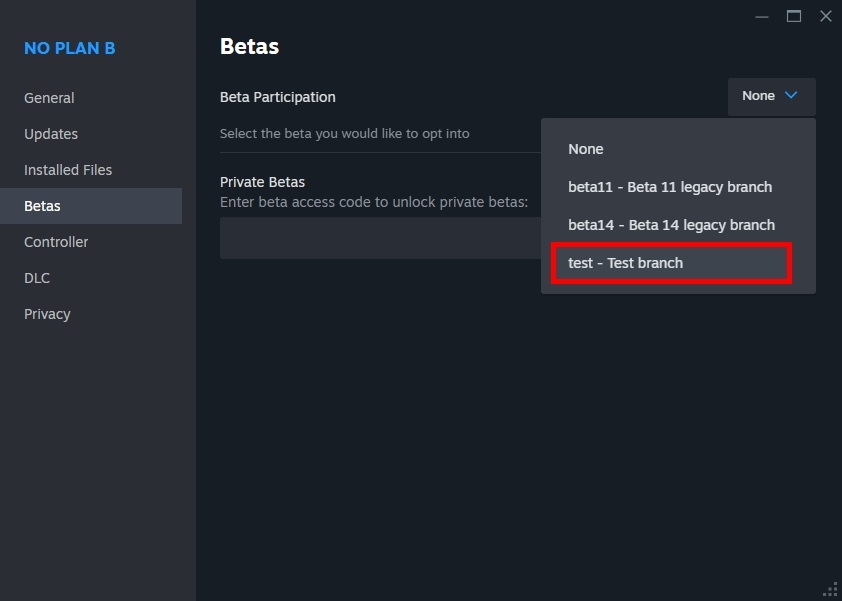
changedReminder: switching to the test branchIn the Steam client, right-click on the game from your library and select "Properties". Select the "BETAS" tab. Select the "test" branch listed in the dropdown menu under "Select the beta you would like to opt into".

No Plan B changes

changedOptimized memory usage in the main menu
fixedFixed the perks used in a previously failed campaign mission appearing in the new one
fixedFixed some skirmish missions being playable before unlocking them
fixedFixed the cancel button still present in the squad selection menu after deleting the currently selected squad
changedIn the Steam client, right-click on the game from your library and select "Properties". Select the "BETAS" tab. Select the "test" branch listed in the dropdown menu under "Select the beta you would like to opt into".

Changelog

If you notice any bug or issue, please report it from the game or reply to this post.

Improvements

  • Optimized memory usage in the main menu

  • Integrated the latest community translations

Fixes

  • Fixed the perks used in a previously failed campaign mission appearing in the new one

  • Fixed some skirmish missions being playable before unlocking them

  • Fixed the cancel button still present in the squad selection menu after deleting the currently selected squad

Reminder: switching to the test branch

In the Steam client, right-click on the game from your library and select "Properties". Select the "BETAS" tab. Select the "test" branch listed in the dropdown menu under "Select the beta you would like to opt into".

The game then should automatically update to the test version.

To switch back to the public branch, just select "None" in the betas dropdown.

Source

Steam News / 2 May 2024

Open original post

Changelog.gg summarizes and formats this update. How we read updates.