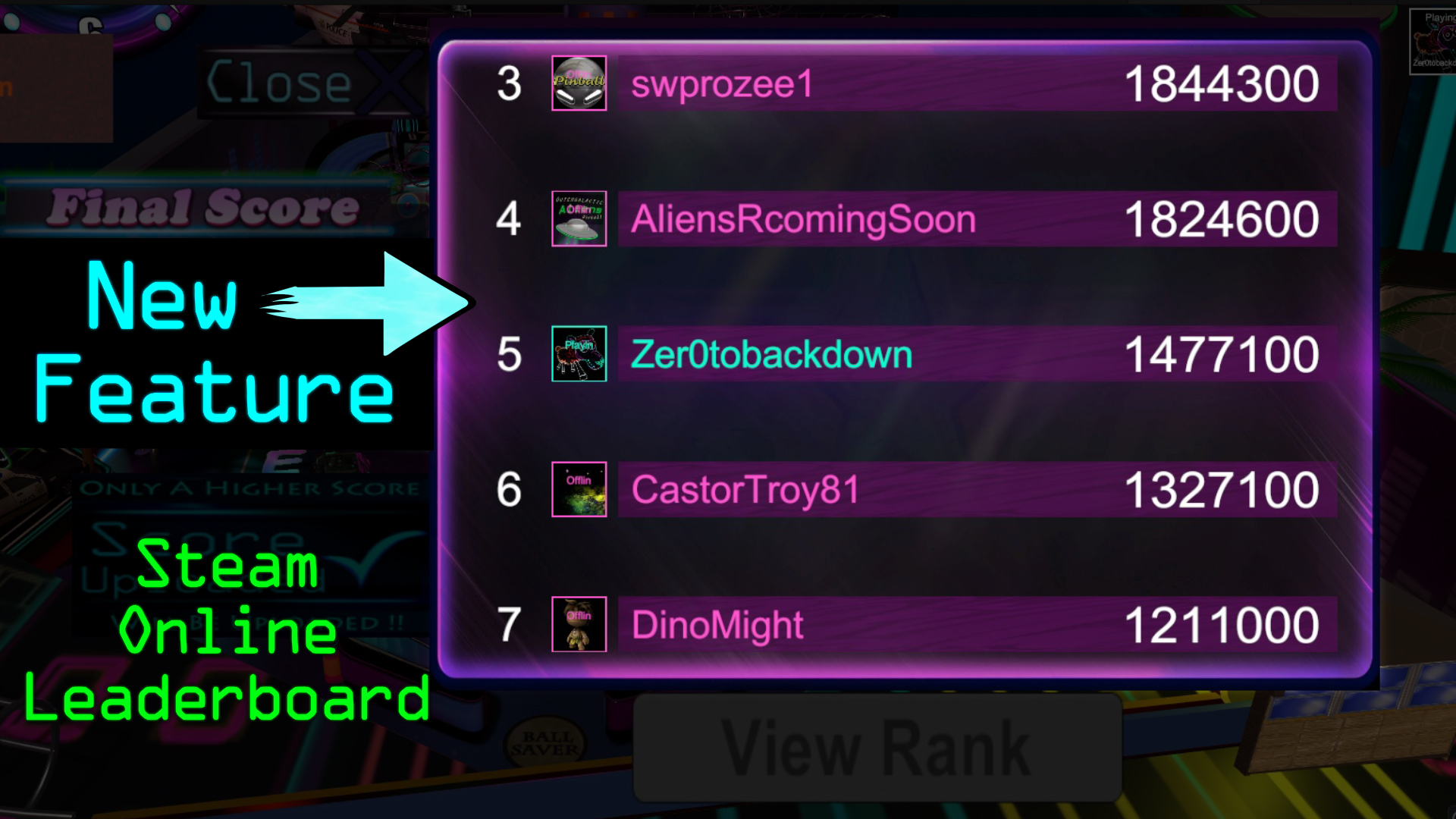
Neon Nights Pinball Steam Online Leaderboards Now Active
Posting a new high score is simple! Once you have completed a game just press the UPLOAD SCORE button and then you can view your ranking with the "VIEW RANK" button. Ready to get back to a new game?
Full notes
Full Neon Nights Pinball update
Read the full published notes in a cleaner layout. The original post stays linked below.
What changed
0 fixes1 addition2 changes0 removals
UI and audio
Server
Performance
addedPosting a new high score is simple! Once you have completed a game just press the UPLOAD SCORE button and then you can view your ranking with the "VIEW RANK" button. Ready to get back to a new game? Just hit the "CLOSE BUTTON X". Simple. Easy.
changedAlso included with this update is the display of the user's steam online avatar that will appear in the top right corner of the game. This little handy overlay will display if you are currently connected to the steam network. You can't post that high score if your not connected, right?
changedFor the online leaderboard system we originally wanted a "Top scorers" button, a "refresh" button, a "friends" button, and a scrolling option. We spent a week trying to get these extra features to work, unfortunately the extra options were causing the game to be unstable and crash. Frequently. Eventually we made the decision to implement the system that is currently in the game, which allows the user to upload their score after each game and view their current rank on the leaderboard ONCE per gaming session. This means that in order to refresh/re-view the leaderboard the user must quit back to the main menu and re-launch back into the game. We admit it's certainly not ideal, it's certainly not a typical system, but it works. The game is stable, and to us that was more important than the extra features. We understand it can be a little annoying having to quit back to the main title screen and play through another game to see an update of your rank, but it was the only way for us to get this system in place by launch.
Neon Nights Pinball changes
addedPosting a new high score is simple! Once you have completed a game just press the UPLOAD SCORE button and then you can view your ranking with the "VIEW RANK" button. Ready to get back to a new game? Just hit the "CLOSE BUTTON X". Simple. Easy.
changedAlso included with this update is the display of the user's steam online avatar that will appear in the top right corner of the game. This little handy overlay will display if you are currently connected to the steam network. You can't post that high score if your not connected, right?
changedFor the online leaderboard system we originally wanted a "Top scorers" button, a "refresh" button, a "friends" button, and a scrolling option. We spent a week trying to get these extra features to work, unfortunately the extra options were causing the game to be unstable and crash. Frequently. Eventually we made the decision to implement the system that is currently in the game, which allows the user to upload their score after each game and view their current rank on the leaderboard ONCE per gaming session. This means that in order to refresh/re-view the leaderboard the user must quit back to the main menu and re-launch back into the game. We admit it's certainly not ideal, it's certainly not a typical system, but it works. The game is stable, and to us that was more important than the extra features. We understand it can be a little annoying having to quit back to the main title screen and play through another game to see an update of your rank, but it was the only way for us to get this system in place by launch.
Posting a new high score is simple! Once you have completed a game just press the UPLOAD SCORE button and then you can view your ranking with the "VIEW RANK" button. Ready to get back to a new game? Just hit the "CLOSE BUTTON X". Simple. Easy.
Also included with this update is the display of the user's steam online avatar that will appear in the top right corner of the game. This little handy overlay will display if you are currently connected to the steam network. You can't post that high score if your not connected, right?
Please note: As a small development team we did run into some issues with implementing the online leaderboard system. The original first uploaded build of this game only had a local leaderboard system. Once your game was over you would input your name and save your score to a save file. It was a decent, but absolutely boring, working system. However, we strongly wanted players to be able to compete online. Pinball is such a score driven game that we wanted there to be more than just a local save file with this title, and our upcoming tables as well. We made the decision to implement the online leaderboard system and scrap the local board.
For the online leaderboard system we originally wanted a "Top scorers" button, a "refresh" button, a "friends" button, and a scrolling option. We spent a week trying to get these extra features to work, unfortunately the extra options were causing the game to be unstable and crash. Frequently. Eventually we made the decision to implement the system that is currently in the game, which allows the user to upload their score after each game and view their current rank on the leaderboard ONCE per gaming session. This means that in order to refresh/re-view the leaderboard the user must quit back to the main menu and re-launch back into the game. We admit it's certainly not ideal, it's certainly not a typical system, but it works. The game is stable, and to us that was more important than the extra features. We understand it can be a little annoying having to quit back to the main title screen and play through another game to see an update of your rank, but it was the only way for us to get this system in place by launch.
We look forward to seeing your high score on the ONLINE leaderboard!