
HomeGamesUpdatesPricingMethodology
Steam News19 November 20257mo ago

Patch Notes for Nov 19th, 2025

Hello everyone! Another update for everyone, adding some things the community has been asking for.

Full notes

Full My Little Spider update

Read the full published notes in a cleaner layout. The original post stays linked below.

Repeated intro

Hello everyone!

What changed

1 fix4 additions1 change0 removals
  • Gameplay
  • UI and audio
  • Performance
  • Compatibility
addedAnother update for everyone, adding some things the community has been asking for.
addedMinimal UI: Added the option that appears in the settings that disables some of the visual effects, such as visually collecting the bugs, and drawing the progress bars when the spider is wrapping bugs. This is intended to make the game less distracting for people who want to focus on the game a little less.
addedScreensaver Mode: This disables all gameplay elements. Bugs will still get caught in the web, and the spider will still chill and do his own thing, but they do not get added to the bug box nor do they provide currency or contribute to achievements etc. This is mainly for people who have completed the game, and still want to have the spider to keep them company.
added5 New Steam Achievements: These focus on having a certain amount and type of bugs in the bug box at once and are intended to be actively chased rather than obtaining automatically when progressing in the game.
fixedThis can be fixed by the user using by disabling Fullscreen Optimizations in Windows for the game.
changedRight click game name on Steam > Properties > Installed Files > Browse > Right click MyLittleSpider.exe > Properties > Compatibility > Disable fullscreen optimizations > Apply > Launch game.

My Little Spider changes

addedAnother update for everyone, adding some things the community has been asking for.
addedMinimal UI: Added the option that appears in the settings that disables some of the visual effects, such as visually collecting the bugs, and drawing the progress bars when the spider is wrapping bugs. This is intended to make the game less distracting for people who want to focus on the game a little less.
addedScreensaver Mode: This disables all gameplay elements. Bugs will still get caught in the web, and the spider will still chill and do his own thing, but they do not get added to the bug box nor do they provide currency or contribute to achievements etc. This is mainly for people who have completed the game, and still want to have the spider to keep them company.
added5 New Steam Achievements: These focus on having a certain amount and type of bugs in the bug box at once and are intended to be actively chased rather than obtaining automatically when progressing in the game.
fixedThis can be fixed by the user using by disabling Fullscreen Optimizations in Windows for the game.

Another update for everyone, adding some things the community has been asking for.

  • Minimal UIAdded the option that appears in the settings that disables some of the visual effects, such as visually collecting the bugs, and drawing the progress bars when the spider is wrapping bugs. This is intended to make the game less distracting for people who want to focus on the game a little less.
  • Screensaver ModeThis disables all gameplay elements. Bugs will still get caught in the web, and the spider will still chill and do his own thing, but they do not get added to the bug box nor do they provide currency or contribute to achievements etc. This is mainly for people who have completed the game, and still want to have the spider to keep them company.
  • Expanded Settings tab: Separated the settings page to different tabs to accommodate the above.

  • 5 New Steam Achievements: These focus on having a certain amount and type of bugs in the bug box at once and are intended to be actively chased rather than obtaining automatically when progressing in the game.

  • Support for 8 spider legs: Dependent on the spider chosen. Currently active for the spider in the gif below. (8 legged spiders are completely optional for people who find them creepy. It definitely removes some of the cuteness.)

Is your background green?

Some users are experiencing a green background in the game, where there is an error in the transparency layer.

This can be fixed by the user using by disabling Fullscreen Optimizations in Windows for the game.

Right click game name on Steam > Properties > Installed Files > Browse > Right click MyLittleSpider.exe > Properties > Compatibility > Disable fullscreen optimizations > Apply > Launch game.

We are looking into a way to have this option done automatically by the game.

-edit-

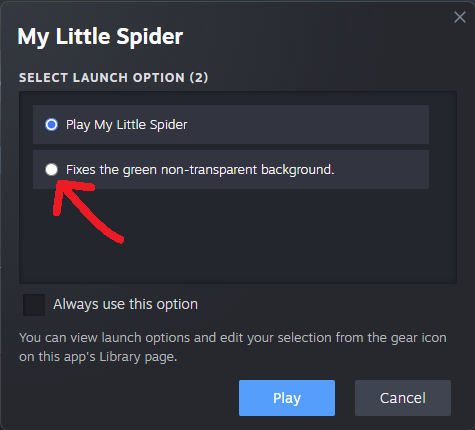
We made an easier way to fix this easier.

Simply select the alternate launch option when launching the game on the Steam Client, like in the screen shot below.

Source

Steam News / 19 November 2025

Open original post

Changelog.gg summarizes and formats this update. How we read updates.