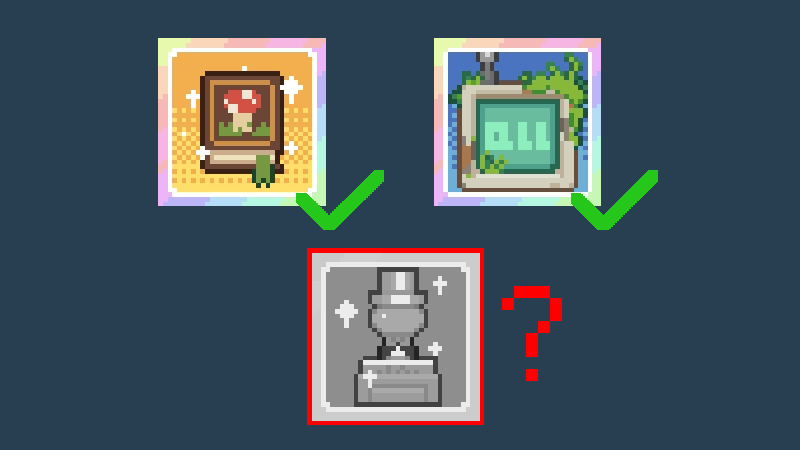
Solution for Unable to Unlock the Last Achievement
If you are sure that you have met the conditions (unlocked all mushrooms, purchased each type of ornament at least once), but still cannot unlock the last achievement, please open the in-game shop page (the page where y
Full notes
Full Mushroom Nook update
Read the full published notes in a cleaner layout. The original post stays linked below.
What changed
1 fix0 additions1 change0 removals
Store
changedIf you are sure that you have met the conditions (unlocked all mushrooms, purchased each type of ornament at least once), but still cannot unlock the last achievement, please open the in-game shop page (the page where you buy mushrooms and ornaments) and wait for a while. The achievement should then unlock!
fixedThis issue occurs because we placed the achievement completion check inside the shop page, so without opening the shop, the game cannot determine if the achievement has been met. This problem has been fixed and will be patched in the next update. For now, please use the method above (if it still doesn't work, please wait for next week's update)!
Mushroom Nook changes
changedIf you are sure that you have met the conditions (unlocked all mushrooms, purchased each type of ornament at least once), but still cannot unlock the last achievement, please open the in-game shop page (the page where you buy mushrooms and ornaments) and wait for a while. The achievement should then unlock!
fixedThis issue occurs because we placed the achievement completion check inside the shop page, so without opening the shop, the game cannot determine if the achievement has been met. This problem has been fixed and will be patched in the next update. For now, please use the method above (if it still doesn't work, please wait for next week's update)!
If you are sure that you have met the conditions (unlocked all mushrooms, purchased each type of ornament at least once), but still cannot unlock the last achievement, please open the in-game shop page (the page where you buy mushrooms and ornaments) and wait for a while. The achievement should then unlock!
This issue occurs because we placed the achievement completion check inside the shop page, so without opening the shop, the game cannot determine if the achievement has been met. This problem has been fixed and will be patched in the next update. For now, please use the method above (if it still doesn't work, please wait for next week's update)!
We are very sorry for the inconvenience caused to players! Thank you for reporting this issue to us! Wishing everyone lots of joy!