
In this update5
Full notes
Full Musgro Farm update
Read the full published notes in a cleaner layout. The original post stays linked below.
What changed
- Gameplay
- UI and audio
- Fixes
Musgro Farm changes
A new testing version is available which features a few QOL changes around recipe visibility/organization and pipetting buildings and fields. These changes are heavily influenced by feedback - thank you to everyone in the community, whether that's sending feedback in game or those of you chatting on Discord!
If you want access to the latest testing, just hit the green Request Access button on the Store Page.
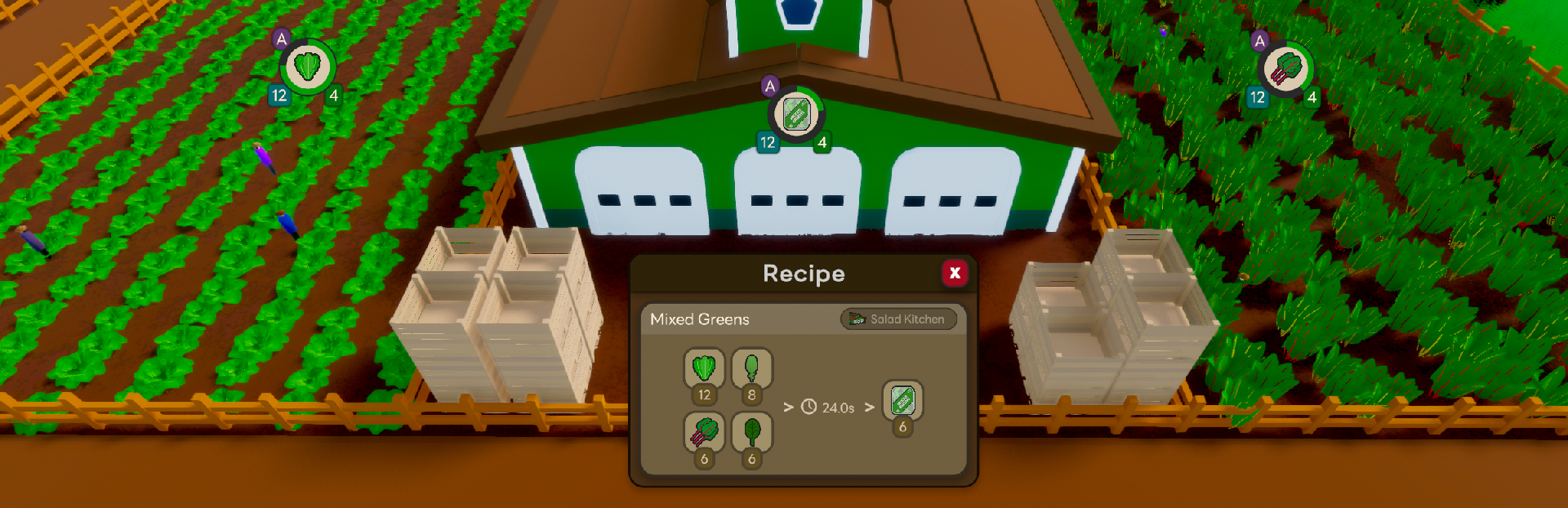
Recipe Popout
There's now a "pop out" button on recipes in the Almanac. This will show the recipe in a floating window so you can keep track of what you need to build.
Better Pipetting
Added a bunch of functionality to the Pipette function (Q). Pressing Q over a field or building will put you in build mode for that field or building, and will now also copy the orientation and any selected recipe.
In addition, this functionality now also works on UI elements, such that pressing Q over a crop icon will put you in "build mode" for that field, and pressing Q over a recipe product icon qwill put you in "build mode" for the corresponding building with the recipe pre-selected.
This doubles up with the Recipe Popout, such that you can open a recipe in the Almanac, pop it out, then "Q" each of the ingredients to quickly build each field or building.
Level Indicators
There's now a new indicator mode for the plot balloons which displays Rank, Level, and Worker counts instead of storage. Press Alt to switch between modes. This new mode is aimed to make it easier to see an overview of your layouts and which plots may be behind on upgrades, etc.
Truck Updates
After investigating a couple bug reports, I found a few underlying issues with the way trucks were being dispatched. This version contains some pretty hefty updates to truck logic, so please report any new or remaining issues you see with either frozen or misbehaving trucks.
Full Changes
Added Levels/Rank/Workers balloon to Alt modes
Added "Time to level" estimates when mousing over XP bars
Large rework to truck reservation logic, fixing some issues when moving plots and reducing contention between trucks
Make waste trucks respond to paused Compost Area
Maintain plot rotation when pipetting
Copy recipe when pipetting a building (Not sure if this is more annoying or helpful - let me know what you think!)
Added pipetting of UI elements such as crops -> fields or recipes -> building
Added button border blink to Contracts button when new contracts are available
Maintain Plot Window tabs when you manually select one and then select a different plot
Fixed tech tree spacing/edges cutting off some elements
Fixed some issues with collection rule edits
Prevented alt balloon logic from firing when alt tabbing, and some other alt tab behaviors
Fixed a few issues with Save menu such as preventing changing names in list when typing
Source
Changelog.gg summarizes and formats this update. How we read updates.