
HomeGamesUpdatesPricingMethodology
Steam News4 June 20188y ago

Sharper font, trading cards, and new room type

MidBoss celebrates its one year anniversary with a new update, introducing Steam trading cards, a sharp pixel art font, and a new room type.

Full notes

Full MidBoss update

Read the full published notes in a cleaner layout. The original post stays linked below.

What changed

2 fixes5 additions0 changes1 removal
  • Gameplay
  • UI and audio
  • Performance
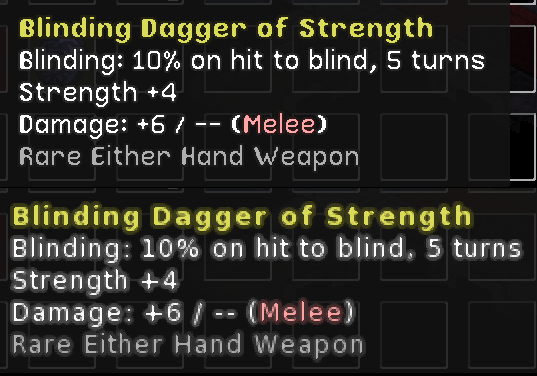
addedMidBoss celebrates its one year anniversary with a new update, introducing Steam trading cards, a sharp pixel art font, and a new room type. Trading cards of course come with a full compliment of cards, badges, emotes, and backgrounds. A new custom pixel art font was created for this update to address complaints of the font being too blurry. Check out the image below to compare the two fonts when seen at 1080p, with the new font at the top and the old at the bottom.
addedIf you preferred the old font you can switch back to it through the options menu. Finally there's a new room type! I won't spoil how it works for you though, you'll just have to go and find out for yourselves.
fixedChanges in v1.3.0:Fixed typo in Staff Mastery tooltip. Fixed an occasional BGM related crashing bug in MidBoss Classic.
addedChanges in v1.3.0:Added a new room type that contains an unbreakable adamantine chest with a glowing red lock.
removedChanges in v1.3.0:MidBoss Pro experience level no longer disables the tutorial as some players were picking it the first time they played the game.
fixedChanges in v1.3.0:Fixed a font rendering bug that could cause weird pointy stroke on death card text on Windows systems. Vsync will no longer be forced off for users who's AMD cards falsely claim to support adaptive vsync. If a crash related to adaptive vsync is detected a file "amd_disable_vsync.txt" is created, if this file is detected on load adaptive vsync is disabled and regular vsync can be used instead.

MidBoss changes

addedMidBoss celebrates its one year anniversary with a new update, introducing Steam trading cards, a sharp pixel art font, and a new room type. Trading cards of course come with a full compliment of cards, badges, emotes, and backgrounds. A new custom pixel art font was created for this update to address complaints of the font being too blurry. Check out the image below to compare the two fonts when seen at 1080p, with the new font at the top and the old at the bottom.
addedIf you preferred the old font you can switch back to it through the options menu. Finally there's a new room type! I won't spoil how it works for you though, you'll just have to go and find out for yourselves.
fixedFixed typo in Staff Mastery tooltip. Fixed an occasional BGM related crashing bug in MidBoss Classic.
addedAdded a new room type that contains an unbreakable adamantine chest with a glowing red lock.
removedMidBoss Pro experience level no longer disables the tutorial as some players were picking it the first time they played the game.

MidBoss celebrates its one year anniversary with a new update, introducing Steam trading cards, a sharp pixel art font, and a new room type. Trading cards of course come with a full compliment of cards, badges, emotes, and backgrounds. A new custom pixel art font was created for this update to address complaints of the font being too blurry. Check out the image below to compare the two fonts when seen at 1080p, with the new font at the top and the old at the bottom.

If you preferred the old font you can switch back to it through the options menu. Finally there's a new room type! I won't spoil how it works for you though, you'll just have to go and find out for yourselves.

Changes in v1.3.0:

(savegame compatible with previous version) [2018-06-03]

  • Bug Fixes

    • Fixed typo in Staff Mastery tooltip.

    • Fixed an occasional BGM related crashing bug in MidBoss Classic.

  • Environment

    • Added a new room type that contains an unbreakable adamantine chest with a glowing red lock.

  • General

    • MidBoss Pro experience level no longer disables the tutorial as some players were picking it the first time they played the game.

  • Graphics

    • Fixed a font rendering bug that could cause weird pointy stroke on death card text on Windows systems.

    • Vsync will no longer be forced off for users who's AMD cards falsely claim to support adaptive vsync. If a crash related to adaptive vsync is detected a file "amd_disable_vsync.txt" is created, if this file is detected on load adaptive vsync is disabled and regular vsync can be used instead.

  • GUI

    • Added a new pixel art font which makes text in the game much crisper and (hopefully) easier to read. This will be turned on by default and the old font can be restored by checking "Use old font" in the Graphics section of the options menu.

    • Because the new pixel font does not have italics, new icons have been added to the forms window to indicate whether an ability is active, passive, or innate.

  • Steam

    • Steam trading cards have been added!

Source

Steam News / 4 June 2018

Open original post

Changelog.gg summarizes and formats this update. How we read updates.