
In this update7
Full notes
Full Messy Up update
Read the full published notes in a cleaner layout. The original post stays linked below.
What changed
0 fixes0 additions1 change0 removals
- Gameplay
changed1.3 The host clicks [Invite Friends] or [Invite Visitors] to generate a link to invite to join "Messy up" for the game.PVE supports up to 3-player local online play and PVP supports up to 4-player online play.
Messy Up changes
changedPVE supports up to 3-player local online play and PVP supports up to 4-player online play.
1.1 Starting the game, MESSY UP!
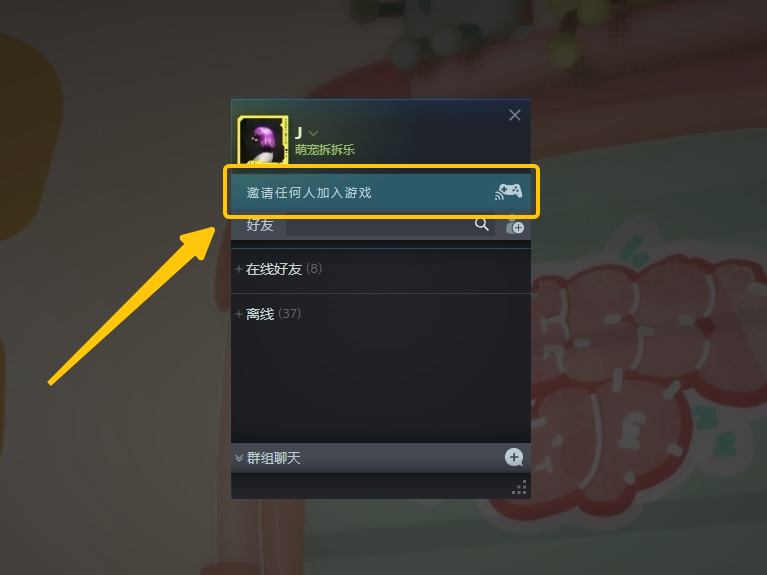
1.2 With the host running the game, open the Friends screen and click [Invite anyone to join the game] to open Steam Remote Play.
1.3 The host clicks [Invite Friends] or [Invite Visitors] to generate a link to invite to join "Messy up" for the game.
PVE supports up to 3-player local online play and PVP supports up to 4-player online play.
1.4 Click on the icon [Keyboard] [Mouse] to unlock the player's corresponding operating privileges.
2. Parsec - How to play online [Episodic Mode & Local Split Screen Battle]?
3. ToDesk- How to play online online to [Episodic Mode & Local Split Screen Match]?
4. VPN - How to speed up the game so that it runs smoothly online?
4.1 Use your favorite VPN and search for "messy up" in the search bar.
4.2 Enter the VPN page and click "Start VPN" or similar buttons to accelerate.
4.3 Starting the game, MESSY UP!
Source
Changelog.gg summarizes and formats this update. How we read updates.