
HomeGamesUpdatesPricingMethodology
Steam News13 September 20214y ago

v0.41 - Localization Fun

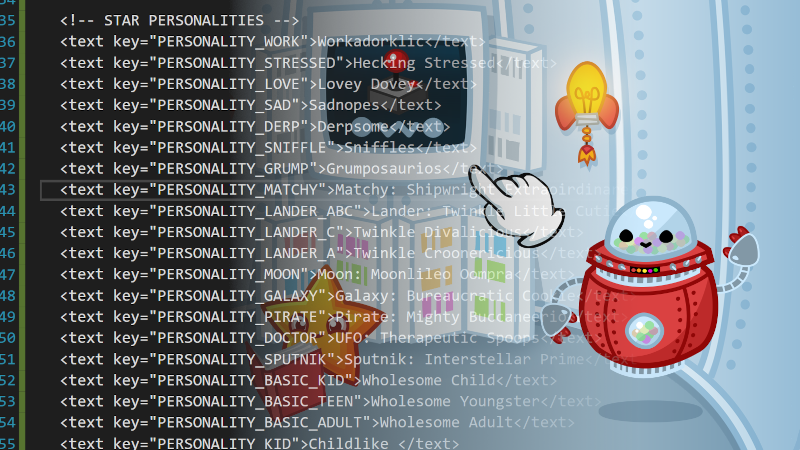
Now you can modify localization.txt in the game's directory, by accessing the game's installed files via the steam client to be any language you want!

Full notes

Full MatchyGotchy Z update

Read the full published notes in a cleaner layout. The original post stays linked below.

What changed

0 fixes1 addition2 changes0 removals
  • UI and audio
changedNow you can modify localization.txt in the game's directory, by accessing the game's installed files via the steam client to be any language you want!
addedAlso we added some special codes {br} is for a line break. {green} starts green text, {black} starts black text and {end} ends the text color. Do not translate these codes, just leave them in your translation, you will see that in the game there is a line break wherever {br} is in the localization. Use this strategically!
changedIf you have a localization for the game in your favorite language, just find me on social and send me the files and I may even make your version the official localization for that language!

MatchyGotchy Z changes

changedNow you can modify localization.txt in the game's directory, by accessing the game's installed files via the steam client to be any language you want!
addedAlso we added some special codes {br} is for a line break. {green} starts green text, {black} starts black text and {end} ends the text color. Do not translate these codes, just leave them in your translation, you will see that in the game there is a line break wherever {br} is in the localization. Use this strategically!
changedIf you have a localization for the game in your favorite language, just find me on social and send me the files and I may even make your version the official localization for that language!

Now you can modify localization.txt in the game's directory, by accessing the game's installed files via the steam client to be any language you want!

The file must be valid XML and you should not modify the key values for the text fields, just the information inside the text brackets. You cannot use < or > inside the text fields because this will ruin the XML so if you want to use them you must use < or >

Also we added some special codes {br} is for a line break. {green} starts green text, {black} starts black text and {end} ends the text color. Do not translate these codes, just leave them in your translation, you will see that in the game there is a line break wherever {br} is in the localization. Use this strategically!

If you have a localization for the game in your favorite language, just find me on social and send me the files and I may even make your version the official localization for that language!

Source

Steam News / 13 September 2021

Open original post

Changelog.gg summarizes and formats this update. How we read updates.