
HomeGamesUpdatesPricingMethodology
Steam News9 May 20251y ago

Auto-Play Returns

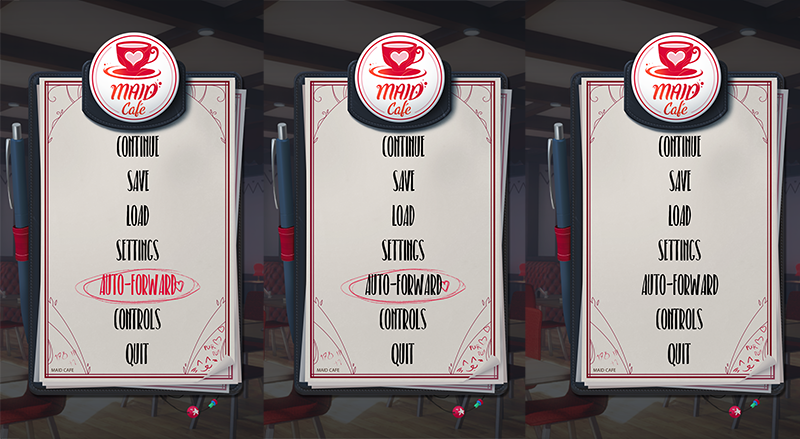
Today we have posted a new update for Maid Cafe, that brings back the Auto-play option to the game, which is now accessible in two ways. Via the Escape Menu, a new option is available: Auto-Forward.

Full notes

Full Maid Cafe update

Read the full published notes in a cleaner layout. The original post stays linked below.

What changed

0 fixes3 additions1 change0 removals
  • Gameplay
addedToday we have posted a new update for Maid Cafe, that brings back the Auto-play option to the game, which is now accessible in two ways.
addedVia the Escape Menu, a new option is available: Auto-Forward.
addedVia the new shortcut Shift + K + N on the keyboard, which will also toggle it on or off as needed.
changedThe settings for the text appearance and how fast it moves to the next dialogue screen can be adjusted via the following options in the games settings.

Maid Cafe changes

addedToday we have posted a new update for Maid Cafe, that brings back the Auto-play option to the game, which is now accessible in two ways.
addedVia the Escape Menu, a new option is available: Auto-Forward.
addedVia the new shortcut Shift + K + N on the keyboard, which will also toggle it on or off as needed.
changedThe settings for the text appearance and how fast it moves to the next dialogue screen can be adjusted via the following options in the games settings.

Today we have posted a new update for Maid Cafe, that brings back the Auto-play option to the game, which is now accessible in two ways.

  1. Via the Escape Menu, a new option is available: Auto-Forward.

This allows you to toggle the auto-forward mode on and off via the main menu, with it showing with a circle around it when toggled on.

  1. Via the new shortcut Shift + K + N on the keyboard, which will also toggle it on or off as needed.

This shortcut now appears in the keyboard controls help screen as well.

The settings for the text appearance and how fast it moves to the next dialogue screen can be adjusted via the following options in the games settings.

N.b. Manually moving text forward via a key, gamepad or mouse whilst auto-forward is activated will usually deactivate it.

Source

Steam News / 9 May 2025

Open original post

Changelog.gg summarizes and formats this update. How we read updates.