
HomeGamesUpdatesPricingMethodology
Steam News11 July 20223y ago

LOVE 3 on your Steam Deck!

Hello, and thank you for playing LOVE 3! As I have made a native Linux port of the game for an older version of Linux, it is not properly supported by the Steam Deck, but thankfully with Windows version runs perfectly!

Full notes

Full LOVE 3 update

Read the full published notes in a cleaner layout. The original post stays linked below.

Repeated intro

Hello, and thank you for playing LOVE 3! As I have made a native Linux port of the game for an older version of Linux, it is not properly supported by the Steam Deck, but thankfully with Windows version runs perfectly! I've spoken with folks at Valve who have assured me that this will eventually be something I can set in the backend, but for folks with a Steam Deck who want to play the game now, here you go!

What changed

0 fixes0 additions3 changes0 removals
  • Compatibility
  • UI and audio
changedHello, and thank you for playing LOVE 3! As I have made a native Linux port of the game for an older version of Linux, it is not properly supported by the Steam Deck, but thankfully with Windows version runs perfectly! I've spoken with folks at Valve who have assured me that this will eventually be something I can set in the backend, but for folks with a Steam Deck who want to play the game now, here you go!
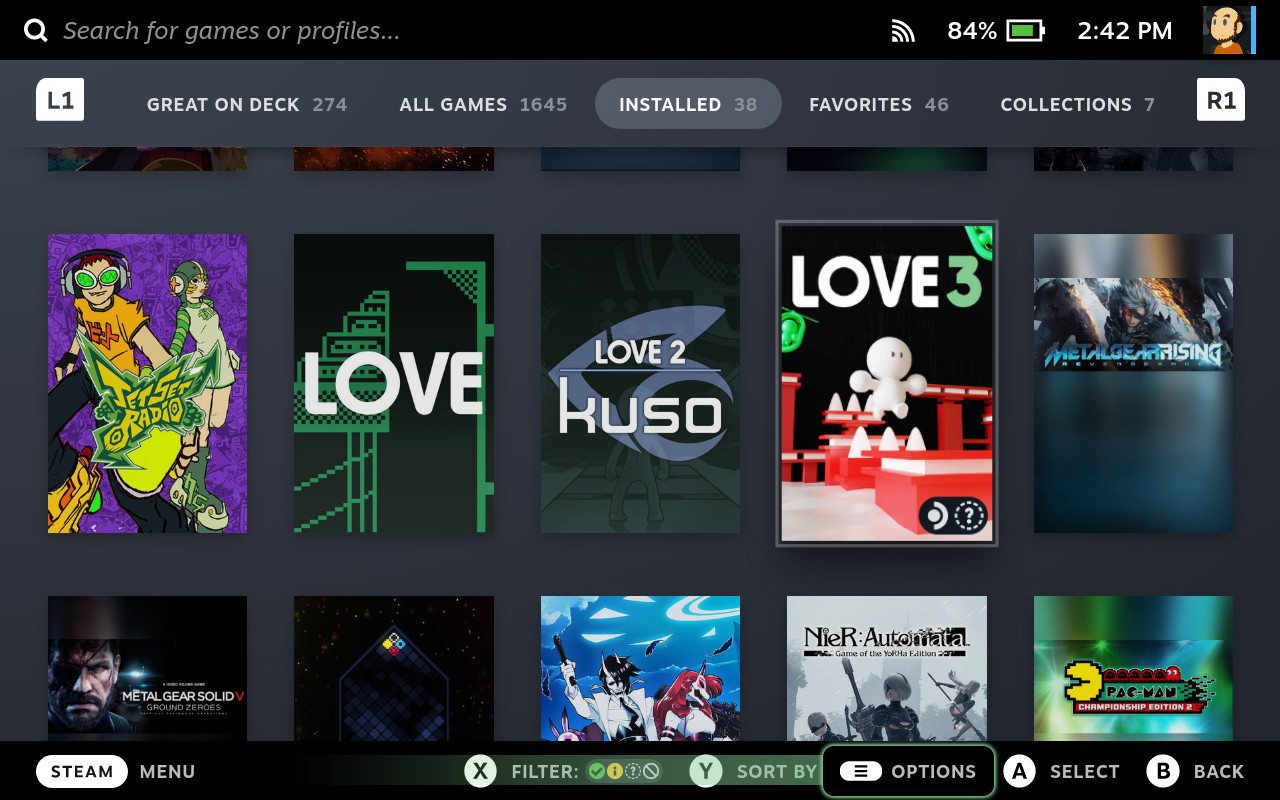
changedFirst, find LOVE 3 in your Steam Library on your Steam Deck, and press the Options Button, as illustrated at the bottom of the screen.
changedFinally, on the left side of the screen, select the "Compatibility" option, set "Force the use of a specific Steam Play compatibility tool", and select "Proton Experimental".

LOVE 3 changes

changedHello, and thank you for playing LOVE 3! As I have made a native Linux port of the game for an older version of Linux, it is not properly supported by the Steam Deck, but thankfully with Windows version runs perfectly! I've spoken with folks at Valve who have assured me that this will eventually be something I can set in the backend, but for folks with a Steam Deck who want to play the game now, here you go!
changedFirst, find LOVE 3 in your Steam Library on your Steam Deck, and press the Options Button, as illustrated at the bottom of the screen.
changedFinally, on the left side of the screen, select the "Compatibility" option, set "Force the use of a specific Steam Play compatibility tool", and select "Proton Experimental".

First, find LOVE 3 in your Steam Library on your Steam Deck, and press the Options Button, as illustrated at the bottom of the screen.

Second, find the "Properties..." option, and press A.

Finally, on the left side of the screen, select the "Compatibility" option, set "Force the use of a specific Steam Play compatibility tool", and select "Proton Experimental".

This will download the Windows build of the game, and you'll be good to go. Launch it like you would any other game on your Steam Deck!

If you've enjoyed your time with LOVE 3 on or off the Steam Deck, it'd be a huge help if you'd leave a review of the game! This will tell Steam to share the game with folks who might also like it. One review can go a long way to a game's success, so I hope you'll take a moment and do that.

Thanks so much for your support, and I hope you enjoy!

Source

Steam News / 11 July 2022

Open original post

Changelog.gg summarizes and formats this update. How we read updates.