Alpha 2.15 Update “Fast Travel and Capturing Enemy Camps”
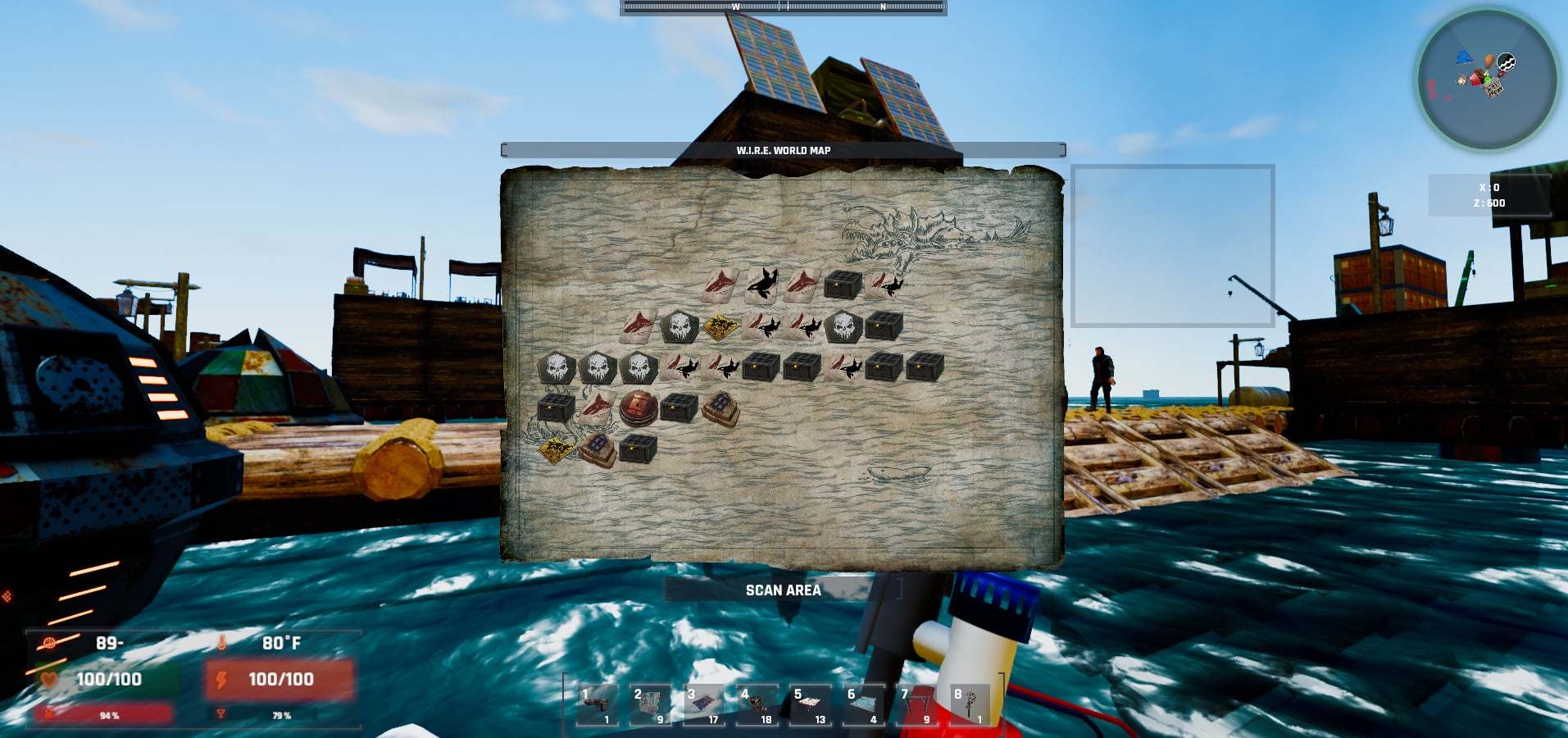
New Features: Fast Travel - Player can now right click on the icons in the world map. By doing so a dialogue will appear telling you how much fuel will be consumed for that trip.
Full notes
Full Landless update
Read the full published notes in a cleaner layout. The original post stays linked below.
What changed
1 fix2 additions0 changes0 removals
Maps
Gameplay
UI and audio
addedNew Features: Fast Travel - Player can now right click on the icons in the world map. By doing so a dialogue will appear telling you how much fuel will be consumed for that trip. If you have enough fuel you will be brought to the spot you picked. If you don’t you will be notified that you do not have enough fuel.
addedNotes: Keep in mind fast travel only uses the main boat, so the player will need to link everything together via the crane, if you wish to take your pontoon or base along for the fast travel. Capturing Enemy Camps - When players kill all enemies in an enemy camp, that enemy camp will be added to the tributary homes list and when the player relogs, a merchant npc will be there instead of enemies.
fixedNotes: This will allow players to clear areas of enemy spawns making more safe areas. Patch Notes: -Seaweed and junkpiles have been added to the underwater caves -Boat buoyancy adjusted so less water will clip with the model when at 100% buoyancy -Fixed map icons, they should no longer be stacking and also show the correct positioning. Correct positioning will only be fixed in new games, since old saves are using an old texture set. -Color corrections -Adjusted super white reflections to be less reflective -Fixed abyssal worms to be damaged by the fusion cutter -Fixed sitting in chairs etc -Fixed 3rd person hotkey function, “z” should be working again if you are driving the boat from the front. -Fixed abyssal worms health UI to update when damaged CodeBullet
Landless changes
addedNew Features: Fast Travel - Player can now right click on the icons in the world map. By doing so a dialogue will appear telling you how much fuel will be consumed for that trip. If you have enough fuel you will be brought to the spot you picked. If you don’t you will be notified that you do not have enough fuel.
addedNotes: Keep in mind fast travel only uses the main boat, so the player will need to link everything together via the crane, if you wish to take your pontoon or base along for the fast travel. Capturing Enemy Camps - When players kill all enemies in an enemy camp, that enemy camp will be added to the tributary homes list and when the player relogs, a merchant npc will be there instead of enemies.
fixedNotes: This will allow players to clear areas of enemy spawns making more safe areas. Patch Notes: -Seaweed and junkpiles have been added to the underwater caves -Boat buoyancy adjusted so less water will clip with the model when at 100% buoyancy -Fixed map icons, they should no longer be stacking and also show the correct positioning. Correct positioning will only be fixed in new games, since old saves are using an old texture set. -Color corrections -Adjusted super white reflections to be less reflective -Fixed abyssal worms to be damaged by the fusion cutter -Fixed sitting in chairs etc -Fixed 3rd person hotkey function, “z” should be working again if you are driving the boat from the front. -Fixed abyssal worms health UI to update when damaged CodeBullet
New Features: Fast Travel - Player can now right click on the icons in the world map. By doing so a dialogue will appear telling you how much fuel will be consumed for that trip. If you have enough fuel you will be brought to the spot you picked. If you don’t you will be notified that you do not have enough fuel.
Notes: Keep in mind fast travel only uses the main boat, so the player will need to link everything together via the crane, if you wish to take your pontoon or base along for the fast travel. Capturing Enemy Camps - When players kill all enemies in an enemy camp, that enemy camp will be added to the tributary homes list and when the player relogs, a merchant npc will be there instead of enemies.
Notes
This will allow players to clear areas of enemy spawns making more safe areas.
Patch Notes
-Seaweed and junkpiles have been added to the underwater caves -Boat buoyancy adjusted so less water will clip with the model when at 100% buoyancy -Fixed map icons, they should no longer be stacking and also show the correct positioning. Correct positioning will only be fixed in new games, since old saves are using an old texture set. -Color corrections -Adjusted super white reflections to be less reflective -Fixed abyssal worms to be damaged by the fusion cutter -Fixed sitting in chairs etc -Fixed 3rd person hotkey function, “z” should be working again if you are driving the boat from the front. -Fixed abyssal worms health UI to update when damaged CodeBullet