
In this update7
Full notes
Full Lakehopper update
Read the full published notes in a cleaner layout. The original post stays linked below.
Repeated intro
Hello pilots!
What changed
- Compatibility
- Gameplay
- UI and audio
- Fixes
Lakehopper changes
I'm happy to announce that the Glacier is now available on the game's main branch! Thank you to everyone who gave it a try on the beta branch and reported bugs and feature requests! Much of this devlog will be familiar to those who have been keeping up with the beta updates, but I'll repeat all that info here for everyone else!
The Glacier
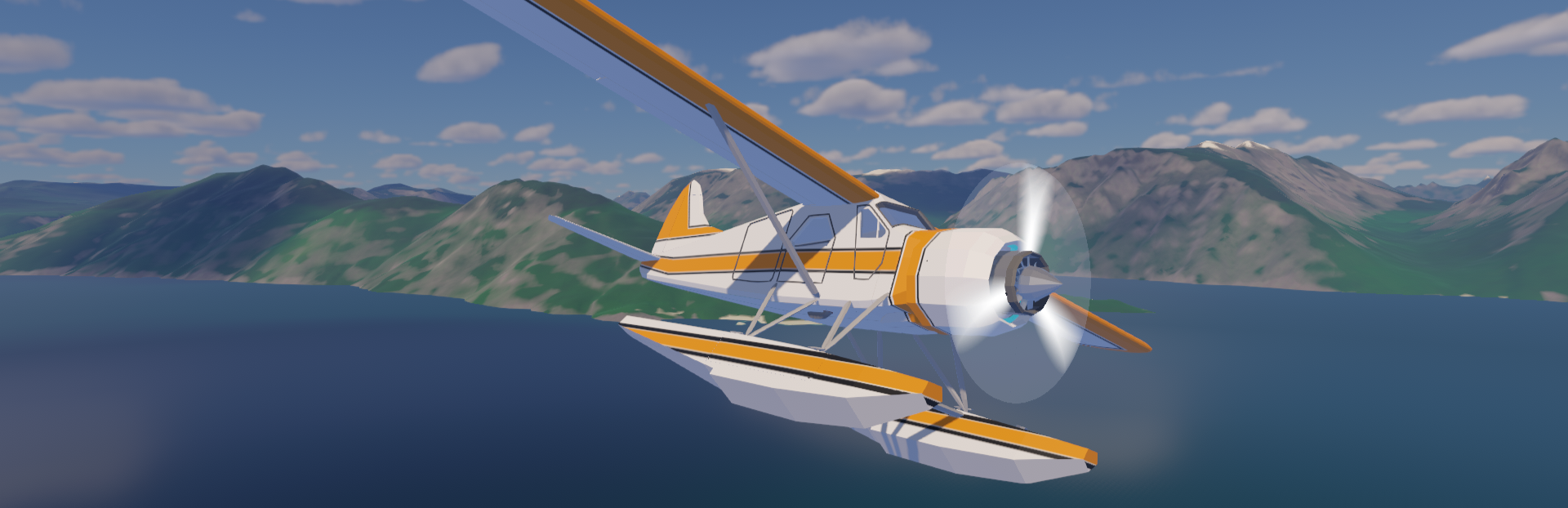
This plane is based on a classic real-world bush plane on floats, much beloved for many, many years. It flies like an absolute dream, even better than I expected. The Glacier is intended to serve as an amazing beginner plane and capable bush seaplane. It's a great plane for players new to flight sims in general, and also for experienced flight simmers learning the nuances of operating a seaplane, or who don't often fly multi-engine planes.
Steam post imageTo give it a try, you can start a new game and choose to start with the Glacier from the main menu. Both a full build and quick start mode are available. You can also fly to Manypeaks, and a stripped-down Glacier fuselage will now be available at the docks for anyone who wants to give it a try in their existing save file.
The Glacier is overall smaller than the Lakehopper (the updated name for the familiar twin-engined flying boat in the game), at just over half the weight, and half the horsepower. It flies slower than the Lakehopper, making takeoffs and landings easy and forgiving. Being a floatplane, rather than a flying boat, the hull design is different, with different, gentler takeoff characteristics.Steam post image
The Glacier, having only a single engine, uses an actual water rudder! A switch on the instrument panel will raise and lower the water rudder (though there's no visual for this part yet). Because it represents real hardware, this works regardless of the "fake water rudder" setting in the game settings.
Steam post imageThe build uses many familiar parts, and some new ones! Basic info for the new Glacier configurations is available in the in-game binder. If you start a new game and pick the Glacier as your starter plane, the shack will have all the parts you need for a Glacier build.
Some parts are still due for an update, particularly the cargo racks. They don't fit the Glacier very well, but they're functional for now.
Feedback and Issues
If you have any feedback or notice any issues with the Glacier specifically, I've created this discussion thread to collect all of them in once place. I've love to hear any feedback you have, as well as any detailed bug reports you can provide! Thank you all for your patience, waiting for Lakehopper's first major content update, with more on the way!
What's next?
Adding the Glacier was a ton of fun. I think it'll work great as a new beginner plane, and just generally a great addition to the fleet. It also works as a first step showing the interchangeability of parts. Any parts that could be re-used between the two different planes, were.
But what am I working on next? Looking at the roadmap, I think my next big priority is adding some new places to fly to. That's been the biggest request/critique of the game as it is now, and I think it's a very fair one. The current three ports represent only a tiny portion of the landscape in the game and I'd love for players to be encouraged to explore farther and wider! I have some ideas for what I want to accomplish for the next big update, so stay tuned!
Here's a full changelog that sums up all the changes between 0.3.5 and 0.4. Anything in bold is an update new to this version from 0.3.10, the last beta update. Check out the other beta logs to see the full journey of adding the plane!
Changelog
Major Changes
Added the Glacier, a single engine floatplane!
The Glacier is available either as a new game option, or available in Manypeaks as a bare fuselage. A bare Lakehopper fuselage is available in Manypeaks as well.
Improvements
Added a locking ring to the Magnoprop Cores
In the Glacier, the short Magnoprop core is right behind the instrument panel and was getting in the way all the time. It became necessary to add some way to secure it so it's not constantly highlighted. The same wrench tool is used to secure the locking ring.
This locking ring was also added to the original Magnoprop core for consistency, and to solve the same issue which was present, but less impactful as your viewpoint overlaps with the right side core only when looking at the overhead panel in the Lakehopper. This part is set as automatically secured when loading an old save.
Added some Glacier specific info to the binder
Tweaked the propeller spinning sprite to make it more transparent and less distracting. This was critical for the Glacier, since you're looking straight through it the whole time you're flying.
Expanded the "Getting Started" section in the binder. It's probably still not very helpful, but I added a few seaplane specific points to the text.
Added locking door handles to the Glacier doors
The entire door being interactable was distracting during flight. All Glacier doors now have a handle that must be unlocked first and then the whole door can swing open.
Bugfixes
Fixed some typos, spelling errors, and inaccuracies in the rest of the binder
Fixed a bug in the debug tool for the debug fly option
Fixed an issue where the player was able to move and open tools while loading
Fixing this required a change to some important control input code. Keep a look out for any controls/input related bugs, especially when using controller. Let me know if you spot any bugs here and I'll get them fixed.
Fixed the reverse thrust light not working on the Glacier instrument panel
Fixed an issue on the Glacier where the underside of the right aileron and flap did not match when using custom colors
Fixed an issue where the dual fuel cell support frame spare part wasn't appearing in the parts shack in Manypeaks
Fixed an issue where the Lakehopper and Glacier that spawn in Manypeaks would end up respawning in the wrong place when flying back to MP
Fixed a bug where if a player is using the external orbit cam when Manypeaks spawns, it would snap to one of the docked planes
Happy skies!
Source
Changelog.gg summarizes and formats this update. How we read updates.