
In this update7
Full notes
Full KovaaK's update
Read the full published notes in a cleaner layout. The original post stays linked below.
What changed
- Performance
- UI and audio
- Gameplay
- Workshop
- Fixes
- Events
KovaaK's changes
KovaaK's 3.9.3
Input Responsiveness and High FPS Improvements
Improved input responsiveness and support for high mouse polling rates. Most players should see no stutters with mouse polling rates above 2000hz now, as well as 3-11% more FPS!
Fixed a bug with challenge timers running at very high frame rates.
Increased the FPS slider maximum from 360 FPS to 1000 FPS. You can manually type up to 2000.
FPS is now capped at 2000 FPS for the time being.
In 3.9.2 and earlier, running the game above 2000 FPS was a strict disadvantage to your score. In 3.9.3, we changed the engine behavior so that this is no longer a strict disadvantage. However, there are still other issues that can make extremely high frame rates a questionable advantage, so we are capping FPS at 2000 for now.
In the long run, we want to support higher frame rates for the best possible performance while making sure scoring remains fair.
Challenge Results and Stats UI
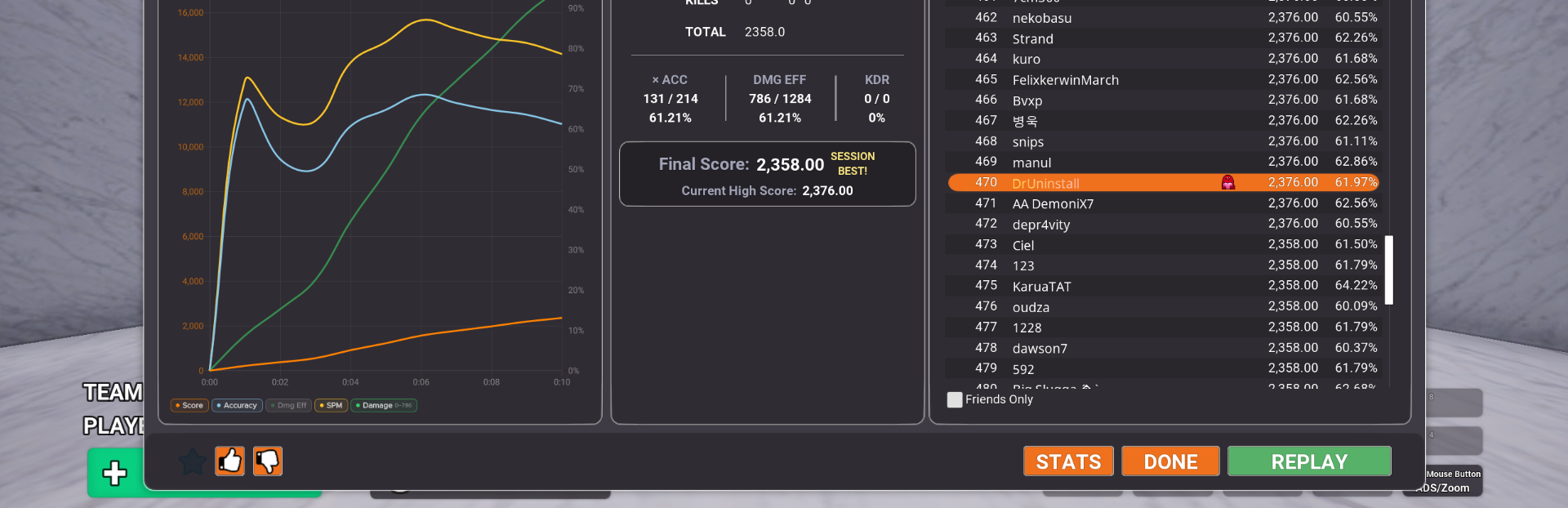
The Last Challenge tab is now the default tab on the Challenge Results screen and appears first.
We plan to add a setting soon that lets you choose which Challenge Results tab opens by default.
Challenge Results → Stats → Entry Details charts now have improved Y-axis label handling and color consistency.
The Performance Details Chart, used in Stats and Challenge Results, now remembers pill filter selections between sessions.
The Performance Details Chart now has improved handling for large chart values with more than four digits.
Stats UI now better utilizes available screen space, especially at stretched resolutions.
Fixed wrapped filter pills becoming unclickable when enough pills were enabled.
Made various small Stats UI fixes.
Sandbox Browser and Scenario Editor
Changed the Online Scenarios tab so you can now search Online Scenarios while they are refreshing.
We still plan to improve Workshop refresh times in the future, but this should make the current refresh behavior less disruptive.
Increased the default Steam Workshop refresh interval from 168 hours to 999 hours.
Removed the Featured Window button and reduced the padding of Sandbox Browser tabs.
Tweaked the pressed effect of most buttons in Sandbox and Scenario Editor.
Discord Rich Presence
Added Discord Rich Presence support.
Other Improvements
Number input fields now accept both "." and "," as decimal separators across all languages.
Hidden the "Invalid Scores On Leaderboard" tooltip.
Fixes
Fixed fullscreen applications moving to the primary monitor after alt-tabbing.
Fixed two issues affecting the Totally Random playlist mode.
Fixed playlist play counts resetting when all scenarios in a playlist had been completed.
Your Voice, Our Inspiration
Thank you for your continued support! As always, we're eager to hear your feedback and suggestions. Stay tuned for more updates as we work to keep KovaaK's the best training and gaming experience possible! Join the conversation on Twitter, Discord, Instagram, TikTok and Reddit! Check out our website! If you'd like to make translation corrections or suggestions, we invite you to visit our Translation Project: https://crowdin.com/project/kovaaks Become a KovaaK's Supporter
Source
Changelog.gg summarizes and formats this update. How we read updates.