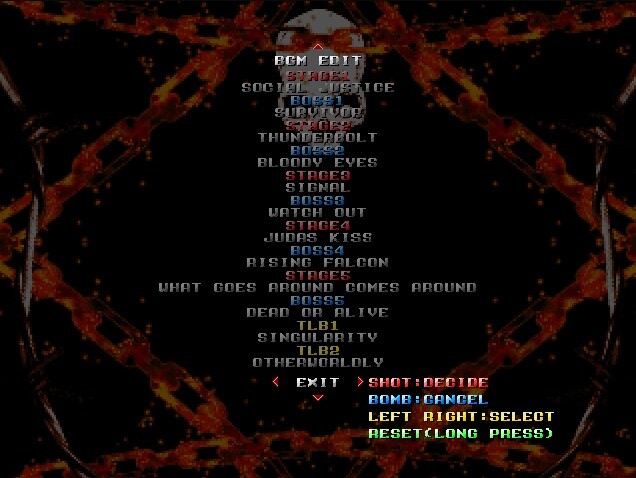
○BGM EDIT function added You can set the 20 newly added songs (one of which is the vocal version of stage 5) to any part of the song. You can save up to 3 combinations.
Full notes
Full 壊漢 -KAIKAN- update
Read the full published notes in a cleaner layout. The original post stays linked below.
What changed
0 fixes3 additions1 change0 removals
Maps
Gameplay
UI and audio
added○BGM EDIT function added You can set the 20 newly added songs (one of which is the vocal version of stage 5) to any part of the song. You can save up to 3 combinations. (You cannot assign a pre-existing song to a different part of the song)
added○Added the ability to skip the demo when clearing a stage
added○The production tool's functions have added achievement, global ranking, and effect tabs to the configuration. (It allows you to display the game like an old CRT monitor, etc.)
changedHow to edit BGM Press the SLOW button on the screen immediately after starting the game to move to the BGM EDIT screen. Use the up and down keys to select the part you want to set, and the left and right keys to select the song (Preview the song with the SHOT button). When EXIT is selected, press the SHOT button to save the settings and return to the title screen, or the BOMB button to return to the title screen without saving the settings. Use the left and right keys to select the saved files SET1 to SET3, and press the SHOT button to SAVE, or the BOMB button to LOAD. Press and hold the RESET key to reset the song allocation to the initial state. (Settings SET1 to SET3 will remain the same.)
壊漢 -KAIKAN- changes
added○BGM EDIT function added You can set the 20 newly added songs (one of which is the vocal version of stage 5) to any part of the song. You can save up to 3 combinations. (You cannot assign a pre-existing song to a different part of the song)
added○Added the ability to skip the demo when clearing a stage
added○The production tool's functions have added achievement, global ranking, and effect tabs to the configuration. (It allows you to display the game like an old CRT monitor, etc.)
changedHow to edit BGM Press the SLOW button on the screen immediately after starting the game to move to the BGM EDIT screen. Use the up and down keys to select the part you want to set, and the left and right keys to select the song (Preview the song with the SHOT button). When EXIT is selected, press the SHOT button to save the settings and return to the title screen, or the BOMB button to return to the title screen without saving the settings. Use the left and right keys to select the saved files SET1 to SET3, and press the SHOT button to SAVE, or the BOMB button to LOAD. Press and hold the RESET key to reset the song allocation to the initial state. (Settings SET1 to SET3 will remain the same.)
○BGM EDIT function added You can set the 20 newly added songs (one of which is the vocal version of stage 5) to any part of the song. You can save up to 3 combinations. (You cannot assign a pre-existing song to a different part of the song)
○Added the ability to skip the demo when clearing a stage
○The production tool's functions have added achievement, global ranking, and effect tabs to the configuration. (It allows you to display the game like an old CRT monitor, etc.)
*How to edit BGM Press the SLOW button on the screen immediately after starting the game to move to the BGM EDIT screen. Use the up and down keys to select the part you want to set, and the left and right keys to select the song (Preview the song with the SHOT button). When EXIT is selected, press the SHOT button to save the settings and return to the title screen, or the BOMB button to return to the title screen without saving the settings. Use the left and right keys to select the saved files SET1 to SET3, and press the SHOT button to SAVE, or the BOMB button to LOAD. Press and hold the RESET key to reset the song allocation to the initial state. (Settings SET1 to SET3 will remain the same.)